


Conversation


The Tactics Vault
Each week we spend hours researching the best startup growth tactics.
We share the insights in our newsletter with 90,000 founders and marketers. Here's all of them.


MidJourney’s UX Journey
From the desk of Gil Templeton – Staff Writer
When MidJourney launched via Discord 2+ years ago, the UX was tricky, at least for me. For those not intimately familiar with Discord (and a little intimidated by their first foray into image-gen) the experience left plenty to be desired.
You had to create and link a couple accounts, you were directed to use public channels filled with other users’ images, it wasn’t clear where your saves went (or how your credits worked), and you started every prompt by manually typing “/imagine”.
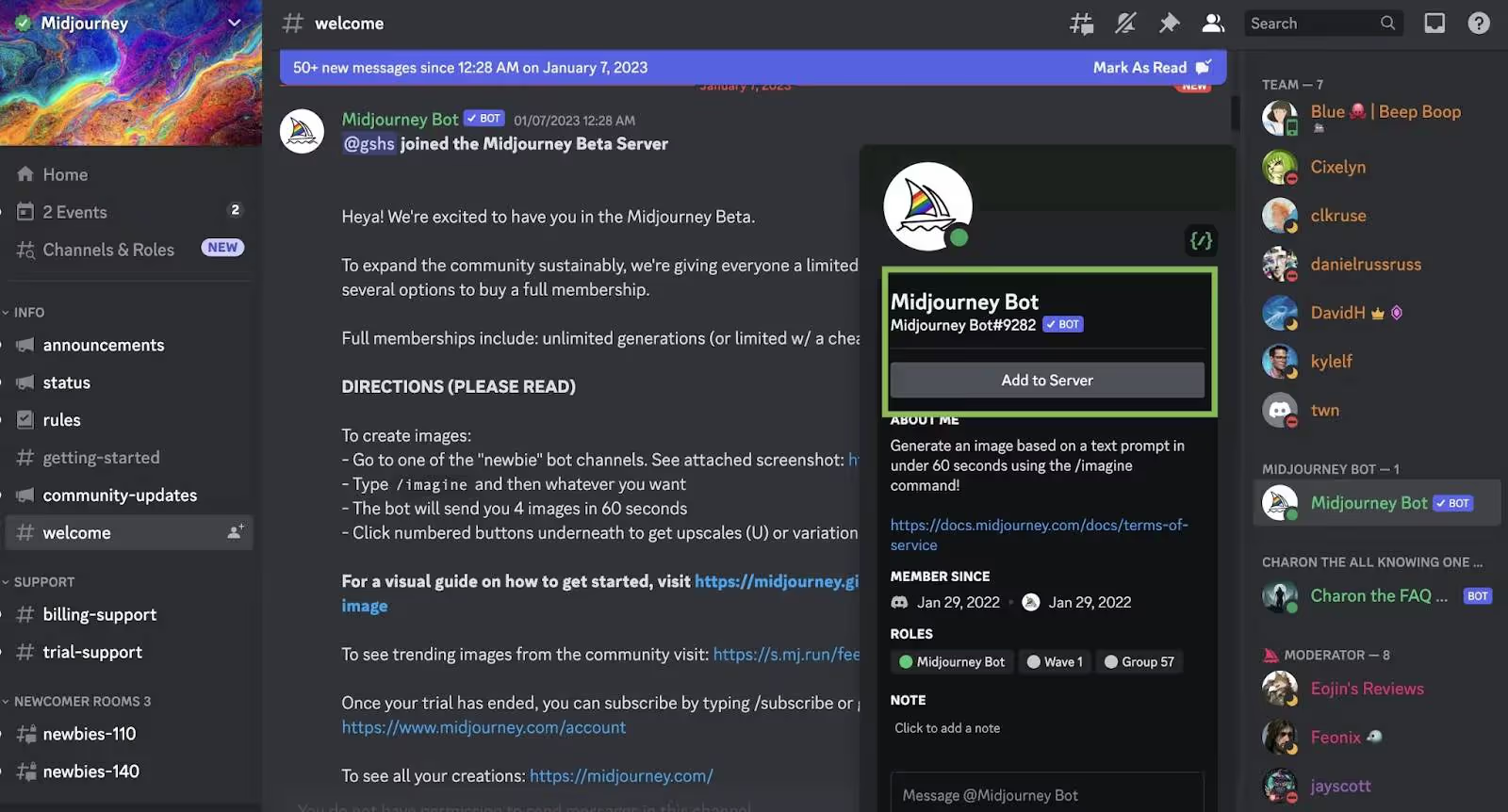
It constantly had me wondering, “Am I even using this right?” and the murky UX almost made me walk away.
Fast-forward to Midjourney today, and it’s as user-friendly as anything: a familiar “search bar” at the top for your prompt, upvoted eye-candy, a simple side panel for navigation, and no two-stepping through another platform (i.e., Discord).
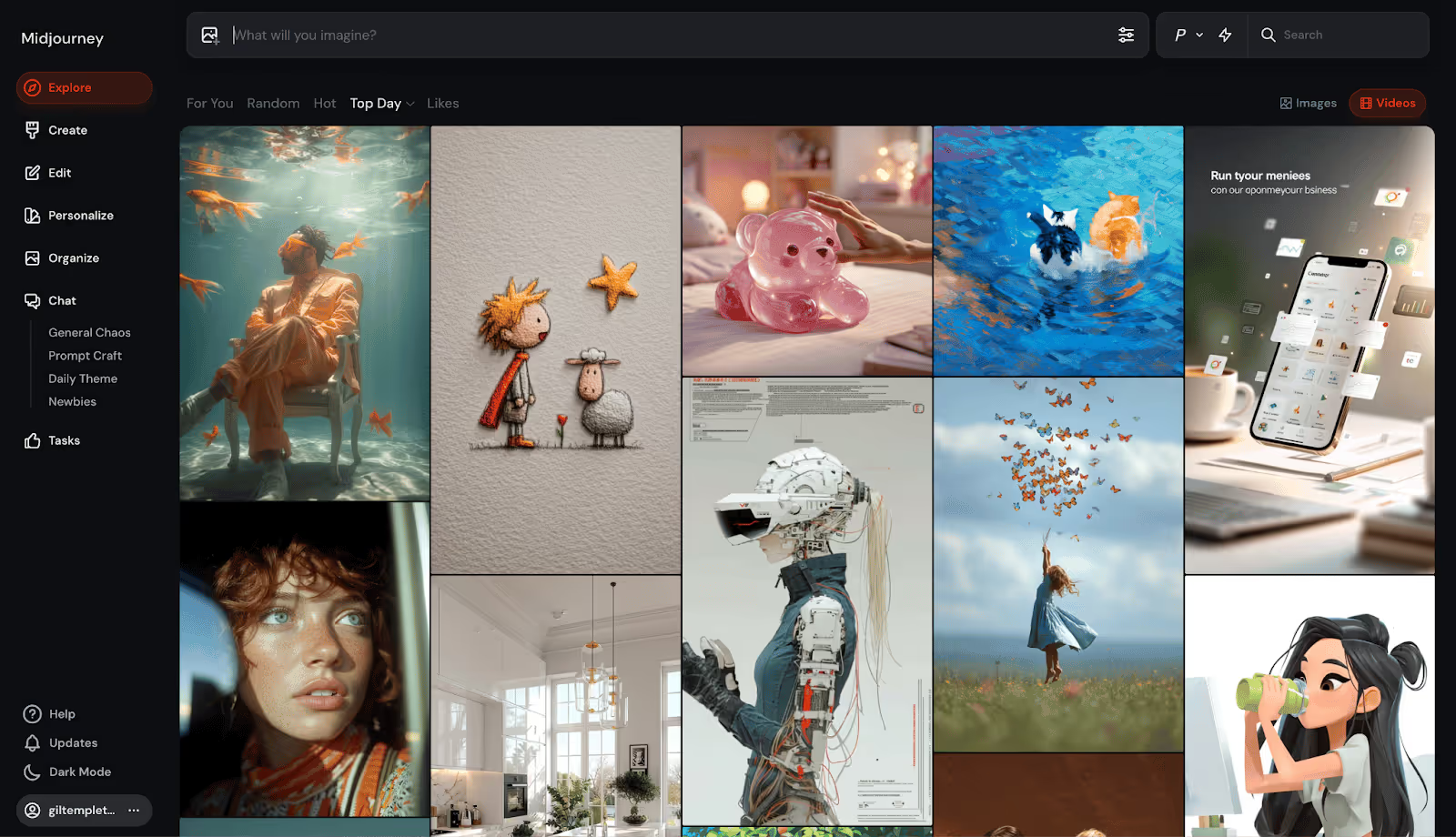
This transformation epitomizes the stupid-simple standard that’s become the template for today’s AI platforms, where the inner-workings are increasingly mind-bending, but the outward-facing wrapper is instantly enticing.
Let’s take a closer look at this standard that’s coalescing around today’s AI darlings.
A New Standard for Chatbots and Visual Tools
The main interfaces of platforms like Lovable, ChatGPT, Gemini, Veo, etc. are shockingly stark, stripped-down, and simple. Even if you have no idea what you’re doing or if you really need this thing, you immediately know how you’re supposed to use it. Then your quick and easy outputs prove why you need it.
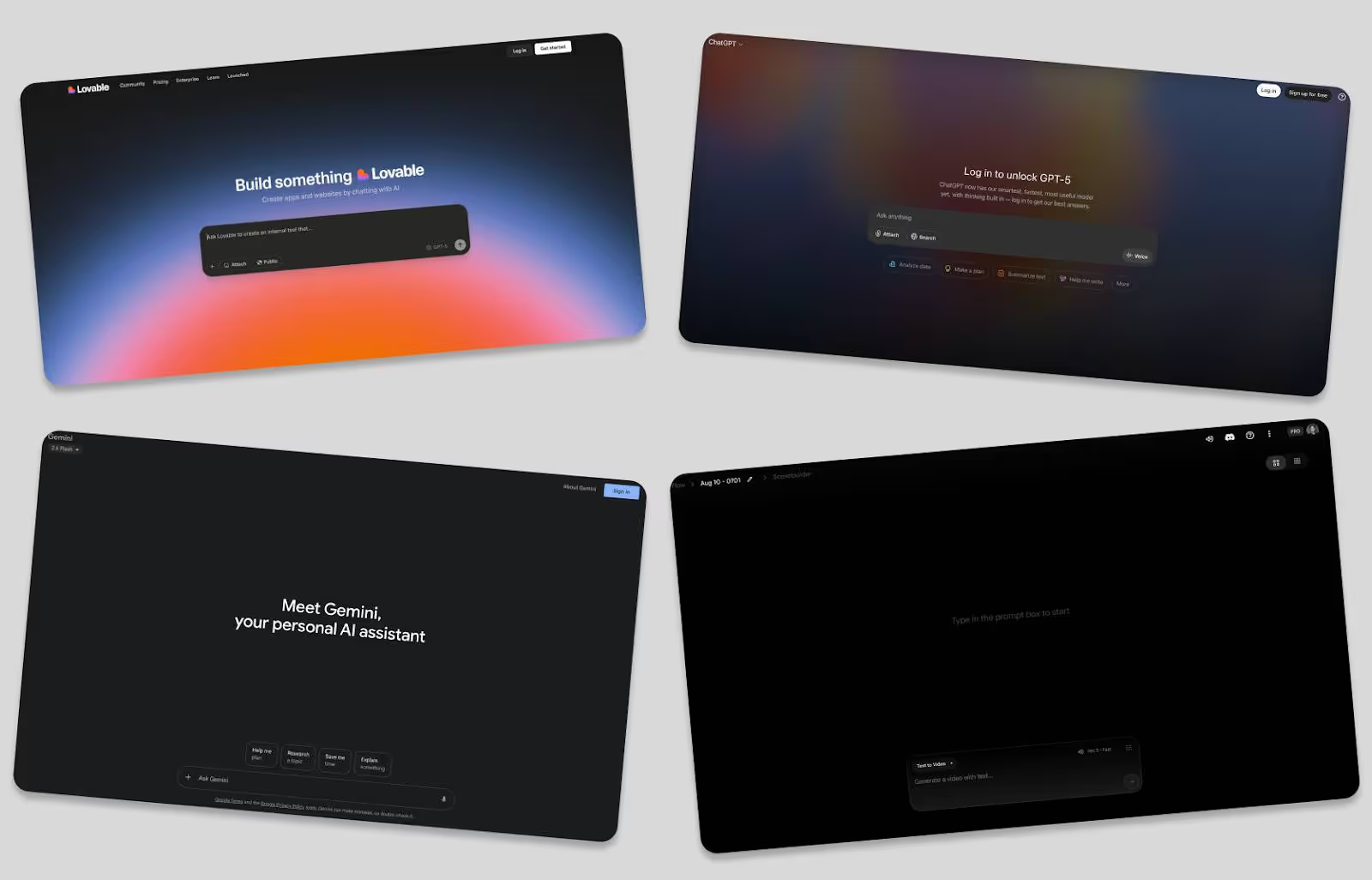
They throw you straight into the experience with virtually zero friction. “Just type something here and have your mind blown, we’ll figure out the details later,” seems to be the new norm. When they do ask you to sign up, it’s free and takes a click or two.
They strip out any potential rub and make the first interaction feel like a win, hooking you with your “Aha!” moment before you can even think about leaving.
My dear grandmother doesn’t know what “vibe” or “coding” mean, but could she vibe code on Lovable in a minute or two? Yeah, she could. It would probably be very bad (sorry, Nana) but she could type a few sentences and get something for her troubles.
Here are some themes and tactics helping these sites turn viewers into users:
- Frictionless or deferred sign-ups: These platforms tend to hook you with output before asking for a credit card. By the time you’re prompted to pay, the platform already has its hooks in you.
- Zero-education interfaces: They remove intimidation for first-timers by skipping the jargon and onboarding tours. There’s usually a single input field in a familiar search bar format, accompanied by easy-to-digest, human-sounding copy.
- Guided “first wins”: These platforms lower the cognitive load by showing suggestions, templates, or sample outputs from others, so users don’t have to think about how to take that first big step.
- Instant feedback: Rapid output delivers an instant dopamine hit that we’re well-documented suckers for. And with highly visual platforms like Sora, Midjourney, or Veo, the outputs are eye-catching and shareworthy.
- Dead-simple CTAs: “Type here” or “Upload a file” or “Paste your text” puts an easy-to-follow breadcrumb right in front of users without overwhelming them.
- Freemium plans: They’ll give you a taste of the real thing without making you pay a dime. Only when you want to cross a certain threshold of credits, time, or quality do they put a price tag on it.
- Lightning-fast Time To First Value (TTFV): By providing value (or the “Aha moment” below) so rapidly, these sites create instant momentum, making it far more likely you’ll engage and convert.

Some Other Interesting Examples
Plenty of other AI-forward or AI-enabled businesses are leaning into instant interactivity and quick wins to remove roadblocks and boost retention. Below are two creative examples:
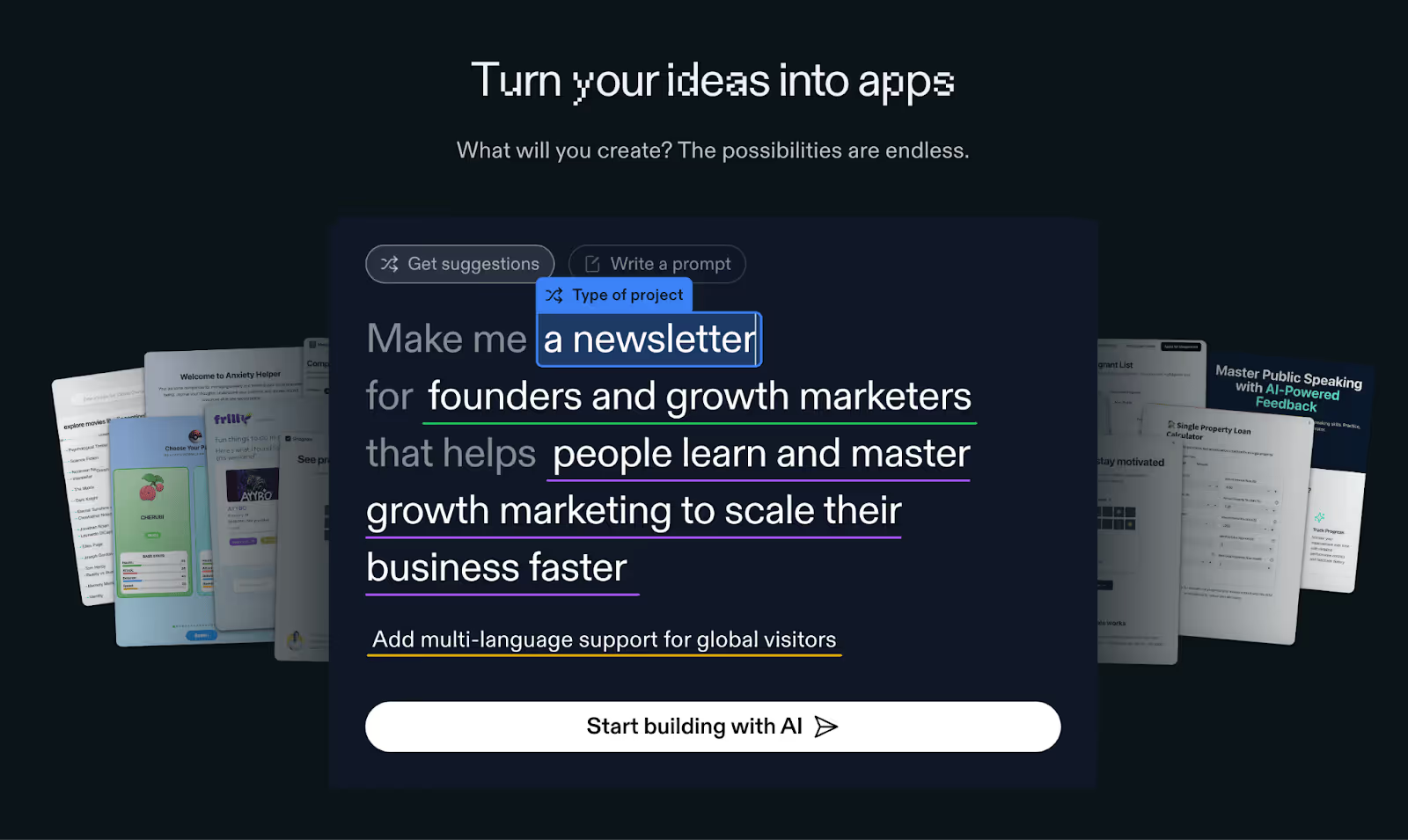
Replit uses a Mad Libs-esque approach for app creation, where the homepage asks first-timers to fill in the blanks on three input fields: type of project, who it’s for, and what it does. This works because it collapses the intimidating “Where do I start?” moment into a playful, low-effort interaction that personalizes the output and gets users involved before asking for an email.
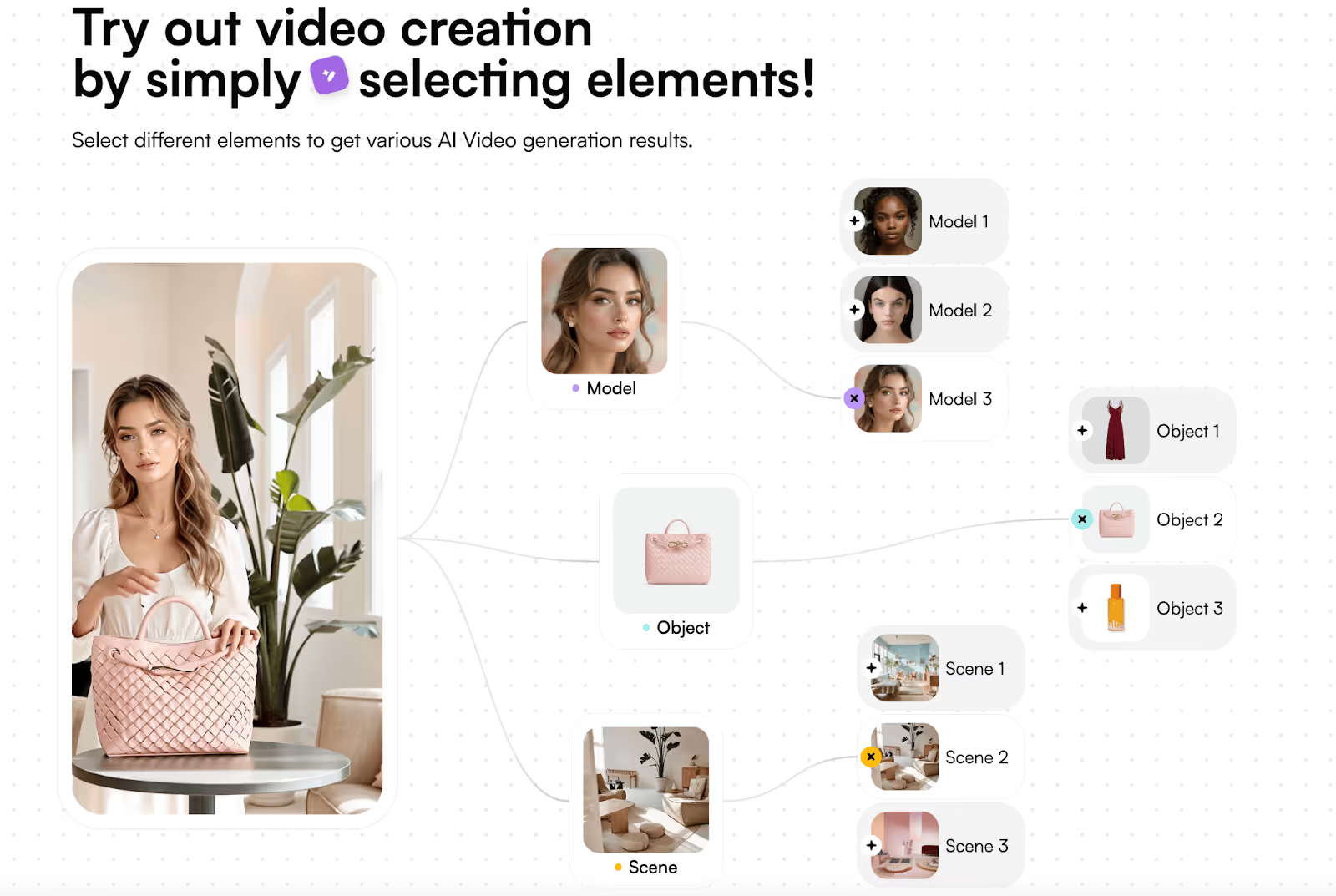
Creati conveys their value in a modular, highly interactive flowchart that begs for you to click on it. You can choose your model, featured object/product, and scene. Within seconds, the output updates to reflect your choices, showing you the exact value they bring.
Psychology of the Free Sample
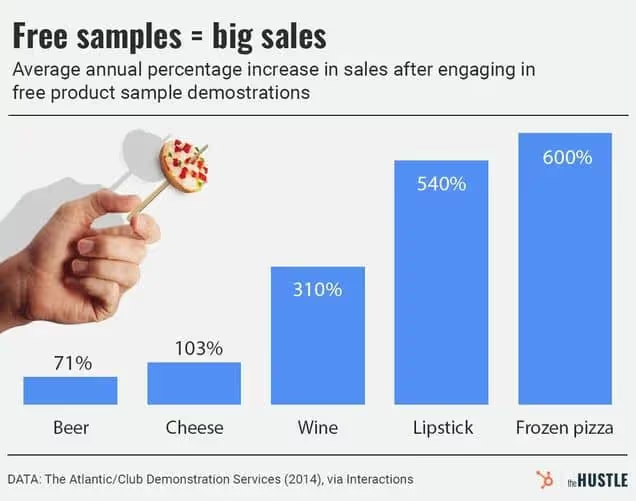
The more I thought about this approach, the more I realized it’s essentially the digital cousin of the Costco free sample, on steroids. Free samples are a notoriously effective tactic at retail, as one industry study of grocery stores showed samples driving product purchases by 2000%.
The chart below shows just how effective free samples can prove to be across product categories (in real life, at least). Even a “laggard” like beer still sees a staggering 71% sales increase after engaging in free sampling.
Free samples work in supermarkets for similar reasons why they work on homepages:
- Instant gratification: Quick, rewarding outputs deliver that same hit of “I got something” like you get from a sugary chocolate chip cookie quadrant.
- Lowered sense of risk: Once you taste it, you know whether you like it or not. So when a site/experience gives you something you like, it’s easier to justify further engagement or payment.
- Reciprocity drives action: While this is likely stronger in an in-person situation, a no-questions-asked free trial/freemium subscription comes across to me as more endearing than the pay-first option.
- Higher awareness: Once you’re exposed to a brand or business, they’re more likely, on average, to be in your consideration set. Of course a positive, hands-on experience can make it even more familiar and memorable.
When I said “...on steroids.” earlier, I was hinting at the attribute that makes this “sampling” even more powerful: bespoke outputs. Because a free sample of baklava is great. No complaints.
But a free sample of exactly what you’re craving (a Philly cheesesteak for me right now) cooked in seconds and served hot? One nibble of that, and I’m 100% reaching for my wallet to buy the footlong. Being able to generate these unique, personal outputs at scale is now possible through AI.
Takeaway: Be Interactive and Instant
Today’s best homepages and landing pages grease users up, so they can glide through progress and achieve gratification (or “first value”) before they can blink.
Sure, yours might not be as simple as a prompt field, but when you aim to make a user’s first steps just as inviting, obvious, and rewarding as these masterful AI juggernauts, your conversion rate will act accordingly. (P.S. if you want deeper guidance on your CRO and landing page optimization, the Growth Program 2.0 will cover that in spades).
If your site’s first impression doesn’t have an interesting “hook” above the fold (more on that here), or it asks people to work too hard (decoding jargon, stumbling through sign-up, guessing the action they should take, etc.) you’re turning people off. And this gap is only getting more pronounced with frictionless AI tools becoming so ubiquitous.
While user behavior has always echoed the sentiment of “Don’t make me think,” it might be heading toward a place of, “Make me something.”
Gil Templeton
Demand Curve Staff Writer
What High-Converting Pages Do Differently
We’ll start with three homepage best practices that give your page a rock-solid foundation.
Convert More With Your Homepage
Insight from Demand Curve
Buyer journeys aren’t nearly as clean as we like to imagine. Most people won’t see your ad → visit your landing page → buy immediately.
It’s more likely to go like this:
- They see your ad while doom-scrolling Instagram. They click.
- Something distracts them away from their phone.
- They remember later in the evening (or 3 weeks later) thanks to a Trigger Event.
- They Google your company name.
- They visit your homepage, not the conversion-focused landing page you intended them to hit.
(At least, that’s how I tend to buy things online.)
Is your homepage optimized for conversion? If not, you may be leaving growth on the table.
Yes, your homepage has many jobs (too many). One is to orient people to your brand and everything you do. But don’t forget high-intent visitors often visit your homepage late in the funnel.
Design it with conversion in mind.
Here are some quick ways to make sure your homepage converts:
1. Start by nailing the above-the-fold
Your above-the-fold (ATF) is the portion of your website that’s immediately visible to visitors: your hero header, subheaders, imagery, and calls to action (CTA).
Header and subheaders: Keep your copy short. Concisely convey what your product is and why they should care. Visitors shouldn’t have to scroll to understand what you offer and how they’ll get value from you.
Imagery: Whether static images, slides or video, keep your product(s) at the forefront. Photos with people are optional, but they have a proven track record of increasing conversion.
Call to action (CTA): Your ATF is the most important part of your most important page, and your CTA here might be the most important part of your entire site. This is what drives action. CTAs for ecommerce tend to be “shop now.” For services, “get started” and “try now” work well. Make sure your CTA is high-contrast and unignorable.
Here’s an example of an above-the-fold done well.
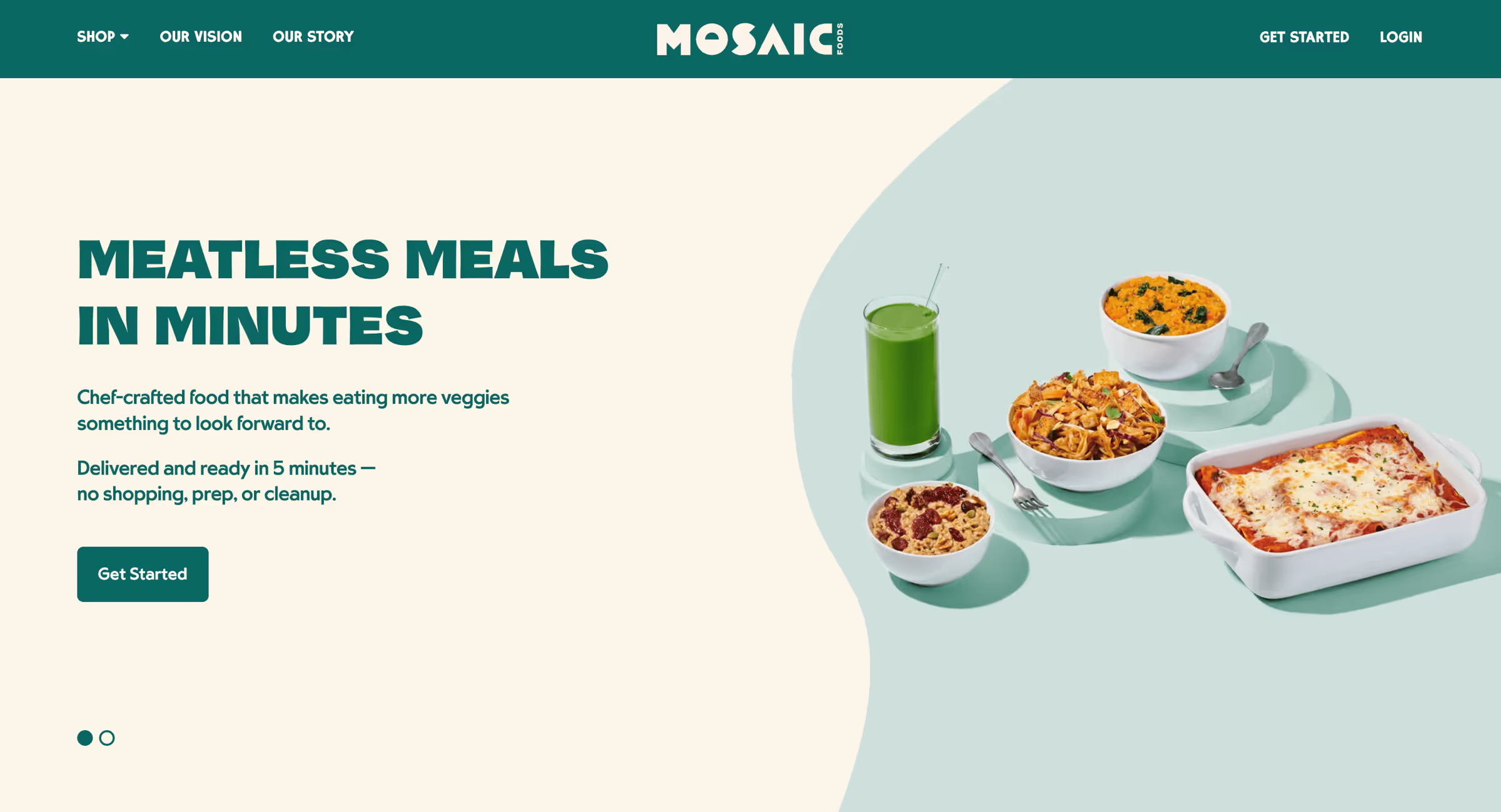
- Concise, punchy header and subheader explaining what Mosaic is and why you should care
- Attractive visuals of the product
- Clear, high-contrast call to action (although they should depart from their monochrome design and make the CTA a contrasting color to make it pop)
We wrote an entire playbook on ATF alone. When you’re ready to create your ATF, you can follow our step-by-step process.
2. Handle objections in your below-the-fold.
Below the fold, you briefly address any objections visitors might have.
Some elements you might include here:
Social proof: Share reviews, press, user-generated content, testimonials, endorsements, ratings, customer logos, and customer stats.
- Include social proof near your CTAs to handle their objections at the key moment where they’re deciding to click or not. Trust leads to action.
- There’s basically no such thing as too much social proof.
Product features: Highlight unique product features that address common concerns.
- Worried about quality? Here’s why we’re the best you can get.
- Worried it’ll take too long? We’ll have you onboarded in five minutes or less.
- Worried about not liking the product? If you don’t like it, we’ll give you a full refund.
FAQ: Take it a step further and add an FAQ section.
- Start with the most common or highest-friction questions.
- Assume they didn’t read the whole page and repeat all the key points.
Bestsellers: If you have several products, highlight your flagship and most popular items. Or highlight a “starter pack” or samples.
Footer: Include pages in the footer that you want to give visitors access to but aren’t critical to the conversion journey, like your exchanges and returns policy.
See how MUD\WTR uses their FAQ section to address common questions (objections):
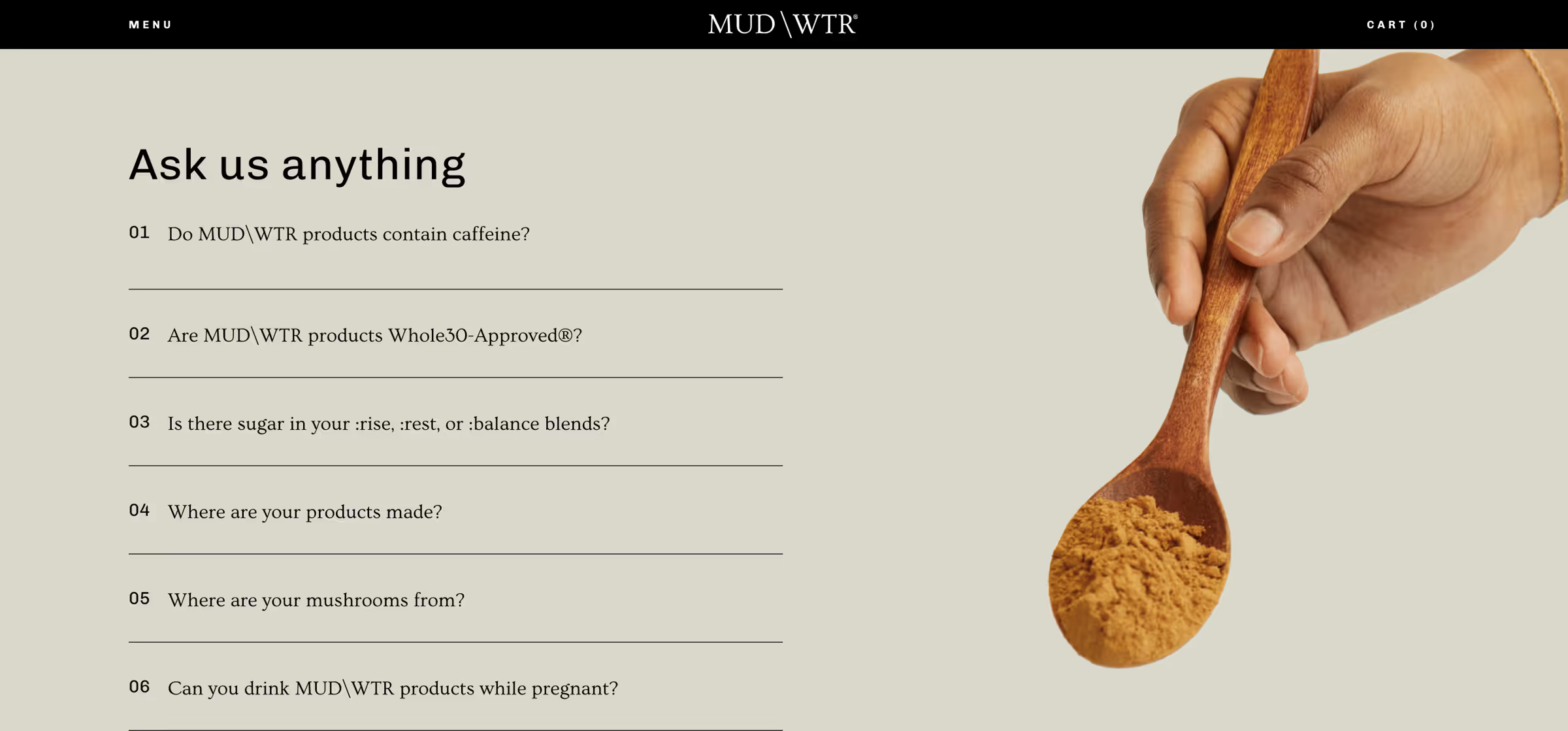
Include CTAs throughout your homepage so visitors don’t have to scroll back to the ATF to take the next step in their buyer journey: the product, pricing, or sign-up pages. CTAs in a sticky nav work well, too.
3. Run an A/B test.
It’s easy to make changes and assume they’re better. Time to test that:
Filter for people who have already visited your ad landing pages. These are the warm visitors we’re experimenting with. Send half to your current homepage and the other half to your new, conversion-focused homepage. See which performs better.
Put a little love into your homepage, you might see a big bump in conversion.
For more, dive into our Above the Fold playbook and Landing Page guide.
Now it’s time to dig a little deeper into the layout of the “perfect” landing page. While homepages and landing pages share a lot of the same DNA, let’s expand on landing page-specific nuances below.
The Perfect Landing Page Checklist
Insight from Tuff Growth and Demand Curve.
Your marketing efforts are wasted if the landing page sucks.
That’s why it's a good idea to use a proven template rather than get too creative.
Wait, don’t we constantly tell you to be creative?
Yes, 100%, your marketing needs to be creative to stand out.
But creative layouts confuse people.
So, be creative with marketing (ads/content/email) and practical with conversion.
Here's a checklist for nailing the perfect landing page (high-res version):

Thanks to our friends at Tuff Growth for creating this A+ infographic, particularly Sean Tremaine, the genius writer and designer behind it. Let’s dive into each of these sections some more.
Hero Section:
The hook is everything:
- Header: Clearly state what you do and why it matters.
- Subheader: Expand your headline. How do you do it?
- Image/Video: Visually communicate your product.
- Call-to-Action (CTA): Place an OBVIOUS button that guides the user to the next step.
- Navbar: Key conversion pages/sections only (Pricing, FAQ, Features) and make it sticky.
Social Proof #1
Social proof is one of the biggest motivators:
- Display usage numbers or logos of well-known customers to build credibility and trust.
Benefits/Features Sections:
Features = talking about yourself. Benefits = talking about your customer.
- Benefit Headers: Clearly state your product or service's main benefits.
- Feature Subheaders: Explain how they get that benefit with your product’s features.
- Image: Use visuals to reinforce the benefits and show your product in action.
- Use bullet points and icons for easy reading.
- Repeat your CTA button for each section.
Social Proof #2
There’s no such thing as too much social proof.
Go deeper with testimonials/case studies/reviews.
- Testimonials: Include quotes from satisfied customers, ideally with names and photos, to add authenticity.
- Case Studies: Highlight the results your customers have had.
You can see a deeper dive into the science of using reviews here.
FAQ Section:
- Don’t assume they read the page. Repeat key details.
- Handle the most common objections.
- Don't lay on the marketing speak, just give the facts.
Tip: Ask support and sales for common customer questions and objections.
Final CTA Section:
Make it glaringly obvious how you can help and how they can take action:
- Hammer in the top value prop.
- Make the CTA clear and persuasive.
- If it’s a form, use as few form fields as possible.
Footer Section:
- Only link to key conversion pages.
- Make it painfully obvious how to contact you.
- Privacy and Cookies Policies and Terms are mandatory.
Note: Of course, you can layer additional sections as appropriate for your startup. You can add pricing sections. Problem agitation. How it works. Product gallery. Your mission. And so on. This is a purely skeleton to build on top of.
Quick Tips
- 90% of the work is done by the hero. Make it hooky.
- Your CTA Button should be the most glaringly obvious thing on the page.
- Be short and clear. Optimize for scannability.
- Mobile-friendly is mandatory.
- If you have the traffic volume, A/B test regularly to find the copy and images that convert best. If not, get a lot of feedback from people.
Check this off next time you build a landing page, and you'll be ahead of 90+% of folks.
Want to get ahead of the rest?
Get our extremely detailed guide walking you through how to perfect each section. And if you want more detailed guides on every aspect of growth, sign up for the Demand Curve Growth Program 2.0 waitlist. Launching soon!
— The Demand Curve Team
What High-Converting Pages Do Differently
The High Cost of Low-Effort Outputs
From the desk of Gil Templeton – Staff Writer
A friend and I were dissecting a LinkedIn post from someone we both know, and it reeked of pure, unadulterated AI slop.
She asked a simple but important question: “Do you keep reading once you know it’s just pasted from AI?”
My response was a hard “No.” And I’ll be less likely to read another post from that person in the future, just because they’ve shown their hand. Their six-fingered hand, that is.
This anecdote speaks to the ways people (and platforms) have quickly learned to spot what’s genuine versus generated (what a CUNY professor describes as an “incredibly banal, realistic style.”) It also encapsulates how these types of posts and people are being categorically dismissed.
Since LLMs are so accessible and widespread, let’s start there, so you can be sure your brand’s associated text outputs (captions, ad copy, scripts, post on LinkedIn or X, web copy, emails, etc.) are boosting your credibility and reach.
Eight Ways To Nuke Your Copy Cred
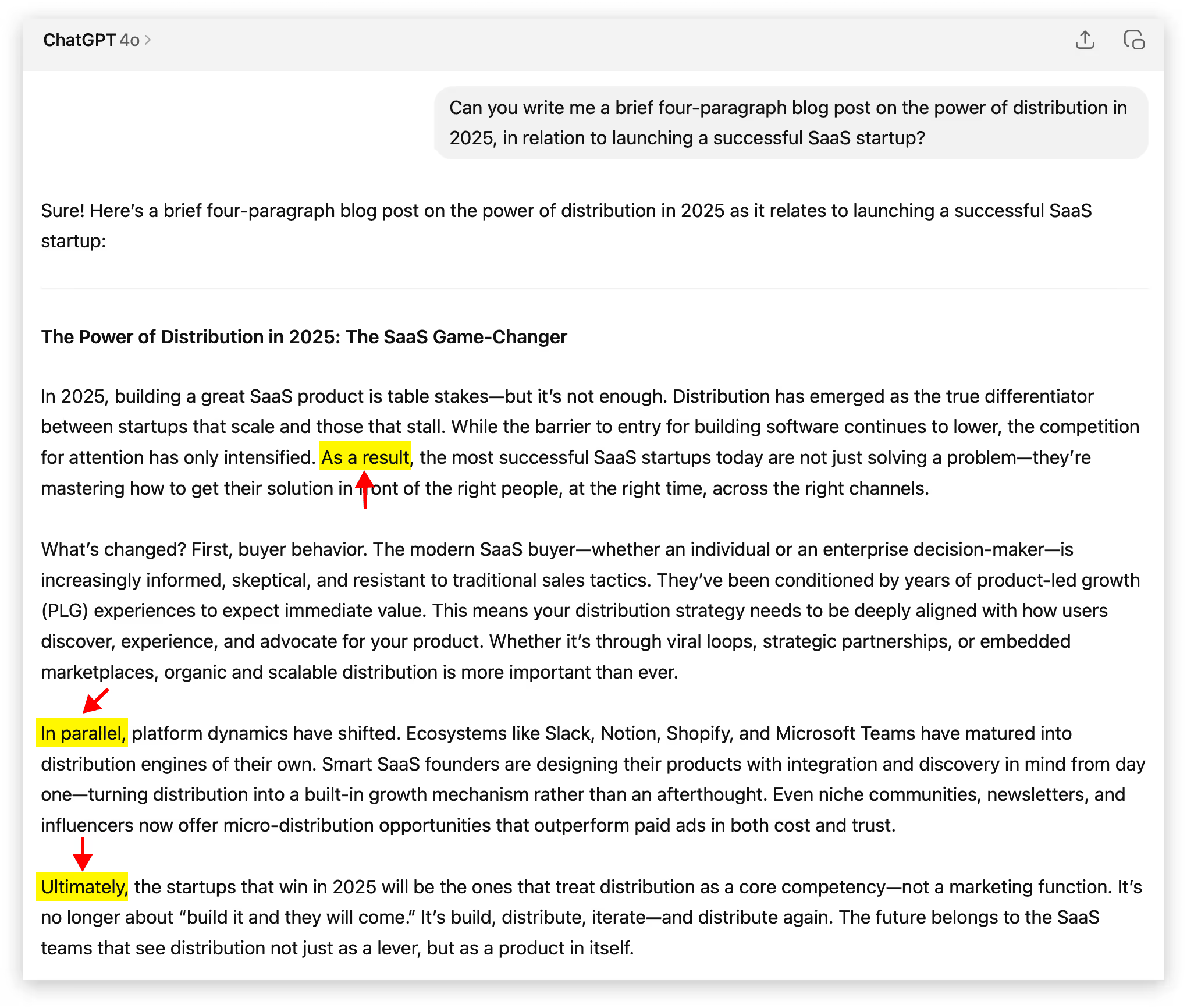
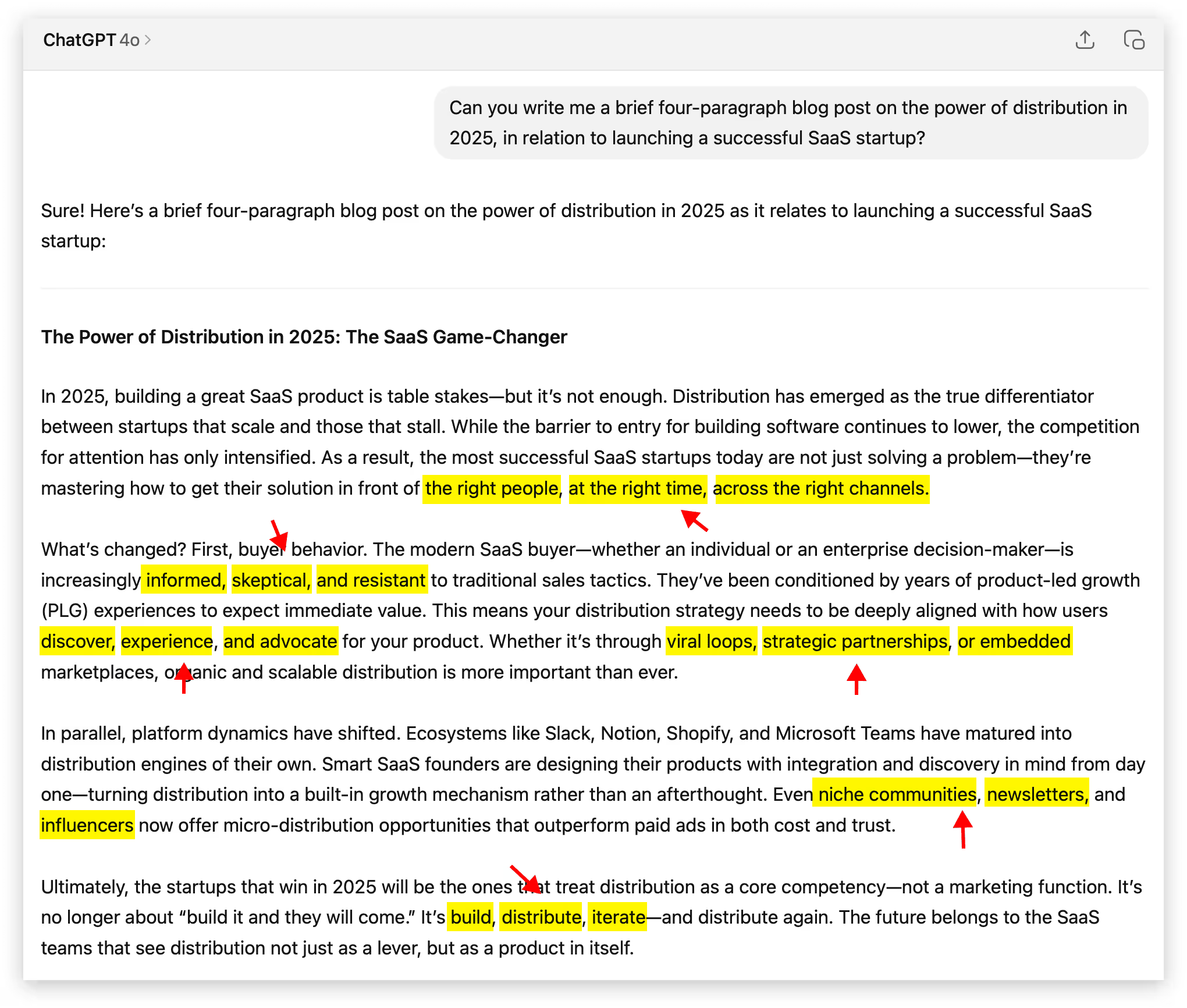
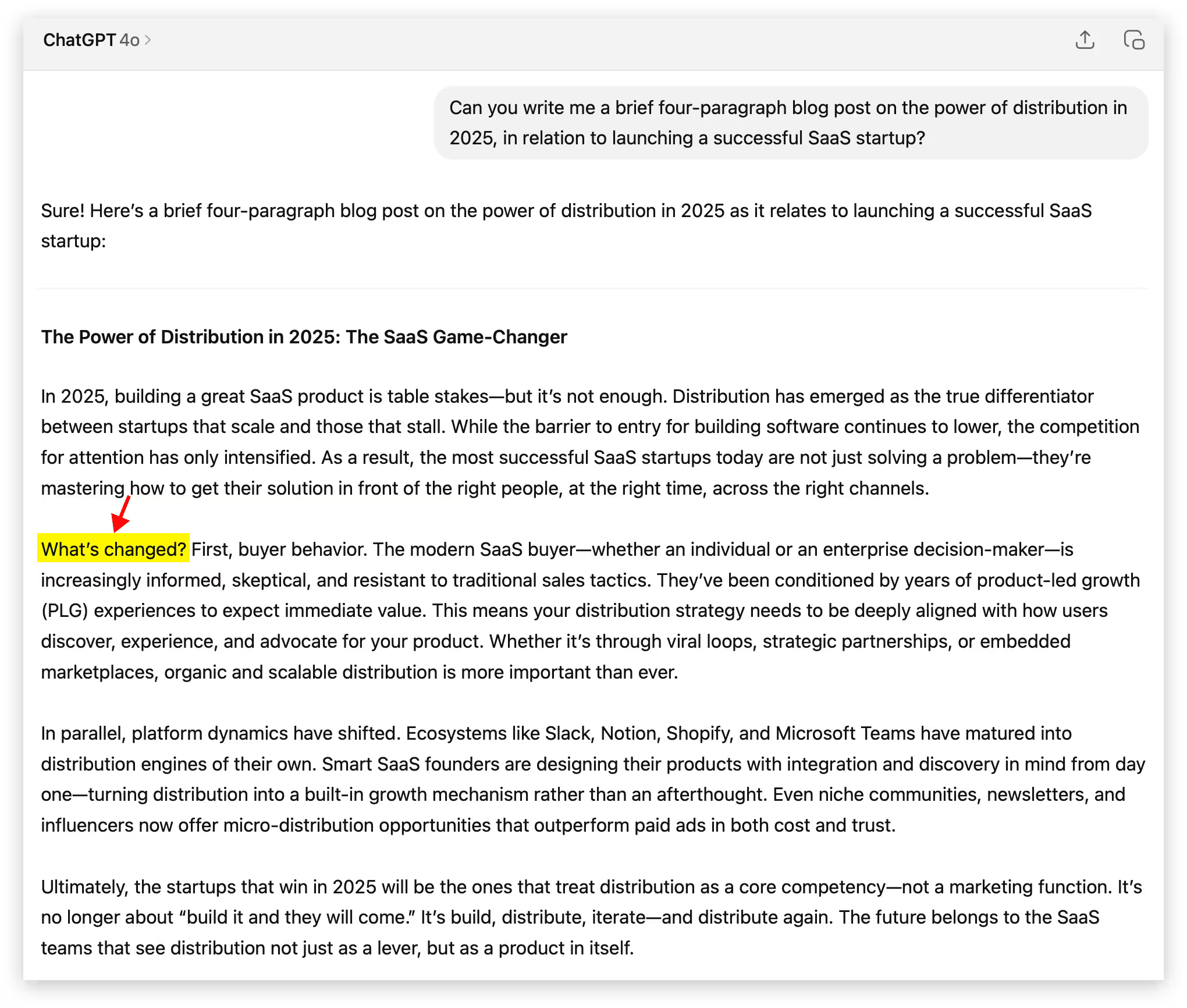
To prove just how predictable AI writing can be, we threw a simple prompt into ChatGPT 4o to see how many instances of AI tells show up. While there are always exceptions, let’s look at some of the common (and lesser-known) AI text transgressions that can register as robot authorship:
- “It’s not just _____. It’s ______.” Similar formulaic, context-based comparisons such as these have been a darling of LLMs. While these can make a strong point or pivot in just a couple words, strive to find another format or approach to convey the idea.
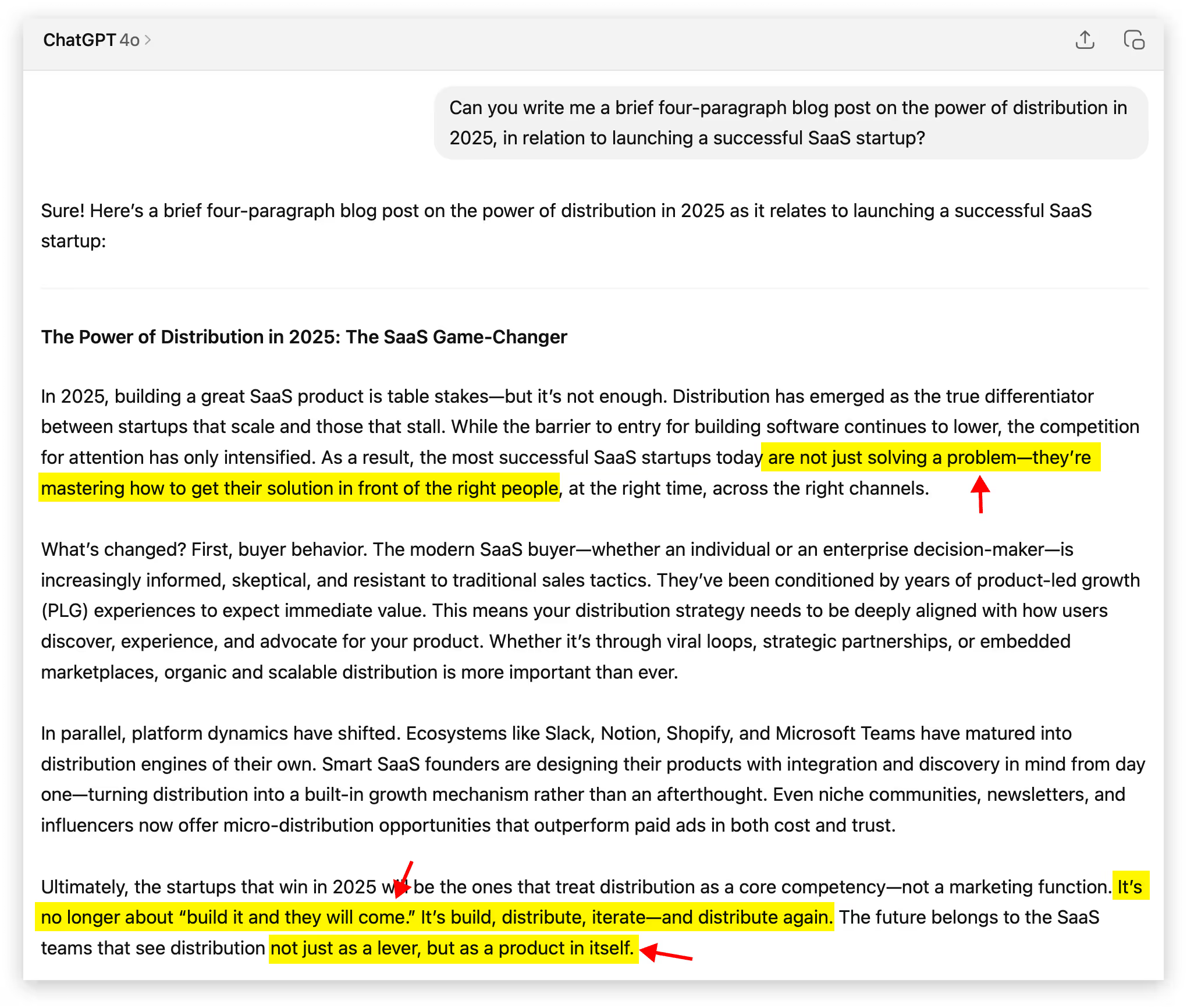
- The much-maligned em dash: This well-documented “tell” has been a major blow to the infinitely versatile punctuation mark that writers notoriously overuse (guilty). In a strange reversal, real human writers are ditching it altogether to signal “Hey, I really put time and attention into this,” as much as it might pain them to do so.

- Excessive hedging or overly formal transitions: Spotting phrases like, “It may be prudent…” or “It might appear that…” show the lack of a clear and compelling human POV. Also formal transitions like "As a result" , "In parallel" , "Ultimately" feel mechanical and overused.
- Tripping over triplets: Using a sequence of threes is a historically strong tactic for storytelling. The number three scratches some itch in our human brains, and AI knows that. So if you see a “build, launch, and scale” or a “simple, smart, seamless” you’re likely staring down the barrel of a bot.
- Grandiose descriptors and verbs: These sensationalist adjectives, adverbs, and verbs try to drum up the emotion and persuasive flair, but they usually feel like a reach. I’m talking adjectives like revolutionary, groundbreaking, jaw-dropping, next-level etc. Adverbs like radically, seamlessly, shockingly, infinitely, etc. And verbs like delve, harness, illuminate, unleash, underscore, facilitate, streamline, bolster, embark, leverage, unlock, elevate, foster, map out, etc.
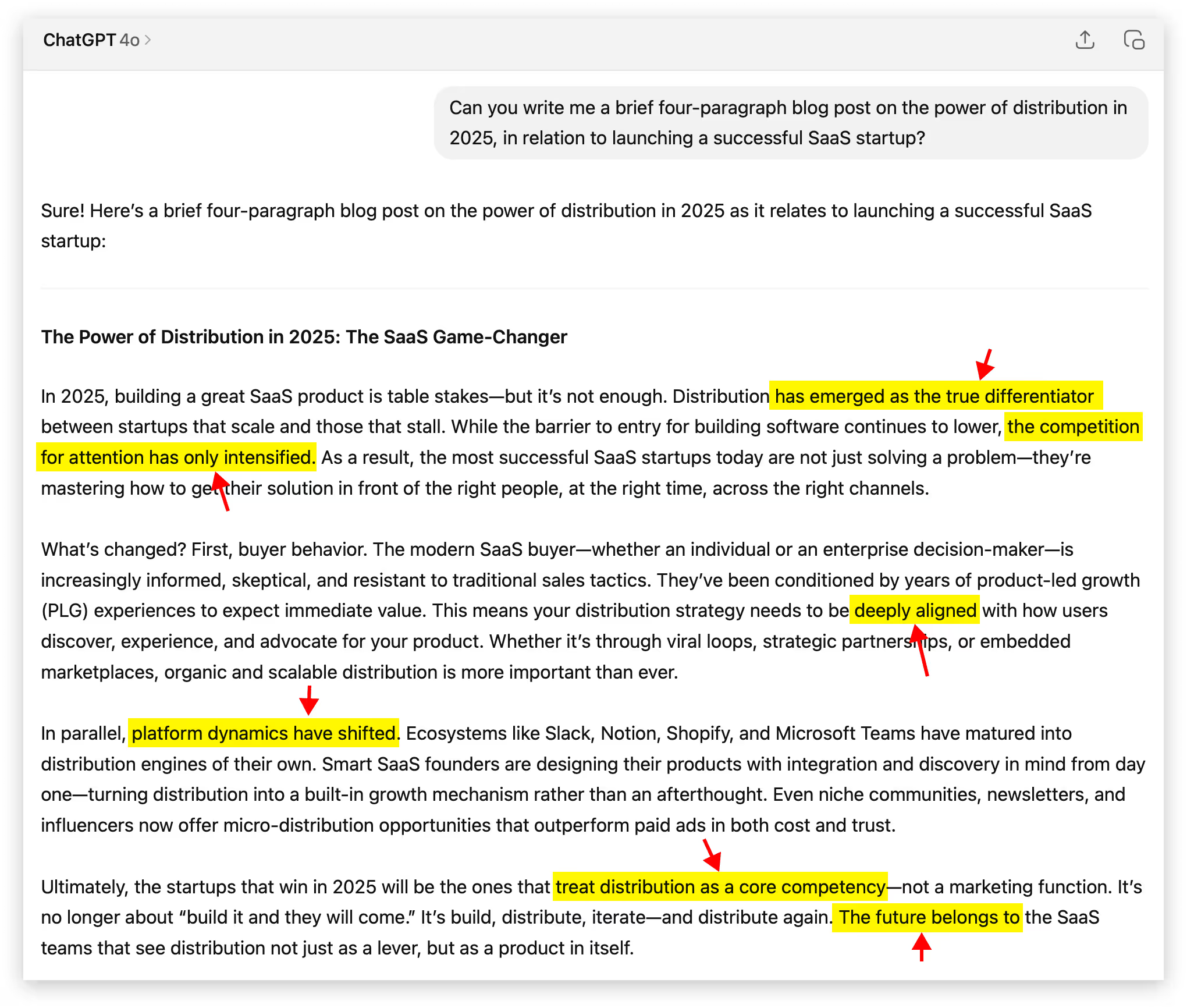
- Rhetorical Questions: These faux-conversational devices pop up when AI tries to sound engaging and interactive. Instead of naturally transitioning between ideas, AI drops in questions like "What's changed?" or "Sound familiar?" to create artificial dialogue.
- Nebulous quotes & sources: If you’re using a quote from someone, triple check that it exists in a credible source outside of your LLM. Sometimes you’ll get quotes that never existed, along with cloudy takes like “Studies show…” or “Experts agree…” when there’s not hard evidence backing it up. A real study showed AI failed to produce accurate citations about 60% of the time, so proceed with extreme caution.
✅ 0 instances ✅
- “Tapestry.” Just the word “Tapestry.” From personal experience (and the experiences of those on a Reddit thread and Grammarly blog too), it seems like AI can’t get enough of this one. Try to resist the urge to use it, unless your content relates to an actual tapestry (not a metaphorical one).
✅ 0 instances ✅
The examples above will be hard to avoid completely in all of your writing. Lots of the callouts are fairly common, and some are particularly effective (especially before they became a little suspicious). If you list a series of three things or use an em dash, nobody is going to write you off. But if you copy and paste a first-draft 300-word output from your LLM, you’ll probably sound some alarm bells.
Our Recommendation: If you're going to use AI to help draft content, use Claude over ChatGPT. In our experience, it's better at writing human-sounding prose. Use a reasoning model (like Opus 4 or Sonnet 4). These models can loop through instructions to avoid AI tells and make sure they don't show up. Create a "Claude Project" with plenty of examples of your actual writing, in your tone. Use this Project to draft your content. Finally, dictate your perspective (and loads of context) into the LLM before you simply prompt it to "write me a blog post." Your unique POV is a huge component of what makes your content human.
Worth Thousands of Words, Audiovisual No-No’s
When you’re going for realism, the same sloppy shortcuts that give your AI-generated copy away can taint your visual and audio assets. If you’re going for something so outlandish, unrealistic, or very clearly made with AI, people don’t judge the same way. As long as they know you’re not trying to fake them out.
But the moment you try to pass AI content off as an actual photograph, something human-made, or a real interview, it can be interpreted as deceptive and unethical. The backlash can be even stronger in certain industries like fashion, where models and photography are sacred. Last week’s public response to the AI model featured in a Guess ad in Vogue Magazine had people upset to say the least.

Product photography affected by AI can also pose an ethical dilemma. Let’s say you include a reference image of your brand’s purse in your Midjourney or Sora prompt, but the output looks more upscale.
The image looks glossy, immaculate, velvety, detailed, even though it doesn’t quite look like that in real life. Is it still honest to use that image in your ad, knowing AI dolled it up? Or have you crossed the line to misrepresentation?
We're not attorneys, but we'd urge you to research FTC regulations surrounding false advertising and deceptive claims in your industry.
Below are some practices and approaches you should avoid to ensure your audio/visual outputs aren’t seen as deceptive or jarring, especially if you are conveying realism:
- Fake humans pretending to be real ones: Passing off synthetic models or avatars as real people (whether in customer testimonials, interviews, or photoshoots) erodes credibility. Even if you disclose your AI usage or use an outright fake influencer (like the fleeting Mia Zelu of Wimbledon fame), it’s no guarantee people will like it or see it as ethical.
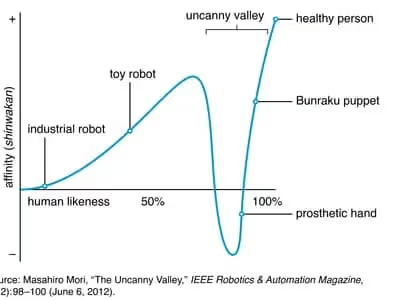
- Uncanny glitches in video: An unnatural movement or jarring facial expression quickly tells viewers they’re looking at AI. If the point of your video hinges on looking real, don’t use AI unless you have total mastery of the output and you disclose your usage of AI. The “Uncanny Valley” theory supports this notion that people can’t stand to look at something almost human. Act accordingly.
- Fake news-style interviews: Creating realistic yet fake footage of someone saying something they never said crosses the line (whether it’s a deepfake of a real person or a made-up character that looks like an everyday person). Unless you’re 100% transparent, or if your account is clearly for comedy/satire purposes only, stay away. This format has proven to be easy to pull off with Google Veo 3.
- Synthetic voiceovers with no context: AI narration with unnatural or flat delivery can stand out as inauthentic to some listeners (or stylistic to others). Use it to prototype or time your edits, but if you want the best shot at a voiceover that conveys human emotion (especially in high-touch, produced pieces) use real voiceover talent. However, ElevenLabs raised $180M in January at a $3B valuation, so the gap might be bridged pretty quickly if progress stays the course. And of course there are cases where AI voiceover works well.
- ChatGPT Sepia Filter: That telltale yellow-beige tint that washes over AI-generated images. It's the visual equivalent of the AI em dash. Yellowish images can still get your point across and might be better than nothing, but make sure the visual message is worth the potential credibility hit. A quick "temperature" and "tint" adjustment can fix the issue.

Platforms Prioritizing Quality
Tech platforms are making their stance clear, use AI to elevate, not automate. They want creators and users who embrace this new technology to add value. They’ve been fine-tuning their policies and algorithms to sort for quality over sheer quantity.
YouTube made a change to their monetization policy where “faceless,” repetitive, or mass-produced content (often made possible with AI) will now be deemed inauthentic and ineligible for monetization. And while remixes and AI content are still allowed, creators must add clear value or commentary for it to qualify. The bar might not be particularly high, but at least the bar has been re-set.
Google has also clarified their stance of “Rewarding high-quality content, however it is produced.” Pay special attention to that phrase: “high-quality.” They’re much less concerned with how something was made, and much more concerned with the actual merits of the site or blog. In other words, you can definitely use AI to help write your SEO-boosting blogs, but the final draft better not read like unoriginal, regurgitated goop.
And if you’re like me, you’re probably scrolling through LinkedIn like you’re walking through a minefield, cautiously approaching each post to inspect for clear and present traces of AI before devoting time to reading it.
Bottom Line: Recalibrating Our Filter
Sure, the tools are faster than ever. The slop is sloppier than ever. But we humans are already doing what we’ve always done during these eras of newfound media overload, recalibrating our filters and redefining our threshold for what’s worthy of our time and attention.
So while you can now “write” a blog post by dictating a few sentences into AI and hitting a couple buttons, remember, so can everyone else. The barriers to entry are lower, and because of that, the bar for quality has never been higher.
Gil Templeton
Demand Curve Staff Writer
A Lovable Story
Insights from Gil Templeton and Kevin DePopas
Stockholm-based Lovable turned a simple, powerful idea into a rocket ship: use AI to let anyone build apps or sites just by describing what they want. The approach, vibe coding, became popular this year as a tool for rapid prototyping, paired with software.
Within eight months of launching in late 2023, Lovable attracted 2.3M active users, saw over 10M projects built, and raised a $200M Series A, valuing the company at ≈ $1.8B. They minted a European AI unicorn at unprecedented speed.
By letting you speak your app into existence with vibes only, it basically turns moodboarding into shipping. A founder described it as holding a “magic key” that opens the door to software without developers.
This level of product-market alignment makes customers’ obsession with the product a natural growth lever. Every output becomes a showcase people want to show off. And each user becomes a signal-boosting evangelist.
It’s one of those rare cases where an innovation has so many use cases and so much visual intrigue, the product itself is the growth engine no matter what channel it’s on or who’s looking at it.
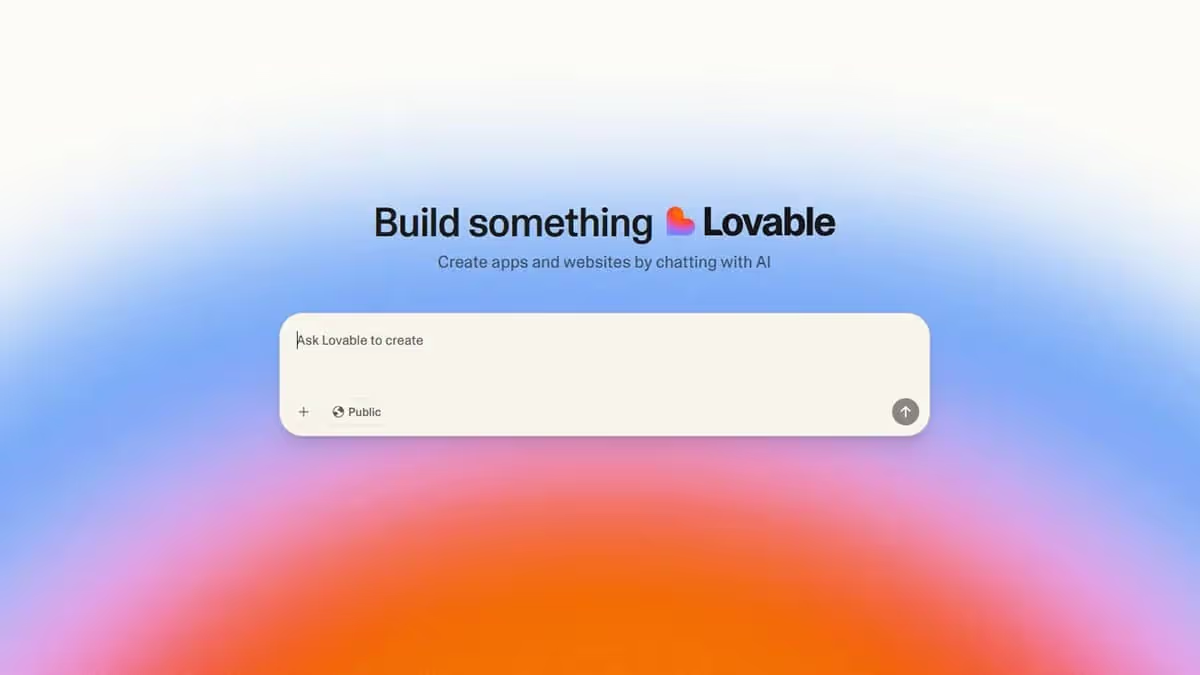
The 12-Channel Illusion
On the contrary, some growth gurus were quick to claim Lovable architected their growth through a complex omni-channel strategy:
- GitHub - Launched as GPT Engineer, got 54K stars
- Product Hunt - Multiple launches, starting January 2024
- X/Twitter - Daily posts from CEO Anton Osika
- LinkedIn - Professional spin on the same X/Twitter content
- Discord - 34K+ member community
- YouTube - 20K+ subscribers, product demos
- Google Ads - Paid search campaigns
- Partnerships - Agency deals with commission structures
- Podcasts - Hit every major tech show (20VC, Lenny's, etc.)
- Events - Presented at Slush and other startup conferences
- Reddit - Strategic threads showcasing the product
- SEO - Blogged about their own growth to attract more growth
Impressive list, but this is more correlation than causation. It's what happens when your viral coefficient (the average number of new users that an existing user generates) is insanely high. Because starting a fire is a littleee easier when your product is a 50-gallon drum of jet fuel.
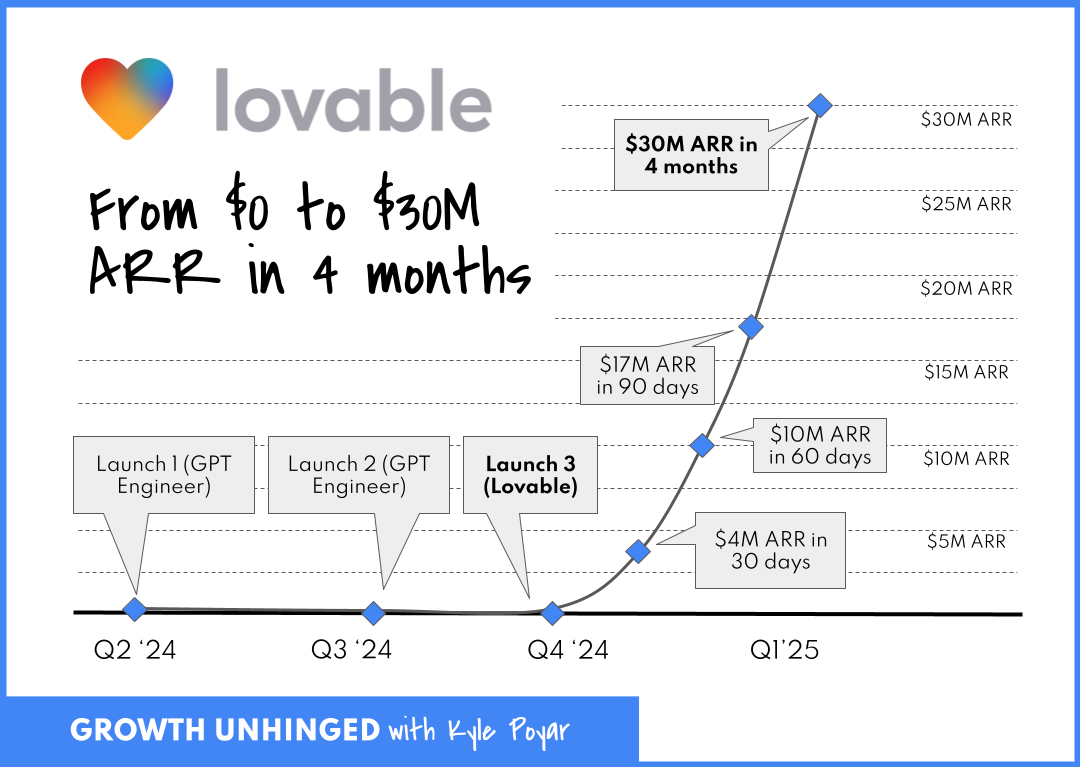
The Viral Coefficient Driving It All
During Lovable's early hypergrowth from over 20,000 users in late January 2025 to over 500,000 in February, they achieved ~25x user expansion in about a month, implying a peak weekly viral coefficient K ≈ 1.24.
When your viral coefficient is that high, channel selection becomes irrelevant. Post on Product Hunt? Viral. Tweet about it? Viral. Show up at an event? The crowd goes wild.
It's not that Lovable mastered these 12 channels in order to grow. It's that their product is so shareable, user-friendly, visually stunning, and so "holy sh*t look what I made in minutes" that any exposure becomes a growth loop.
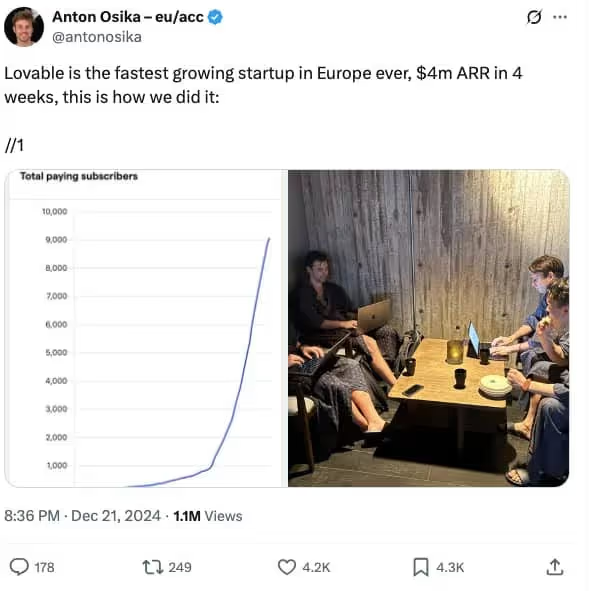
Mo’ Money. No Problems.
And if you're still tempted to mimic their strategy, gut check whether you have as much cash on-hand to fuel your growth.
Unlike most startups, Lovable never had to worry about scraping together cash, due to a sizable $7.5M pre-seed followed by an explosion of early revenue traction. Lovable launched on November 21st 2024. By February 2025 (3 months after launch), they had:
- Acquired 30,000 paying customers
- Hit $17M ARR
- Raised a $15M pre-Series A
- Spent $2M to get there (mentioned in an X post from the CEO, Anton Osika)
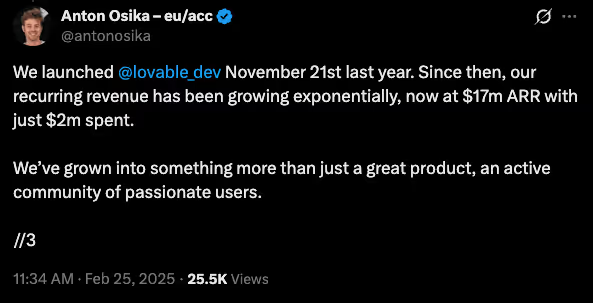
While Osika doesn’t mention exactly how they spent the $2M, even if only 20% of that $2M went to marketing, that's still $133,000/mo in marketing spend out of the gate. Most startups are trying to stretch out $10k over three months of Meta ads. 🥲
When you have that kind of capital, you can afford to have a presence everywhere at once. You can hire Discord community managers, video content editors, SEO writers, and still have budget left for paid ads.
Why Your Bicycle Can't Handle a Jet Engine
Lovable rides a jet engine fueled by three things:
- Insane product-market fit that creates outputs people compulsively share
- Early revenue and venture funding that enables simultaneous channel execution
- Perfect timing in the AI gold rush where "I built this with AI" still grabs eyeballs
There’s a good chance your startup doesn’t have all of these to the degree Lovable does. Which means copying their channel playbook isn’t particularly useful.
The Actual Takeaways Here
Strip away the hype and oversimplification, and here's what matters:
- Build virality into your product: To the extent your product/service supports it, ask yourself, "Is my product something people actually want to show others? Can we build in network effect dynamics?"
- Be realistic about resources: If you can’t spend $100K+/month on growth, you probably can’t fund a breakneck 12-channel growth strategy.
- Recognize survivorship bias: Remember, for every Lovable, there are 1,000 startups that tried to "be everywhere" and burned out.
- Learn from Lovables individual channel strategies: None of this is meant to knock Lovable. They are clearly very talented marketers and you can still learn from them. Building in public on X might be a great strategy for you.
The Channel Focus Reality Check
In the incredibly likely event your product doesn't have Lovable's inherent virality, here's your channel playbook:
- Test 3-5 channels with small budgets ($3-5K each)
- Identify the one with the best unit economics
- Scale that channel until you hit diminishing returns
- Only then consider adding channel #2
It’s not as sexy, but a steady, sustainable, scalable growth engine is how the majority of successful startups actually grow (it's also the key focus of the Demand Curve Growth Program).
Bottom Line: Product Over Everything
Lovable's story is seductive (and potentially dangerous) because it suggests you can brute force your way to product-market fit. “Just be everywhere all the time! Master ALL the channels! Growth will surely follow!”
That's bass-ackwards. Lovable earned the right to be everywhere, because their product was everywhere-worthy. They mastered all channels because every channel bowed down to it.
Your job isn't to copy Lovable's channel tactics. It's to build something users love and share as much as Lovable. Until then, a focused channel strategy likely beats cosplaying as a hypergrowth startup.
Gil Templeton
Demand Curve Staff Writer
Kevin DePopas
Demand Curve Chief Growth Officer
The Worst Rebrands of All Time
Insight from Gil Templeton — Staff Writer
Quiznos (2004): The Scary Sub Spongmonkeys
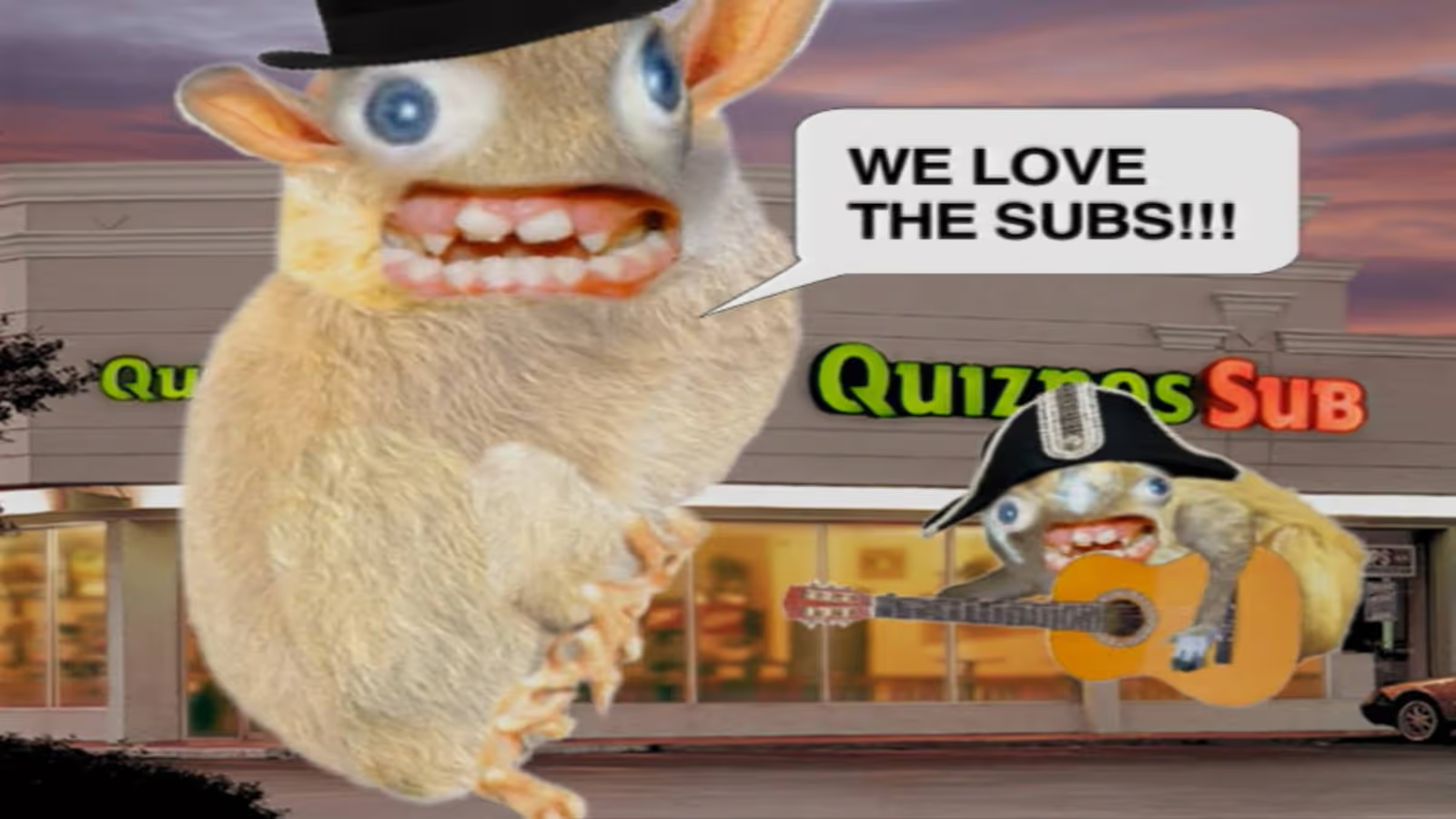
The Situation: Quiznos was getting their lunch eaten by Subway, which had a huge marketing budget and was building momentum through brand recognition, value messaging, and healthy offerings (yes, the Jared Fogle ads). Quiznos needed a breakout campaign to make them relevant and top-of-mind, especially with the younger crowd.
The Goal: Stand out in a crowded fast food market by being weird and irreverent, targeting younger, internet-savvy customers in the early viral video era.
The Rebrand: Quiznos launched the infamous national ad campaign featuring the “Spongmonkeys,” aka the bizarre, rodents with floating heads and screeching voices.
The Reception: The ads were plenty memorable, but deeply off-putting. The original Spongmonkeys were born from a viral Flash animation video, but their jump to mainstream TV was jarring for most Americans. Many were grossed out and/or creeped out, but most importantly, the campaign didn’t communicate anything meaningful.
Despite high ad spend, Quiznos lost market share and momentum as Subway doubled down on clear messaging around value and freshness. They emerged from Chapter 11 bankruptcy restructuring in 2014. Today, there are fewer than 200 Quiznos locations, compared to about 4,700 at their peak. Compare that to Subway’s 37,000 global locations. Of course, you can’t pin it all on one bad brand move, but the campaign might’ve taken Quiznos from “toasty” to “toast.”
The Takeaway: It’s okay to be weird, as long as you have a good reason for it. Being memorable doesn’t matter if people don’t remember what you’re selling (or when your food becomes associated with something kinda repulsive). Wackiness and silliness can’t carry your positioning if your core value prop isn’t clear.
Jaguar (2024): The Eclectic Electric U-Turn

The Situation: Jaguar had seen seven straight years of declining sales and was lagging behind luxury competitors in the EV arms race. With growing regulatory pressure on gas-guzzlers in Europe and a change in preference toward tech-forward EVs, Jaguar desperately hit the hardest of resets.
The Goal: Boldly recast Jaguar as a premium EV player and reposition the brand against Tesla and Porsche instead of leaning on heritage.
The Rebrand: A shocking repositioning of Jaguar into a minimalist EV-only brand with all-new type and colors, flattened logos, and a nebulous high-art ad that went viral for the wrong reasons.
The Reception: Like a bad car wreck, this gave people major whiplash. Fans (and pretty much everyone else on the planet) reacted viscerally, noting how the classic allure of the heritage brand was completely gone. People were confused by the vague “Copy Nothing” slam-poetry and enraged that the ad didn’t even show a car.
While sales had been declining for years, only 49 Jaguars were purchased across Europe in April 2025 (yes, 49 cars across continental Europe). Compare that to 1,961 cars in April 2024, and that’s a 97.5% drop in YOY sales. Mind-boggling for a storied hundred-year-old company.
The Takeaway: Jaguar absolutely needed to make a bold change. But instead of ushering the brand into the EV age, they came across as confusing, vacant, and weird for weird’s sake. They’d likely be better off if they made a more focused shift that combined their glorious heritage with today’s EV tech (and still offered a fuel-burner or two as a safety net for now).
Tropicana (2009): Grasping at Straws
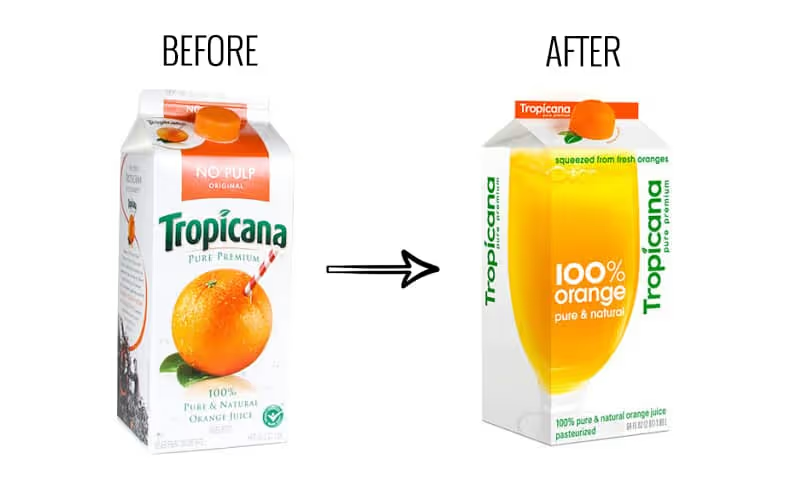
The Situation: Minimalism and clean design were becoming the dominant aesthetic in CPG, as brands like Honest Tea and Naked Juice gained market share. Classic orange juice was facing hipper, healthier competition, and the legacy brand felt like they needed to make a shift.
The Goal: Tropicana wanted to modernize its image to signal purity and healthiness, appealing to a younger group of health-conscious shoppers.
The Rebrand: A total packaging overhaul that replaced the iconic orange-with-a-straw for a minimalist glass of juice and sterile sans-serif type.
The Reception: Customers couldn’t find it. The new look removed about every distinctive brand asset that made Tropicana recognizable and iconic. Within 60 days, sales had dropped by 20% (a loss of over $30 million). Needless to say, the old packaging made a quick comeback.
Tropicana sales saw a sharp rebound after reverting to the previous look, but it still didn’t reach previous highs. It’s likely that sixty days was enough time for consumer habits to shift permanently, and the reversion could have also signaled a somewhat-stale step backward, when Tropicana had a chance to evolve more intentionally from the failed effort.
The Takeaway: Sometimes recognition is better than reinvention. Mega-distinctive assets (like the red and white spiral straw in the orange) are strong visual cues for consumers to quickly identify at-shelf. So sometimes it’s best to gently update them, not ditch them altogether. When a premium, legacy brand looks more like the everyday store brand, consumers will either have trouble finding it, or they’ll default to the cheaper option and move on.
HBO Max → Max (2023): Rewinding Brand Equity
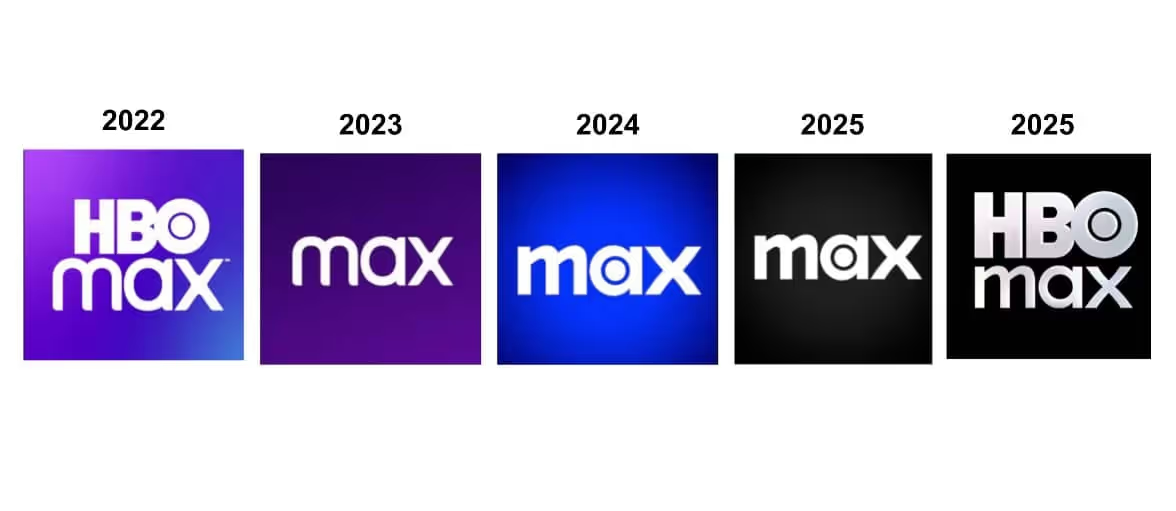
The Situation: Warner Bros. and Discovery had just merged, and they wanted to consolidate media assets under one roof to compete with Netflix and Disney+. There was internal pressure to streamline the brand and create a name that could stand for more than prestige TV.
The Goal: Create a platform that housed all content under one neutral umbrella. “Max” was supposed to be simple and expansive, allowing it to flex to select, new Discovery offerings.
The Rebrand: HBO Max (originally HBO GO) rebranded to “Max,” as part of the consolidation strategy.
The Reception: The name lost the strongest asset HBO had: its name. “HBO” stood for premium TV, while “Max” sounded like a budget broadband provider. Because of consumer confusion, the app tanked in App Store rankings, and HBO’s reputation got watered down by association with reality TV and clutter.
The Takeaway: Play to your strengths. If one part of your brand holds more equity than the rest of your offerings combined, build on that. HBO was the standard-bearer in award-winning, premium entertainment for decades, and they should have put their valuable name on a pedestal. After the confusion, HBO wised up and reverted back to HBO Max after several iterations of Max. A “full-circle” moment for the ages.
JCPenney (2011): The Anti-Sale Strategy
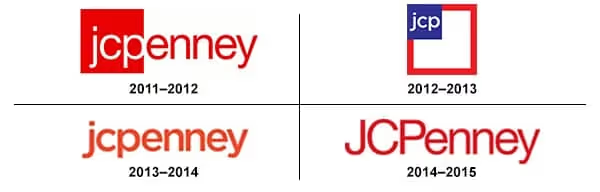
The Situation: JCPenney was struggling for relevance after the recession. Big-box and specialty retailers like Target, Kohl’s, and fast fashion brands were stealing market share, and JCPenny’s coupon-driven model suddenly felt outdated. Fresh off his success as the retail chief at Apple, the board brought in Ron Johnson as the new CEO to lead the reinvention.
The Goal: Reposition JCPenney as a modern, stylish department store that didn’t rely on gimmicky sales. The idea was to attract younger, higher-income shoppers and compete with trendy retailers.
The Rebrand: Ron Johnson led a full-scale rebrand from the top down. In addition to overhauling the brand’s look (including a square in the logo to match the new “fair and square” pricing approach, get it?) he eliminated sales, coupons, and markdowns in favor of an everyday pricing model.
The Reception: It turns out the traditional JCPenney shopper was a deal-hunter who loved coupons and doorbuster sales more than pricing transparency. The rebrand was seen as unearned and untrue to their crowd’s sensibilities.
In one year, JCPenney lost over $4 billion in revenue as foot traffic plummeted. Johnson was fired in 2013, and the brand walked back most of the changes. But they still experienced a slow, decade-long slide until filing for bankruptcy in 2020. Where’s JCPenny today? It looks like they just offloaded about 20% of their locations to a PE firm.
The Takeaway: Don’t rebrand for the customer you wish you had. Rebrand for the one you’ve earned, and reap the halo-effect along the way. Drastically changing your business strategy without accurate insights is a gamble to say the least. A rebrand should evolve your positioning without erasing what people were actually showing up for.
So When Should You Rebrand?
If your business is in one of the situations below, it might be time to consider making one. If not, you should probably fight the urge for now.
- Your positioning has shifted: You’ve evolved beyond your original product or audience, and your current brand doesn’t accurately reflect what you do best.
- You’re being mistaken for someone else: If customers confuse you with a competitor or unrelated brand, you need to stand out more clearly.
- You’re targeting a new audience segment: A new prospective target may require a fresh voice, look, or story to resonate. But make sure it doesn’t turn your loyalists off, RE: JCPenney.
- You’ve outgrown your humble beginnings: Maybe you didn’t have the time or budget to invest in quality branding when you started your business. If you’ve received a new round of funding or can otherwise afford a needed brand update, a fresh coat of paint might be the professional sheen you need.
- You’re entering a new stage of growth: Important opportunities like expanding to new markets or launching a flagship product can be the right moment to level up.
Find Clarity, Then Use Creativity
I hope these cautionary tales haven’t scared you away from making an important brand update if you need to.
The takeaway here isn’t “Rebrands are dangerous.”
The takeaway is: Rebrands can be multipliers, but they need to be executed thoughtfully.
There’s a reason just about every company undergoes a rebrand or two throughout the years. Offerings, audiences, opportunities…they can all change, and a brand needs to make strategic updates in order to keep its footing and keep climbing.
Have any good stories or lessons from your company’s rebrand? Reply with a message, we’d love to hear about it.
Gil Templeton
Demand Curve Staff Writer
How AI is making your growth problems worse (and how to get back on track)
Insight from Kevin DePopas - Demand Curve Chief Growth Officer
The AI Productivity Paradox
This week, I analyzed feedback from 800+ companies explaining why they joined our Growth Program. One founder wrote:
"All our growth has come magically and almost nothing we did seems to work."
Another said they were running:
"Organic, App Store Search Ads, Google Ads, Facebook Ads, Affiliate Marketing, YouTube, Snapchat..." but still struggling to scale.
This is the pattern I see everywhere now, amplified by AI tools.
Look, I've been there. When you're just starting a company, you inherently don't know what works. To find out, you need to test. And generally speaking, testing more gives you more chances to unlock a winner.
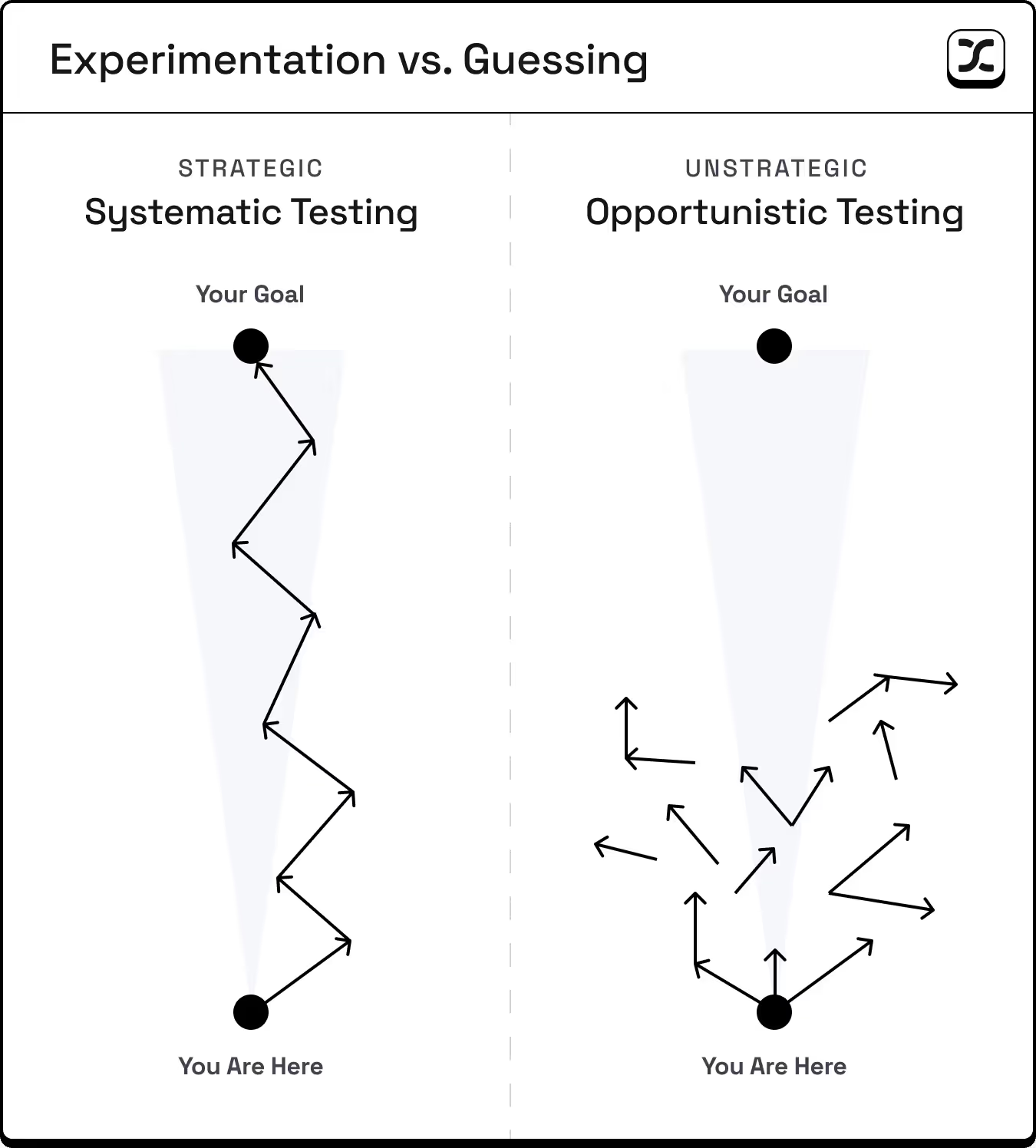
But there's a difference between systematic experimentation and spraying and praying at 10x speed.
Companies using AI to run 20 tests per month when they used to run 3 end up with a lot of shallow data but very few real deep learnings that inform how they can adapt their strategy and double down on what's working.
Not to mention, even if you can run 20 tests per month:
- Are you adequately budgeting those tests?
- Are you letting them run long enough?
- Are you documenting what you learned?
- Are you building on previous insights?
The answer is almost always no.
Your Foundation Is Your Multiplier
Think about it this way, if you just got your driver's license, getting a Ferrari won't make you a good driver. It'll just make you more dangerous on the road. And if you're heading in the wrong direction, you're going to end up 100 miles off course, when if you rode a bike, you'd only end up a mile off course.
How I think about it:
- Strong fundamentals × AI = Compound growth
- Weak fundamentals × AI = Compound confusion
Here's what strong fundamentals actually look like. Make sure to have these in place before amplifying your growth efforts with AI.
1. Know Your 5 Fits (Not Just Product-Market Fit)
After working with hundreds of startups at our agency and thousands of startups through our Growth Program, we've identified 5 critical fits. We wrote a whole newsletter about this in May, but it's worth revisiting.
- Market-Product Fit: Your product actually works. People are pulling it out of your hands. They use it and tell friends.
- Market-Model Fit: Your pricing aligns with how your market buys. (One company we worked with was trying to sell $50K enterprise contracts through self-serve.)
- Market-Brand Fit: Your brand resonates with your specific audience (e.g., Stripe's technical excellence appeals to developers).
- Market-Channel Fit: You're where your customers actually make purchasing decisions (e.g., B2B SaaS on LinkedIn, not TikTok).
- Model-Channel Fit: Your unit economics work in your chosen channels (e.g., $10/month products can't afford $100+ CACs).
Miss any of these, and AI will enable you to spin your wheels faster than ever, until you run out of cash.

2. Implement a Minimally Viable Experimentation Framework
One Growth Program student told us their biggest challenge was...
"Knowing what's working/not working...and consequently, knowing where to focus."
When you're running a startup, it seems so appealing to have all your tests cleanly organized and meticulously tracked.
But like wasting time on worthless AI-fueled tests, overbuilding your experimentation framework can pull valuable time from running the actual experiments.
I can't tell you how much time I've wasted in Notion, Clickup, Asana, etc...
Even a minimum level of organization helps. What matters is learning intentionally to inform your strategy.
This is the difference between testing loops and learning loops:
- Testing loops ask: "Which version won?"
- Learning loops ask: "What did this teach us about our customer?"
You don't need a complex system. Create a simple Google Doc with these questions:
Ideating tests:
- What metric are we trying to improve?
- What are all our hypotheses for improving it? (List them all, even wild ones)
- What evidence or customer insight supports each hypothesis?
Prioritizing tests:
- Which test has the highest conviction based on customer data?
- Do we have enough traffic/users for a meaningful result?
- What's the effort vs. potential impact?
Planning tests:
- What exactly are we changing?
- What does success look like? (Define win criteria upfront)
- What's our budget/time limit?
Learning from tests:
- What happened? (Just the facts)
- Why did it happen? (Your best explanation)
- What's our next test based on this learning?
Not that you need it, but I'm giving you permission to literally do this in a Google Doc. The best system is the one you'll actually use.
Three well-designed experiments that you track beat 20 random (un-tracked) tests, every time.
3. Max Out What Works
Most early-stage startups abandon their channels too early.
I worked with a DTC company spending $6,000/month on ads. They had barely scratched the surface of their serviceable addressable market.
Their CAC was $40, and their unit economics could support up to $80 CAC before they would be unprofitable on every sale.
As they pushed spend above $6,000, their CAC crept up to $50, then $60. They panicked and pulled back.
But here's what they missed. Even at $60 CAC, they were still profitable on each sale. The real questions they should have asked:
- What's our payback period at the higher CAC?
This is how long it takes to recoup your customer acquisition cost. If you spend $60 to acquire a customer, when do you get that $60 back? For subscription businesses, it might be 3-6 months. For this DTC company, it was immediate on first purchase.
- Can our cash position handle the float?
"Float" is the money you need upfront before customers pay you back. Even if you're profitable long-term, you need enough cash to cover acquisition costs while waiting for revenue. A startup with $50K can't float thousands in ad spend if payback takes months.
- Is our contribution margin still healthy?
This is what's left after subtracting all variable costs (product, shipping, transaction fees) from revenue. As long as this margin exceeds your CAC, you're adding profit with every sale.
For this company, all three answers were favorable. In other words, they were leaving cash on the table by pulling back ad spend.
Rising CAC isn't always bad. Only start testing new channels when your marginal CAC in the current channel exceeds what you could realistically achieve elsewhere.
Most startups never get there. They see CAC increase 20% and immediately jump to the next shiny channel, spreading themselves thin instead of maximizing what's already working.
Have you actually pushed your best channel to its limits? Or did you just get scared when the numbers changed?
The Bottom Line
Before you add another AI tool to your stack, test another channel, or pull the plug on an existing test, ask yourself:
- When's the last time you went through the 5 Fits framework with your co-founder or a trusted advisor?
- Do you have a simple, systematic way to document learnings from tests?
- Have you maxed out your best-performing channel?
Depending on your answers above, AI may actually be delaying your success.
Focus on your fundamentals first. Build real learning systems. Max out what's working.
Then, and only then, let AI amplify your efforts.
Kevin

Kevin DePopas
Chief Growth Officer
How AI is making your growth problems worse (and how to get back on track)
Insight from Kevin DePopas - Demand Curve Chief Growth Officer
Identifying The “What” Trap
Insight from Gil Templeton - Staff Writer
This lesson focuses on lead marketing messages (your homepage, ad copy, pitch deck headlines, social content, etc.) Of course there are places where customers are seeking more technical or detailed info, but let’s focus on high-level copy today.
The “What” Trap shows up when your messaging answers questions such as:
- “What do we make?”
- “What industry are we disrupting?”
- “What features are we proud of?”
- “What’s our origin story?”
All fair questions internally. But externally, they produce messaging like:
- “We use clean, ethical ingredients.”
- “Scalable cloud infrastructure solutions”
- “Innovation is in our DNA.”
- “Meeting the highest industry standards.”
None of this is wrong per se, but it’s answering the wrong question. Because your customer isn’t asking “What do you do?” They’re asking “What’s in it for me?”
While this messaging might be technically accurate, it’s emotionally vacant.
Why Do So Many Make This Mistake?
Most founders and marketers don’t set out to write ineffective, self-centered copy. But when you’re so deep inside the business, it’s like trying to read your label from inside the jar. And it’s easy to default to what you know best: What you made. How you made it. Why it’s better.
That’s all valid stuff. But it’s not what gets strangers to stop scrolling or lean in.
You don’t win with more description or explanation. You win with more relevance.
The B.A.D. to B.E.S.T. Pivot
When messaging falls into The “What” Trap, it tends to be an ineffective mix of boastful, abstract, and dry. In other words, it’s just plain B.A.D.
In order to pivot to a more appealing message, we need to shift our point of view to create the B.E.S.T. message:
- Benefit-Led: Lead with what your customer gets, not what you made.
- Empathetic: Show how you understand their problem or aspiration.
- Story-Driven: Anchor the message in a moment or feeling they can relate to.
- Transformational: Focus on how their life can improve because of you.
As you can see, all of the B.E.S.T. lines on the right have flipped the focus to the customer. They use specificity, and they imply a transformation for the better.
For other useful exercises, check out the Copywriting Frameworks Cheatsheet featured in the Growth Program.

Tips for Making the Pivot
Speak to one person: You’re not shouting at a crowd through a megaphone, you’re showing one person what they stand to gain.
- Ex. “We provide 24/7 tech support.” → “You’ll never have to troubleshoot alone again.”
Speak like a real person: Use contractions, cut any fluff, and avoid incomplete sentences.
- Ex. “Innovating smarter workplace software solutions for you since 2005” → “You run the business. We’ll handle the boring stuff.”
Embrace directives/imperatives: The examples in the chart above use words like “feel,” “get,” and “wake up” to be actionable and paint a picture of what life could look like with the product or service.
- Ex. “A platform designed for fast-growing startups” → “Scale smarter. Sleep better.”
Start with your customer’s “after” state: Stop selling features and start selling transformation. What does your customer want to achieve or get rid of?
- Ex. “Designed with posture-correcting lumbar support” → “Work a twelve-hour day without a sore back.”
Give it the “So what?” test: Don’t expect a stranger to care unless it’s immediately clear what your product/service can do to improve their emotional state.
- Ex. “Delivered in 2–3 business days” → “Order today. Get it by the weekend.”
Putting It All Together: Three Unique Examples
Let's transform real messaging from B.A.D. to B.E.S.T. by working with three examples representing different businesses: a B2B software tool, a service marketplace, and a consumer product.
Example 1: B2B Software (Analytics Platform)
Step 1: Start with the bad example "Advanced AI-powered analytics with real-time dashboard capabilities"
Step 2: Identify the core benefit Marketers can finally understand which campaigns actually drive revenue.
Step 3: Try a version for each B.E.S.T. tenet
- Benefit: See which campaigns make money (not just clicks)
- Empathy: "I'm tired of explaining why our CTR is high but sales are flat"
- Story: Your CEO can finally stop questioning your ad spend
- Transformation: From guessing what works to knowing what pays
Step 4: Draft new lines from the above insights
- Stop guessing which ads actually make money.
- See your real ROI, minus all the WTF.
- Turn marketing data into a narrative your CEO actually understands.
- Go from ‘CTR is high’ to ‘Revenue is higher.’
Example 2: Service (Freelance Marketplace)
Step 1: Start with the bad example "Vetted network of 10,000+ professional freelancers"
Step 2: Identify the core benefit Hiring help doesn't have to eat up your whole week.
Step 3: Try a version for each B.E.S.T. tenet
- Benefit: Get help without the hiring time suck
- Empathy: "I need help NOW but don't have 3 weeks to find someone"
- Story: You posted at 9am and had three great options by lunch
- Transformation: From drowning in work to actually moving forward
Step 4: Draft new lines from the above insights
- Get unstuck without the 47-step hiring process.
- Find help faster than writing another job post.
- Post your project at breakfast. Review candidates by lunch.
- Leave the hiring circus behind for good.
Example 3: Consumer Product (Sleep App)
Step 1: Start with the bad example "Science-based sleep optimization technology"
Step 2: Identify the core benefit Selling the feeling of waking up well-rested.
Step 3: Try a version for each B.E.S.T. tenet
- Benefit: Wake up feeling like a functional human
- Empathy: "I'm so tired of being tired all the time"
- Story: You didn't need three alarms for the first time in weeks
- Transformation: From zombie mode to morning person
Step 4: Draft new lines from the above insights
- Wake up feeling human, not hungover.
- Sleep through the night without the 3am spiral.
- Stop pretending coffee is a personality trait.
- How to become an annoyingly cheerful morning person
Now it’s time to try this exercise for your business. Start with any lead marketing messages that don’t clearly answer “What’s in it for me?” for your customers, and walk through the steps above. After you’ve got a worthy replacement line, go live and test it to see how it improves your key metrics.
Keep Your Eye on the Ball
Now more than ever, it’s hard to stay focused. With so many channels to manage, AI outputs to choose from, content to create, and thought leaders zinging hot takes, it’s easy to lose the plot when it comes to creating consistent, compelling messaging.
But messaging clarity is still one of the biggest levers you can pull, especially if you can zoom out far enough to see your business through the eyes of your target audience.
If you run your copy through the “What’s in it for me?” lens, and resist the urge to simply describe what you do, you’ll be ahead of most competitors stuck in “me” mode.
The more you get into this habit, the more you’ll turn marketing goop into messaging that works hard.
Gil Templeton
Demand Curve Staff Writer
How to Name Anything, A Blueprint
Insight from Gil Templeton - Staff Writer
Step 1: Warm Up With Name Archetypes
To begin your naming project, let’s start by establishing some common categories of names. You’ll naturally gravitate toward some buckets over others, but keep your ideation broad at first. Buckets you don't initially gravitate towards might end up leading you somewhere.
- Descriptive: These names tell you exactly what the company does. Clear, literal, and SEO-friendly, but not too unique or aspirational. Ex. General Motors, The Weather Channel
- Abstract: Made-up words that have virtually no meaning or connotation, but can come to mean something over time. Often catchy and distinct. Ex. Xerox, Hulu, Dasani
- Evocative: Names that hint at a larger story, emotion, or cultural idea, inviting interpretation and storytelling. Ex. Robinhood, Patagonia
- Functional-Fresh: Names that reference what the product does, with a playful or metaphorical twist. Fun and somewhat intuitive. Ex. Swiffer, Pinterest
- Founder’s Name: Using the founder’s name or a variation to signal legacy, craft, or prestige. Common for food & bev, DTC, and fashion. Ex. Ben & Jerry’s, Chanel
- Compound: Portmanteaus formed by two words smashed together to create something new and memorable, great at signaling multiple ideas. Ex. Facebook, YouTube
Keep in mind, this list of categories isn't exhaustive, and there’s certainly no right or wrong place to begin. This is just a good way to ground ourselves and get the ideas flowing.
Exercise: Look at 8–10 brands you love, and see if you can put each of their names into one of the categories above. Some might fit into a couple categories, and some might fall into less common categories not listed here.
Step 2: Play the Numbers Game
Like most creative exercises, naming is a numbers game, where a higher quantity naturally leads to higher quality. Remember, Da Vinci had hundreds of projects that were unsuccessful, and only a couple that endured.

For example, a famed study (retold in Art & Fear) split a pottery class into two groups: one graded solely on sheer quantity of their pottery output, the other on creating a single perfect pot. Each time, the quantity group “accidentally” produced the best pots, simply by throwing more clay and learning from each attempt.
In this spirit, try to riff with a partner or two in this early phase. Create a fun and open space where there are no bad ideas (even though 95+% of them will certainly be bad ideas). Like improv comedy, it’s all about “Yes, and…” at this stage.
Write down anything that comes to mind and don’t linger. Keep going. And going. And going.
And if you don’t have a partner, keep your keyboard clicking, your pen moving (or your voice dictating into AI). Inertia is your friend. You should be aiming for a couple hundred names.
Exercise: Generate 50+ names for each archetype category, for a total of 300-500 names. Store these in a Google Sheet to review later. This process can go faster than you think, especially with AI.
Routes and Resources to Riff With
While you’re in the “quantity” phase, here are some tools or prompts that can help you iterate.
- Embrace Latin roots: Dig into relevant root words (e.g. port, aqua, vis, dict) then combine or augment them in different ways. These can be somewhat of a cheat code, clueing people in on what your product might do or solve (even if it’s a 100% made up word).
- Translate key words in other languages: Sometimes hearing a boring English word in another language can add some flair or help you unlock a new word altogether.
- Use word finder tools: I always have a Litscape tab open during a naming project. The “words containing sequence” tool helps you find all words that contain your chosen sequence of letters.
- Common idioms and sayings: Let’s say you’re naming a home improvement business. Look up any and all idioms having to do with houses, and you might find part of a phrase or saying that brings it all home.
- Portmanteaus via AI: ChatGPT is pretty good at understanding the assignment when it comes to two-part word mashups. Keep your prompt simple, instructing it to combine two relevant themes or motifs into non-existent words that retain typical phonetic structures.
- Tap into the senses: Think about what your product or service looks, feels, sounds, or even tastes like, then brainstorm around those qualities. Sensory words often carry implicit emotion, which helps your name do more with less.
- Map out your metaphors: Build a mind map of symbolic themes associated with your brand (e.g. growth = gardens, rocket ships, compounding interest). These detours can lead to surprising but resonant name ideas.
Step 3: Thin the Word Herd
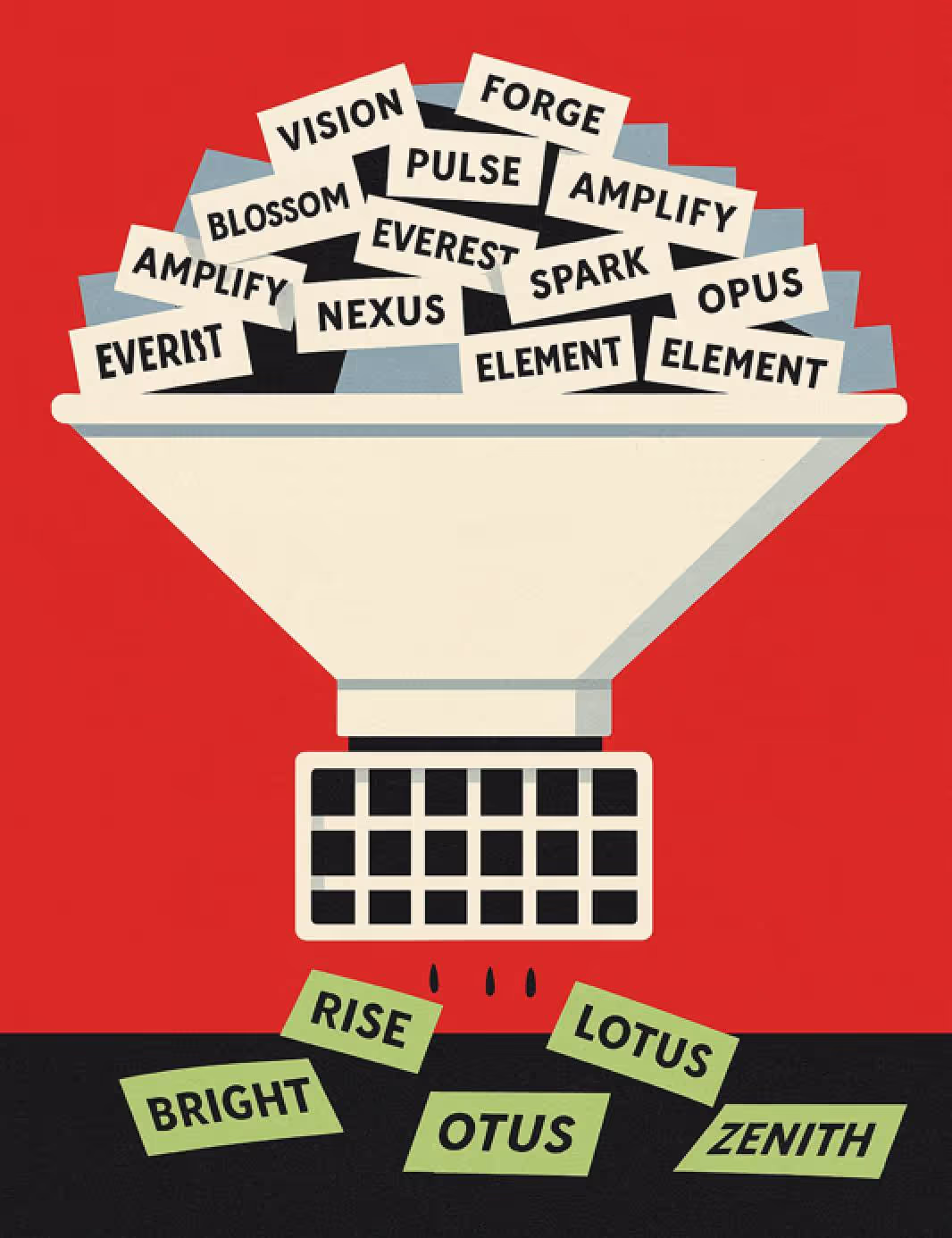
Once you’ve spent enough time amassing a huge batch of names in your Google Sheet (hopefully a couple hundred), it’s time to trim the list down to the cream of the crop.
First, go back through your master list and highlight the names that feel like they have the most potential.
Maybe there were a couple you fell in love with when you wrote them down, or maybe fresh eyes give you a newfound appreciation for names that didn’t trip your trigger initially.
There’s no hard and fast rule here — or anywhere in this meandering process for that matter — but I’d aim for a batch of your best 30+ names at this point.
Exercise: Narrow down to your top 30 or so names. Look for ones that: (1) made you smile when you wrote them, (2) feel fresh with new eyes, (3) could work across multiple products, (4) you'd feel proud to tell your mom about.
Step 4: The Heartbreaker, Check Availability
Up until now, we’ve been living in a naming fantasy land, but it’s time to face reality. Get ready to say goodbye to the majority of the selected names you’ve fallen in love with, because most of them will be unavailable for you to use IRL (in real life). Here’s how you can check for viability.
- Give it a Google: The quickest way to see if a brand with a name like yours exists (especially within your category) is to Google it. If there’s a brand with the same name in an unrelated industry, you’re usually safe, as long as it wouldn’t be confusing to a consumer. This is why Delta Airlines and Delta Faucets can coexist peacefully.
- Do a trademark search: Ah, good ol’ government websites. Use the US Patent & Trademark Office TESS tool to check whether your name is trademarked by someone else already. You can often see who owns the trademark in case you wanted to do further research or reach out directly.
- Check for URL availability: I use GoDaddy.com to see if my name’s “.com” version is available, and if not, I see which other options might fit the bill. The closer you can get to “brandname.com” the better, usually. This is more of a consideration than a black-and-white decision — but if an established company is already using your name, owns the best URL, and has a high SEO ranking for your name, is that an uphill battle worth fighting?
If the .com URL is already taken for a name you love, try these prefixes: get-, hey-, try-, use-. Or try -app, -co, -hq as suffixes. The D2C healthcare brand Hims launched in 2017 under the domain Forhims.com before they could acquire the cleaner Hims.com domain in 2020.
- Salvaging favorites: You might have already listed some existing names with funky or off-kilter spelling (e.g. Lyft or Tumblr), but now can be a time to push words into more unique territory to make them distinct from competitors or established brands in other industries, especially if there may be some confusion.
- Try dropping a letter (“Quick” becomes “Quik”)
- Try swapping letters with similar sounds (“Light” becomes “Lyte”)
- Try adding extra letters (“Drop” becomes “Dropp”)
Misspellings may have worked for Flickr in 2004, but proceed with caution. Every dropped vowel or swapped consonant adds friction, at least at first. People will generally type the 'correct' spelling first, potentially sending traffic to competitors. Only do this if your name is worth the education tax (and the obligatory investor eyeroll).
- Check Your Domain's History: Even if a domain is available, that doesn’t guarantee a clean history. A close friend of mine picked what seemed like the perfect URL with his his ideal ".com" address for a cheap price. Months later, he learned his emails were going to spam folders because the domain was an adult site years prior. It was still blacklisted, and he had to rebrand the whole company. Sigh.
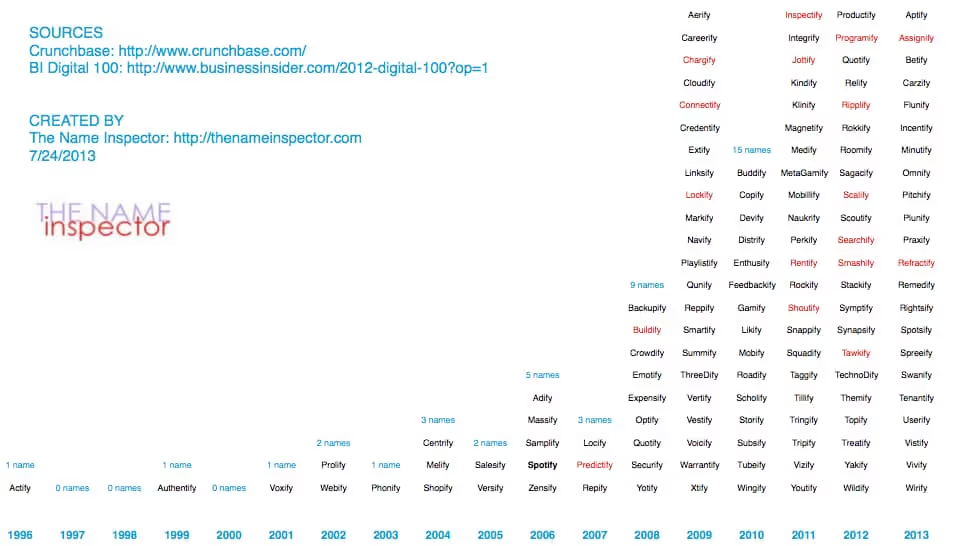
While it's great to sound relevant and current, leaning into the major trends can sometimes leave you lost in the noise. Take a look below at the exponential boom of names ending in "-ify" and how they start to blend together after a while.
Step 5: End With the Gut-Checklist
After checking the availability of 30ish favorite names, you’ll likely end up with 5ish viable options that are legally safe and pass your initial vibe test.
If there’s a clear, legally viable winner in the group, great. Test that option against the following criteria below. If you have a couple contenders you feel good about, do the same to see if one rises above the rest.
If you need a sounding board or another set of eyes, ask a trusted partner or an expert in the space to test the name against the following questions. However, be cautious about opening this up to a group. It can be hard to achieve consensus or useful feedback through a larger audience.
Your Gut-Checklist:
- Can someone pronounce it correctly after reading it once?
- Can someone spell it correctly after hearing it once?
- Is it easy to remember?
- Does it feel like the future of your brand?
- Could it stretch to your future products or offerings?
- Would you be proud to wear it on a shirt?
The Bottom Line
Once you have the name that passes the test, sleep on it, say it out loud, imagine it in a headline or on packaging. A great brand name should make a strong first impression and leave a lasting one, too. So if yours can make customers smile, spark curiosity, or solve a problem for your business, don’t overthink it too hard.
Sleep on it, and if it still holds up tomorrow, congratulations. You might have just found a name that opens doors for your brand.
Gil Templeton
Demand Curve Staff Writer
Doubling Our Sponsorship Revenue in 30 Days
Insight from Kevin DePopas - our Chief Growth Officer
Over the years, our newsletter sponsorship business has essentially run itself. Inbound inquiries flow through our website, occasional leads come from marketplace aggregators like Passionfroot and Paved, and revenue remains stable without much intervention.
With our heads down relaunching Growth Program 2.0, sponsorship revenue hadn't gotten much love from a growth standpoint.
During the second week of June, Justin (our CEO) and I mapped out Q3 priorities. We decided it was time for a quick 80/20 sprint to improve newsletter revenue and operations.
The goal: Double sponsorship revenue in 30 days (doing as little work as possible).
The challenge: We had contacts scattered across email threads, a basic Notion database acting as our "CRM," Sponsy (where we host our newsletter storefront), and no systematic approach to nurturing leads.
Here’s how we began to tackle the opportunity.
Understanding Our Options, Shrinking the Problem
I needed to understand what we were working with, so I mapped out the top ways to grow newsletter revenue:
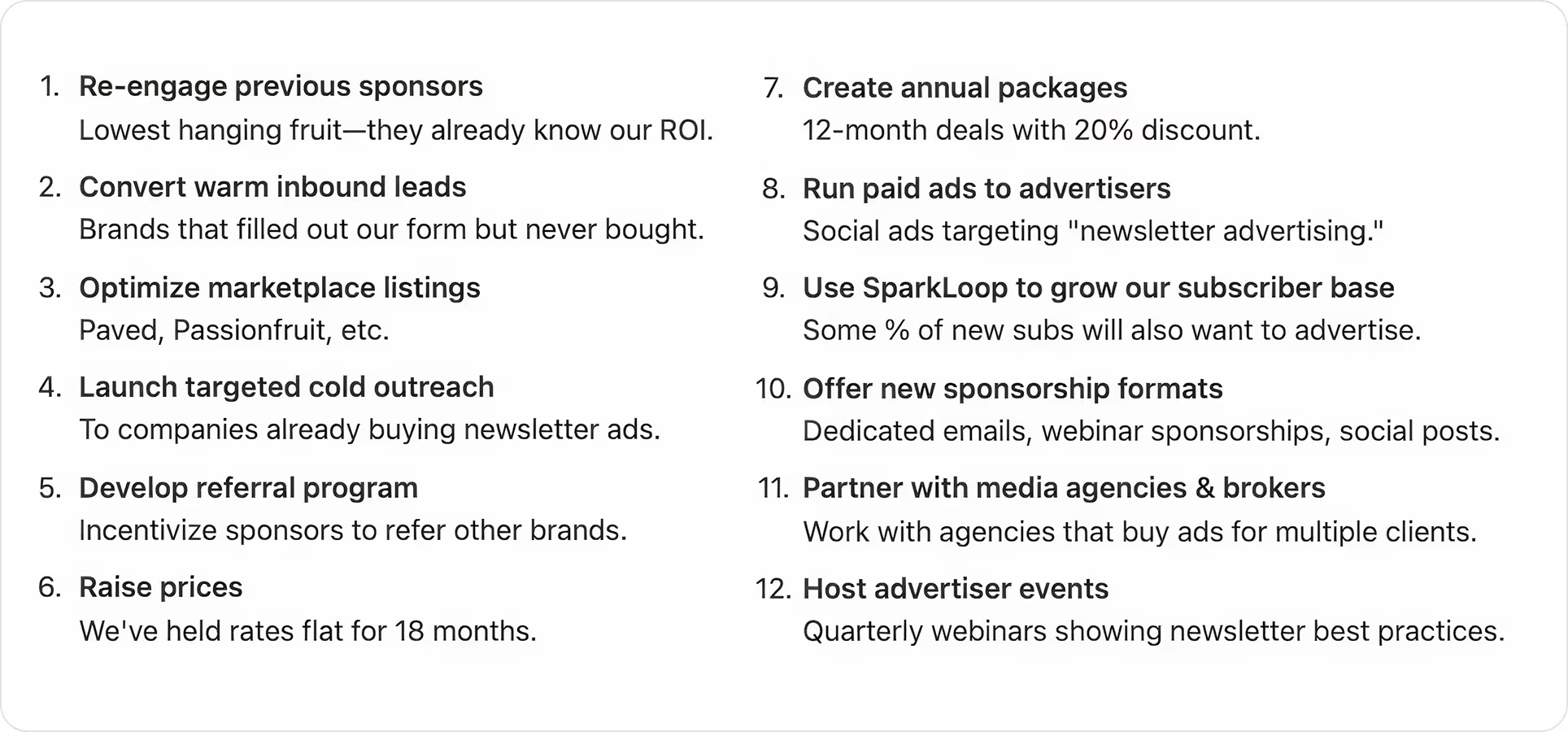
After some thinking, we agreed that our fastest path to near-term revenue (without incurring too much operational overhead) was reconnecting with people who already know us…
- Previous Sponsors
- Warm Inquiries
The two categories comprised hundreds of potential deals just waiting for follow-up. Now that we had our priorities, we moved on to the next challenge, getting organized.
Getting Organized, Finding the Right Infrastructure
Before reaching out to these two buckets of prospects, I needed somewhere to house the data and manage the process.
After researching options, I landed on Attio. They'd sponsored our newsletter months back, and their AI-native CRM positioning and Notion-esque UI/UX intrigued me.
I reached out to see if they'd be comfortable with me documenting my experience using their tool.
They agreed and are sponsoring this issue, but everything you're about to read is my genuine experience using their tool. Attio has since become our main CRM.
The Implementation, Multiple Tools, One Workflow
Here's the workflow I built. It involves several tools working together, with Attio as the central hub.
Step 1: Data Extraction & Import
First, I pulled two lists:
- Previous sponsors from Sponsy (our sponsorship management tool).
- Inbound inquiries from Tally forms that pipe into Notion.
I uploaded these as CSVs into Attio, creating a unified deals “list”. While the CSVs only contained basic company info fields (company name, domain, and main contact email), Attio automatically enriched all the other data I needed (company descriptions, revenue estimates, employee counts, LinkedIn profile URLs, previous email conversations, etc.).
Step 2: Intelligent Filtering with AI Fields
Next, I didn't want to waste time nurturing prospects if they weren't a good fit to sponsor our newsletter. I decided all previous sponsors were worth reaching out to, but I needed to filter the larger list of inbound inquiries that never converted.
Attio lets you create “AI Attribute” fields that analyze structured and unstructured data using LLMs. I figured I could use a Research Agent attribute field to help me analyze and categorize inbound prospects based on fit.
So I created a "Sponsor Fit" field that evaluates each company based on two criteria:
- Whether they target startups/marketers
- Whether they have budget to support sponsorships
This cut my outreach list by 60%, focusing only on high-probability opportunities.
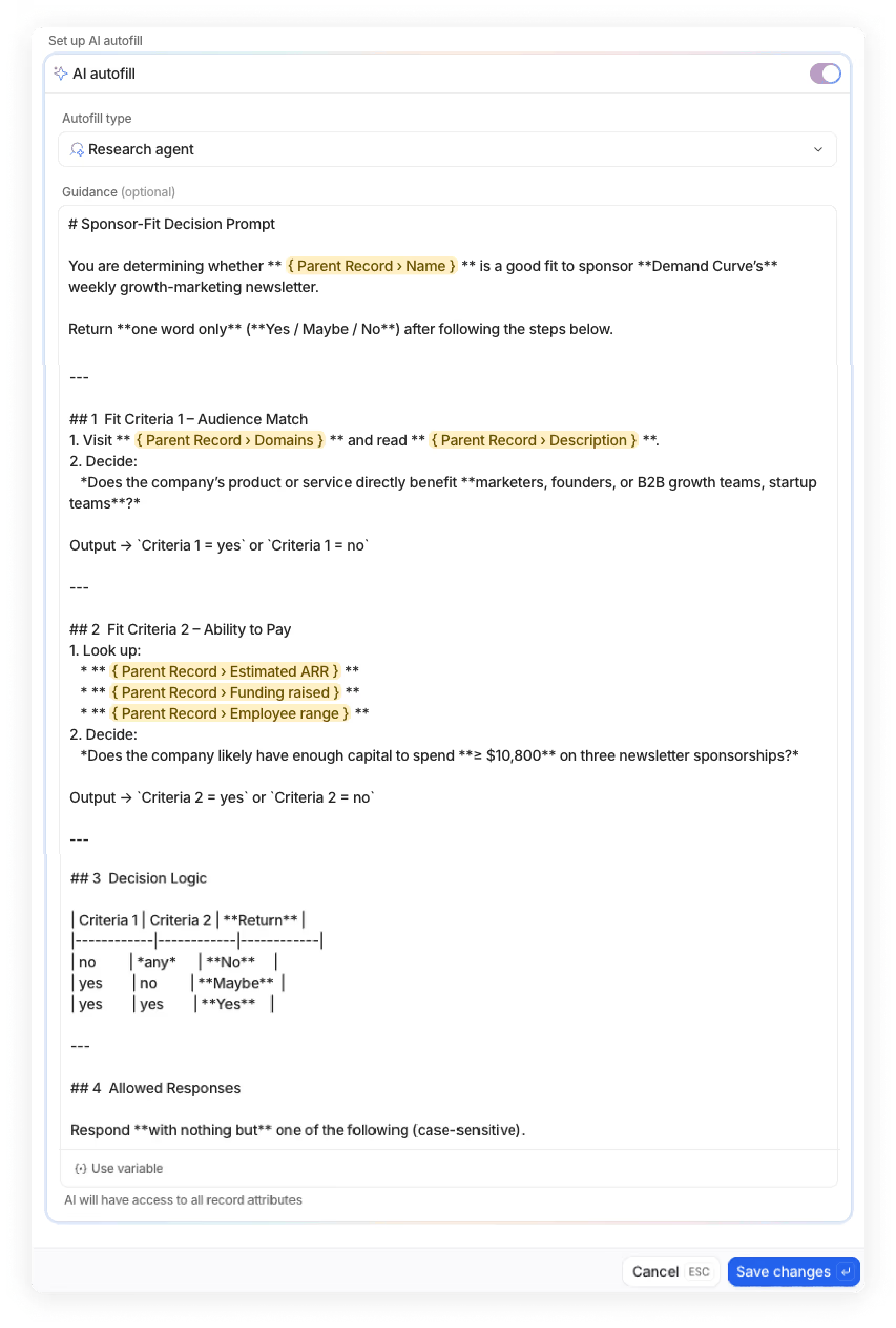
Note for builders: I was considering using a tool like Clay for filtering and data enrichment, but Attio handles similar enrichments internally without buying another tool or learning a new system. If Attio doesn't have an enrichment capability you need, you can fire workflows that integrate with Clay, n8n, or other tools. Simple enough for lightweight systems, but can scale if needed.
Step 3: Research for Personalization
Now that I had organized lists of previous sponsors and good-fit potential sponsors, it was time to plan the campaigns.
Data shows personalized emails can 2X+ response rates, so I wanted to tastefully incorporate personalization that proved we understand each company's product and how it relates to the Demand Curve audience.
To do this, I built another AI Research Agent Attribute field in Attio that:
- Visits each company's website
- Extracts their main product offering
- Summarizes key value props
- Formats it for email personalization
We’ll use this field later in our personalized email outreach, stick with me!

Step 4: Building Smart Campaigns
Time to put it all together. I built two campaigns in Attio:
- Campaign A (Previous Sponsors): Companies that have already sponsored our newsletter one or multiple times.
- Campaign B (Warm Inquiries): People who filled out our inbound form but didn't move forward AND met our “sponsor fit” threshold.

Step 5: Creating the Email Copy
Rather than crafting campaign copy from scratch, I wanted our emails to reflect how we actually talk about Demand Curve sponsorships.
I used ChatGPT o3 to build a scraper (via Google Apps Script) that pulled all my sales-related email conversations from the past two weeks into a Google Sheet. This captured how I handle objections, explain service offerings, answer questions, all the nuances of real conversations.
Vibe Coding Shoutout: I’m not a developer, so I had to vibe code this whole scraper. It took about 20 minutes.

I then exported the CSV of my sponsor sales conversations and fed it into a Claude 4.0 Opus Project, asking it to create simple 3-4 touch campaigns for each audience.
Pro tip: To improve your cold email quality, create a Claude Project and load it with training data from cold email experts. I loaded all of Lavender AI's cold emailing blog content into my project before feeding it my sales conversations.
Step 6: Personalizing with AI Content
Research from Lavender AI shows that including a personalized "P.S." at the end of emails can increase reply rates by 35%.
So I used Attio's AI Variable functionality within my email sequence to reference the “Product/Value Prop” field I created earlier, and use it to create personalized P.S. lines for each prospect:
"P.S. I think {Company Name}’s {AI Field: Product/Value Prop} would resonate with our audience."
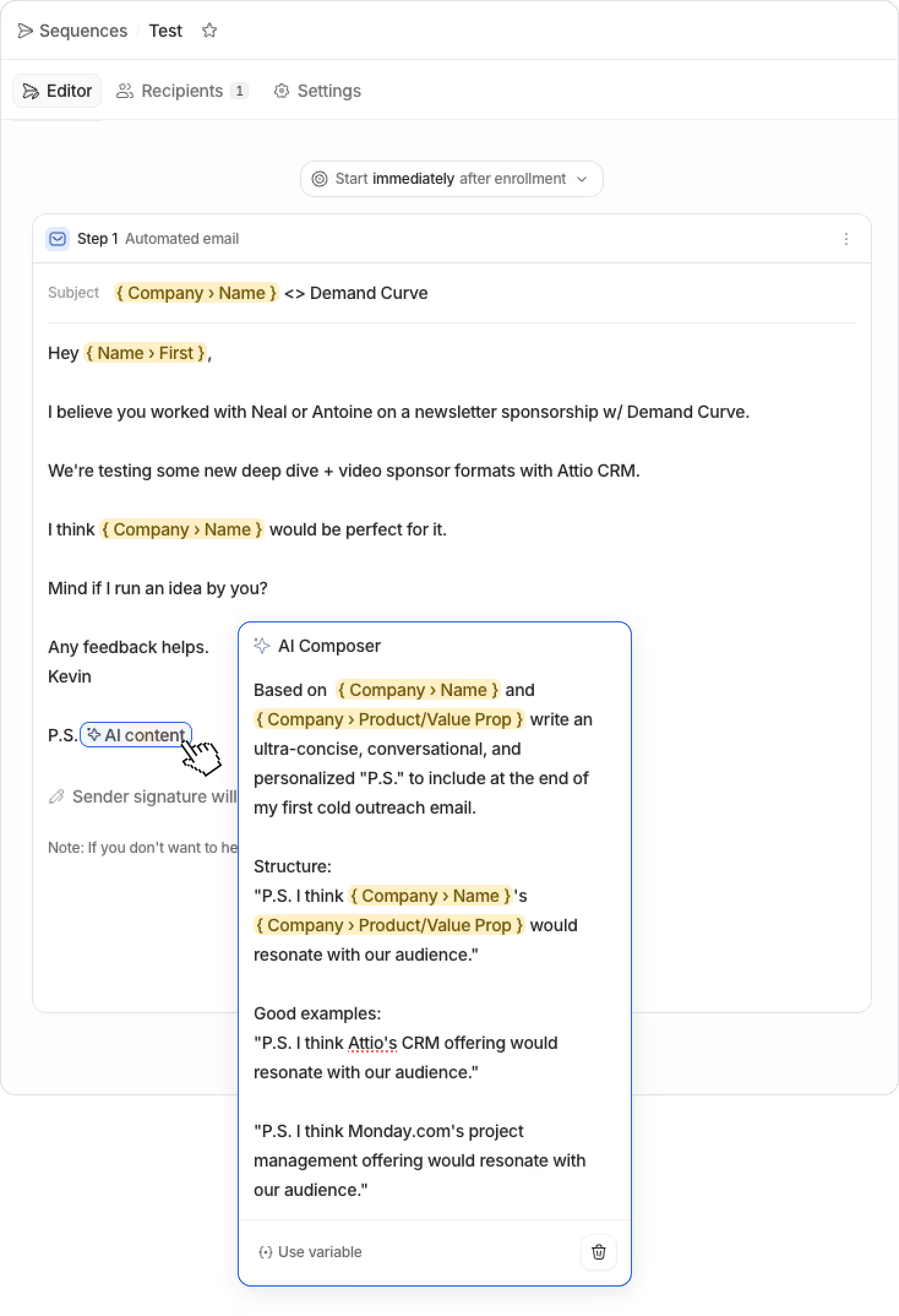
Notice how I'm able to reference the AI Research Agent field I created earlier (Product/Value Prop) as a prompt input within Attio's AI email variable.
Results So Far
I ran the campaigns for 14 days and have continued any active sales conversations since. Here are the preliminary results (as of 7/15):
- 32% campaign reply rate (industry average is 8-10%)
- 24 active deals initiated from initial campaigns
- 4 package deals closed so far
- 9 deals active (still in conversation)
Want to join the mix for Q3/Q4 sponsorships? Email me. 😉
What's working well:
- AI enrichment saved hours of manual research.
- The AI variable within email templates (and it's ability to reference other AI fields as prompt inputs) is a powerful feature I haven’t seen in many other email tools.
- Everything lives in one place, Attio acts as my hub, consolidates sheets and Notion into a single source of truth.
- Attio’s Call Intelligence meeting assistant joins my calls and captures notes/follow-up items (I didn’t even realize this was a feature when I signed up, but I’m liking it).
- As an avid Notion user (and a sucker for good design), I appreciate the thoughtfulness of Attio's UI/UX.
Looking ahead: I'm excited to see how Attio continues developing agentic capabilities. Similar to how Attio removes the need for Clay for lightweight enrichment, with further development, it could eliminate the need for n8n for AI automation use cases.
I'd also love if Attio's AI fields allowed connecting custom LLMs for more flexibility in what models run on the backend, getting closer to Clay's customization options.
The Consolidation Potential
As I built the workflow above, it was hard to ignore that Attio could potentially replace multiple tools in our stack.
- CRM: If you're using Notion as a makeshift CRM (like we were), Attio can obviously replace that.
- Data Enrichment: If you're contemplating Clay for enrichment, I’d test out Attio first to save yourself another subscription.
- Meeting Recordings: Paying for meeting recording tools? Attio can likely replace these.
- Email Sequences: Attio's built-in email automation can potentially save you yet another SaaS subscription. (Attio also has a pretty seamless integration with Mixmax that I’m playing with).
We haven't consolidated everything yet, but the potential is there. And for smaller teams, this could mean significant simplification and cost savings.
If You're Thinking About Modernizing Your Sales Stack
Attio genuinely surprised me. The AI features aren't an afterthought, they're front and center throughout the application. The interface is clean enough that our team actually uses it. And the potential for tool consolidation is real.
If you're like I was (cobbling together spreadsheets, losing track of conversations, missing follow-ups) it's worth exploring.
Try Attio free for 14 days →
No credit card required.
Doubling Our Sponsorship Revenue in 30 Days
Insight from Kevin DePopas - our Chief Growth Officer
How AI video impacts founders, growth marketers, and startup execs
Insight from Gil Templeton—Creative Director @ BrandBossHQ
High-production video is no longer just for giants with million-dollar media budgets. AI has collapsed the cost, time, and overall hassle of video creation, giving lean teams the power to punch way above their weight. What used to take a quarter can now happen over a weekend, and the results can be just as effective when done right.
- You can now iterate and test video ad creative (not just static) without waiting on agencies, shoots, or post-production delays.
- Brand storytelling is back on the table for teams who couldn’t previously afford the polish required to make it feel legit.
- It’s easier than ever to stand out in noisy channels like TikTok and YouTube with content that looks like it came from a studio, not an iPhone.
What does traditional video production (sans AI) look like?
Obviously video production can be done at any budget, from person-talking-to-iPhone all the way up to a feature film. But let’s look at what a brand might need for a somewhat-polished 30-second pre-roll video ad with human talent:
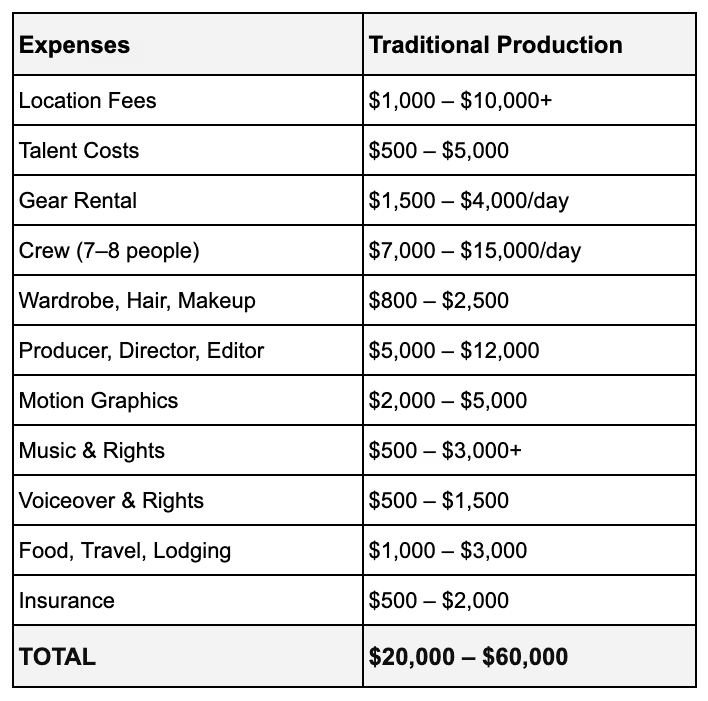
There’s a crazy amount of expense and effort that goes into this process — especially when results may vary. And while having a high-production brand video can perform well, it might not “outperform” assets produced on way scrappier budgets.
The new economics of AI video production
Case Study: How the Kalshi video was made

Let’s take a look at what went into making the Kalshi ad referenced earlier. Again, this aired during the 2025 NBA finals. Here’s a great quote from PJ Accetturo, the self-proclaimed “AI filmmaker” who was hired to make the ad:
“It was aired on TV, alongside $400K+ 2-month-long productions, and this took me 2 days, costing a lot less. But most importantly, I got to stay in my underwear for the entire shoot.”
In PJ’s blog post about making the ad, he casually reveals his process. Basically, he:
- Writes a rough script
- Uses Gemini to convert it into a shot list
- Runs the prompt through Google Veo 3 on Flow
- Selects the outputs that meet his standard/vision
- Then edits the sequence using a common video-editing software.
A couple days. About $2,000 in AI video credits. One talented dude working from home. Compare that to the headaches of typical video production, and the case becomes compelling quickly. In the same blog, Accetturo makes a prediction about where things might be headed:
“The future is small teams making viral, brand-adjacent content weekly, getting 80 to 90 percent of the results for way less.”
While the ad is chaotic and imperfect, it’s proof that companies can make broadcast ads (and lower-stakes videos) with AI tools instead of traditional production studios. This is a massive opportunity for emerging and challenger brands looking to steal attention from more established category players.
You can debate the quality of the ad (and point out that it clearly looks AI-generated), but you can’t debate the earned media coverage and economic efficiency of the spot. Just search “Kalshi Ad” on Google and you’ll see the splash of earned media attention the ad generated.

AI Video Showdown: Sora vs. Midjourney vs. Veo
Let’s break down three common video-generation platforms so you can understand which might be best for your style of video. Depending on your subject matter (ex. beautiful light-motion product shot vs. introducing a talking mascot) your choice of platform can make all the difference.
OpenAI Sora

Strengths: Sora excels at generating realistic, physics-aware scenes with cinematic lighting and fluid motion, all inside longer-form (up to 60 seconds) clips. Its deep integration with ChatGPT makes it perfect for prompt-driven storytelling.
Best for:
- Captivating product shots in vivid settings
- Mood pieces for lifestyle or mission-driven brands
- Explainers using metaphor-heavy visuals
- Preserving real details of a product throughout shots
- Creating environmental stills that you can later add motion to
Midjourney Video (V6.0+)
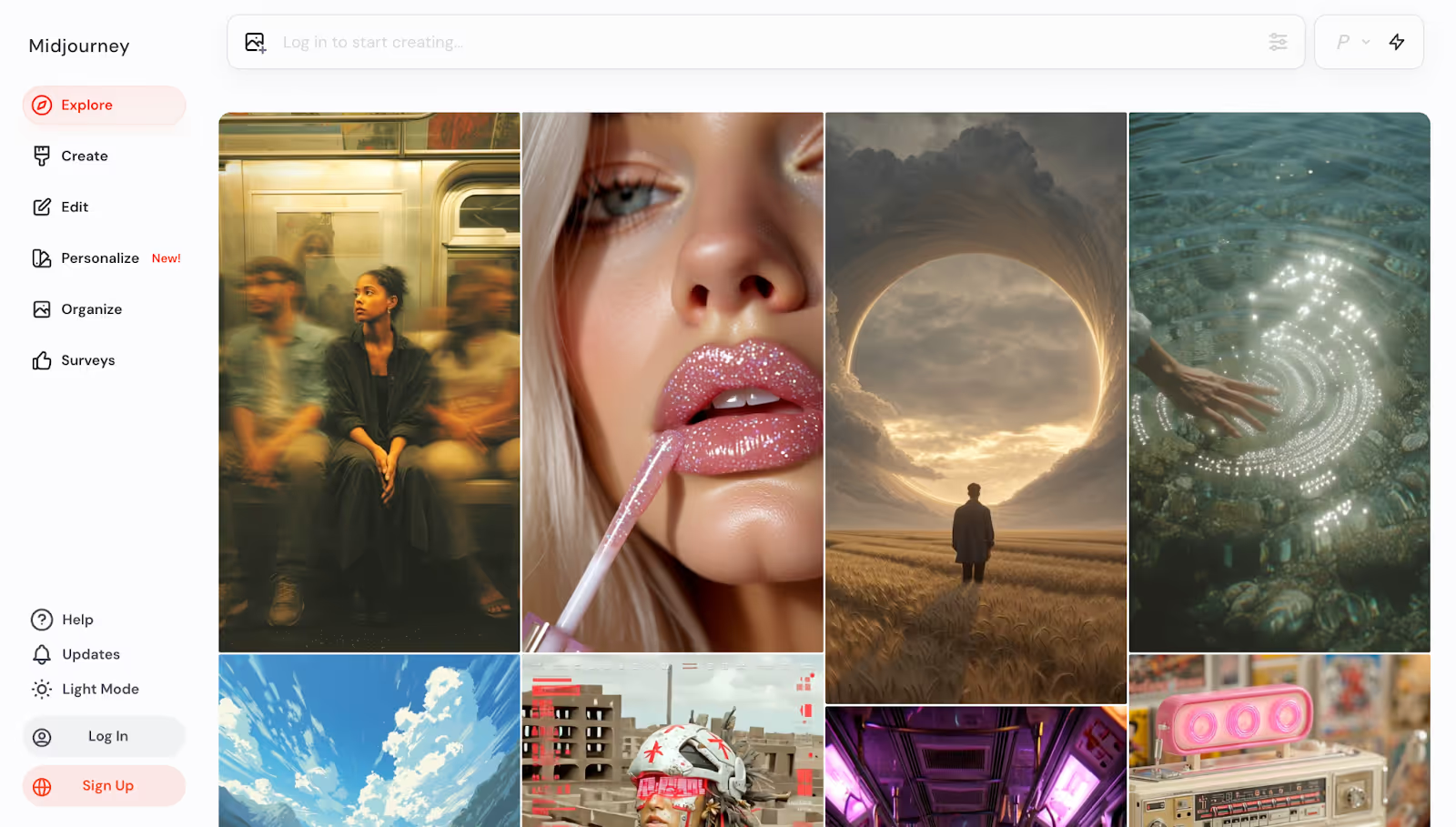
Strengths: Midjourney’s video output leans hyper-stylized, with dreamlike textures, bold motion, and painterly effects. It’s lightweight and faster than the rest, ideal for bold creative that doesn’t rely on realism.
Best for:
- Social-first, scroll-stopping visuals
- Brand identity loops for video intros, banners, and reels
- Abstract, dreamy, or hyperreal visuals
- Product mood reels (ex. luxury perfume ad in abstract fog)
Google Veo 3
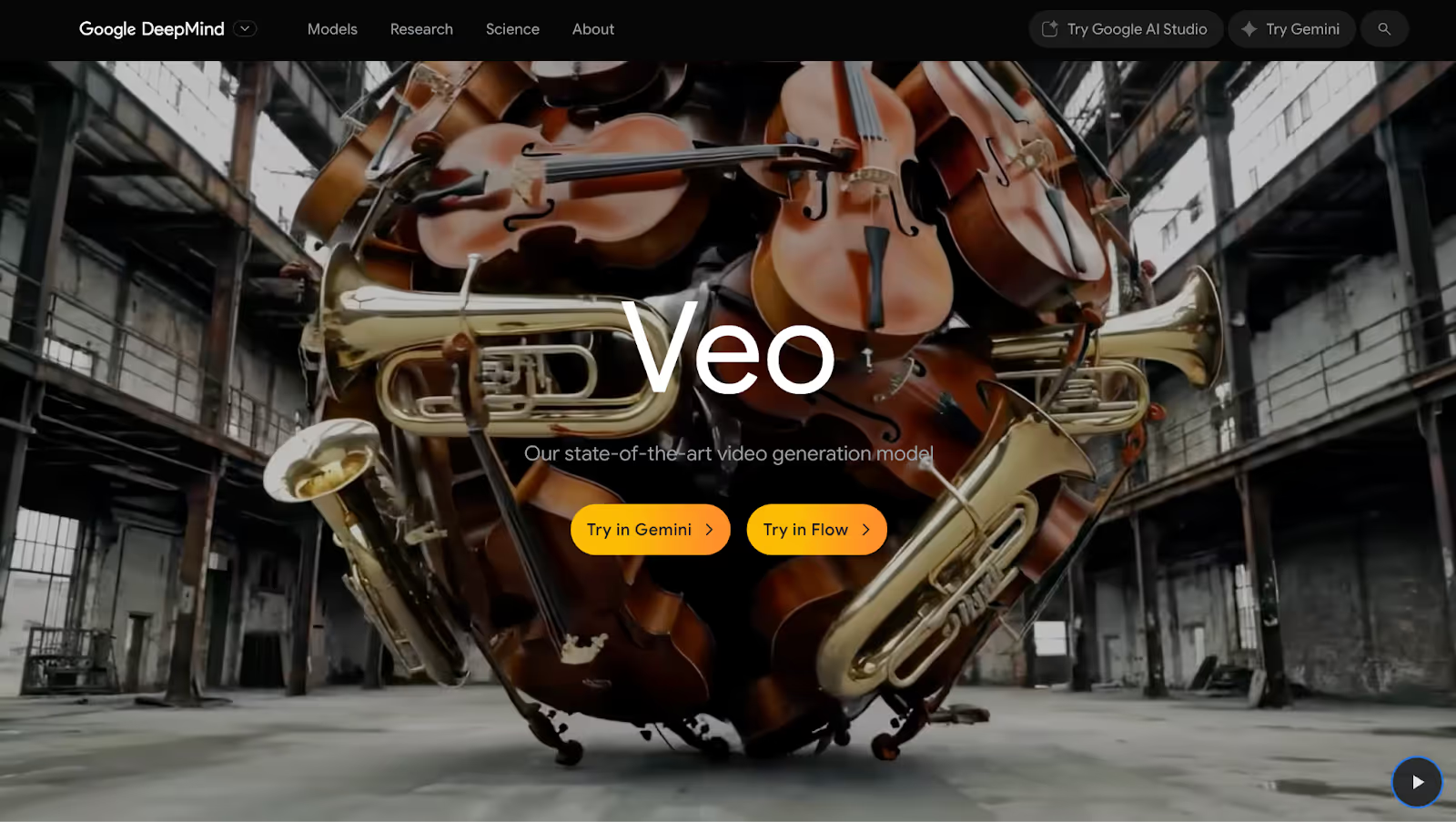
Strengths: Veo 3 delivers polished, photorealistic footage with cinematic camera moves, sharp details, and high resolution, making it the most production-ready tool of the bunch. Best for realistic shots with people, and its frame-to-frame capability adds a useful layer of control.
Best for:
- Polished ad spots that mimic agency-level work
- B-roll libraries to elevate decks, ads, or site content
- Quick-cut trailers or brand intros
- Funny or absurd character-based scenes
Note: We know, there are other video generation platforms out there…Kling, Runway ML, Higgsfield, (and countless AI UGC tools). Each has their benefits and tradeoffs. Here’s a more comprehensive list.
Where do things go from here?
For brands and businesses looking to embrace AI-generated video, here are some informed predictions about the trends and changes we’ll see in the near future.
“Close enough” becomes enough
While AI video opens up tons of possibilities that aren’t feasible on traditional production budgets, it’s still hard to get it just right. For companies who can handle their product looking a little distorted at times or an unnatural gesture from a character, AI will scratch the video itch. For those seeking perfection or complete control, traditional production has the upper hand, for now.
Not a believer yet? Don’t forget how far video AI can progress in a single year.
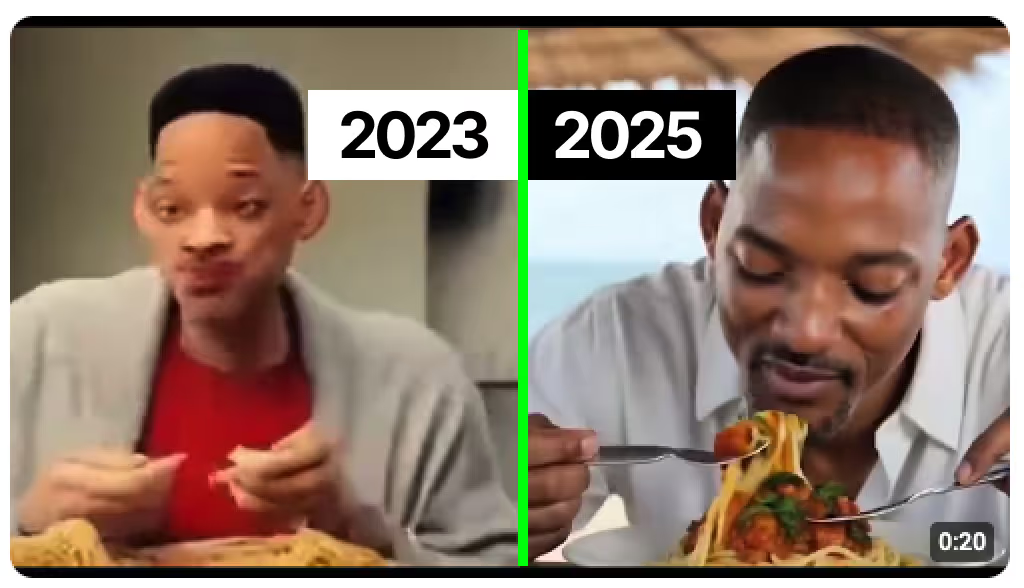
Niche comedy social accounts
Whether it’s an Instagram account like @alexlexobx1 that leans into the shared experiences and inside jokes of a community like the NC Outer Banks, or a slew of political-leaning TikTok handles spoofing the other party’s apparent hypocrisy, absurd comedy is an easily repeatable, occasionally viral formula for AI video (and AI image) generation.

A numbers game
It’s becoming less about creating perfect pieces of art and more about creating as many assets as possible with the chance one or two in the batch will gain traction. Entrepreneurs and Vtubers like Bloo (who has 2.5M Youtube subscribers) are leveraging AI to create low-effort clips, sometimes up to 80 per day. While critics will call it classic “AI slop,” view counts and occasional virality are showing the potential of a volume-based video approach.
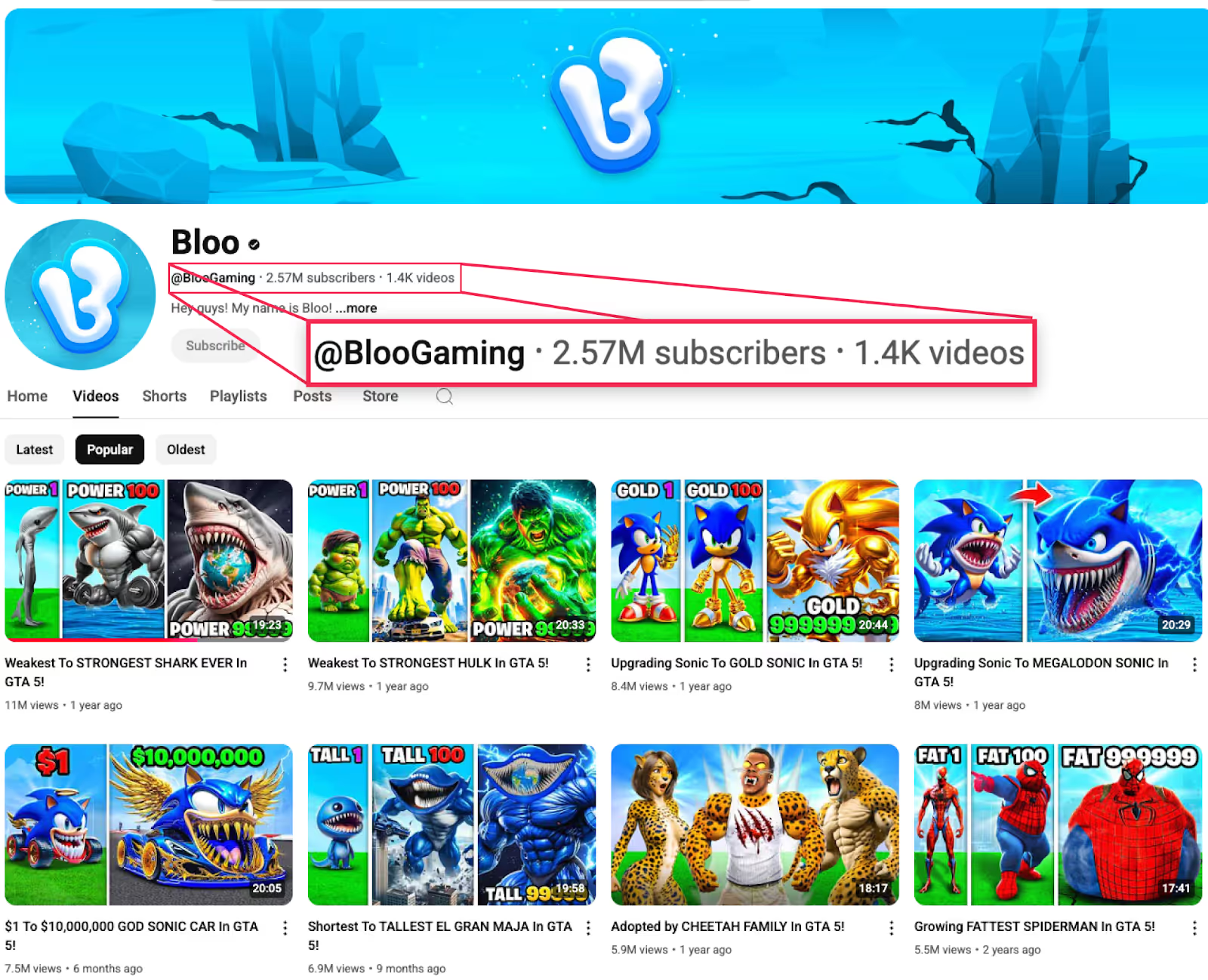
The bottom line
AI video still has its quirks, but you'd be wise to start testing because six months from now (let alone a year from now) your control over consistency and realism in AI video will likely be 10x what it is now.
The tools are ready. The gap between big budgets and bootstrapped teams just disappeared. So what are you waiting for?
Time to start shipping.
Gil Templeton
Creative Director @ BrandBossHQ
Demand Curve Guest Writer
P.S. Check out my portfolio if you're interested.
How AI video impacts founders, growth marketers, and startup execs
Insight from Gil Templeton—Creative Director @ BrandBossHQ
Algorithms Changed. A Lot of Creators Didn't.
Insight from Kevin DePopas—our Chief Growth Officer
Since TikTok exploded in 2020, every major platform has shifted from follower-based to interest-based algorithms. Instagram, YouTube Shorts, and even LinkedIn have all adopted similar mechanics for content distribution.
The algorithm shows your content to a small test group. If the test group engages (quantified via watch time, shares, saves, etc.), the algorithm keeps expanding reach. If not, reach slows, then stops.
This means your follower count matters much less than it used to. Your first post can literally reach millions of users if it captures attention.
Having a solid follower count can certainly help. It's why my favorite Youtube channel, Veritasium, seems to pull 5M+ views in 24 hours, every time. The algo knows their content is top-notch, so it pushes it hard.
Enter the "Generalist Principle"
I first heard of this concept from author, Brendan Kane, in his podcast interview with Chris Do on The Futur. Brendan and his team have built content strategies for everyone from Taylor Swift to small, hyper-niche craftspeople. After analyzing thousands of viral posts, he noticed something counterintuitive.
The most successful "niche" creators don't actually create niche content. They take their expertise and package it so anyone can understand and enjoy it, while still delivering value to their core audience.
Think of it like this. A tax accountant could post the same piece of content, framed two different ways:
- "New IRS Rule 462.B Affects S-Corp Distributions."
- "The IRS Just Changed A Single Rule That Could Save You $10,000."
Same topic, but one version has a chance of attracting viewers who would never follow a tax accountant.
Let's Look at the Numbers
Say you're a B2B SaaS consultant creating content about enterprise software implementation.
Niche approach:
The primary goal of your content is to educate people on the nuances of enterprise software implementation.
- Total addressable audience: 100,000 people
- Viral reach: 10% see your content
- Views: 10,000
- Viewers who are potential clients: 50%
- Potential clients reached: 5,000
Generalist approach:
The primary goal of your content is humor, entertainment, or novelty, while subtlety educating on enterprise software implementation.
- Total addressable audience: 1,000,000 people
- Viral reach: 10% see your content
- Views: 100,000
- Viewers who are potential clients: 10%
- Potential clients reached: 10,000
Despite an 80% drop in the proportion of viewers who are potential clients (50% → 10%) with general content, your potential customer base still doubles thanks to the broader audience.
Three Examples Worth Studying
In his free e-book, The Guide To Going Viral, Brendan uses the following examples to highlight the generalist principle.
Tanner Leatherstein makes handmade leather goods. Instead of turning his Instagram grid into a wall of undifferentiated product shots targeted at affluent buyers, he buys $500+ designer bags and tears them apart on camera.
His 'Is It Worth It?' series taps into a question a lot of people have wondered, are luxury goods worth the price? While dissecting each bag, he not only entertains the masses, he also builds trust with a large number of people who may consider buying a bag from him instead of Hermès.
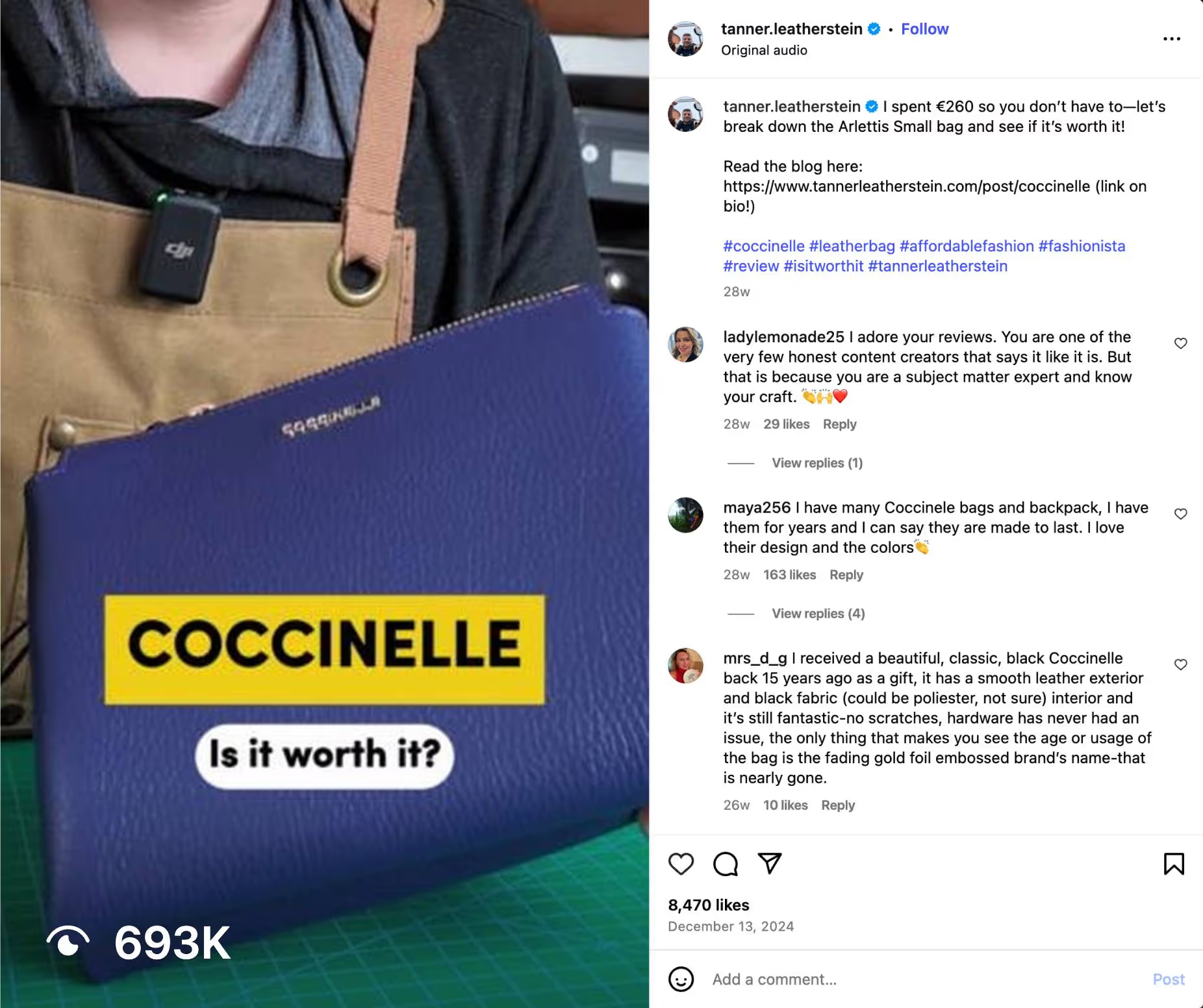
Dr. Julie Smith is a clinical psychologist. Instead of posting academic lectures about cognitive behavioral therapy techniques that only fellow therapists would understand, she uses everyday objects to visualize complex mental health concepts.
In one video, she fills a trash can with crumpled papers to represent emotional overwhelm, then slowly removes and folds each paper to show what therapy feels like. Through this format, she entertains millions who will probably never book a session, while demonstrating her expertise to a select few who might.

Graham Stephan teaches personal finance. His biggest video (8.6M views) isn't titled "Understanding Compound Interest." It's "How I Bought a Tesla for $78/Month." Far more people are curious to know his trick vs. learning about a subject they already think they understand. The finance principles he teaches along the way feel like a bonus, not the main point of the video.

Our Own Mixed Results
I've been testing this myself on the Demand Curve LinkedIn. Most of our videos get between 1,000 and 5,000 views. Decent for B2B content (Right guys? We're doing great, right? 😅)
But one video hit 390,000 views. The topic? Celsius energy drinks.
The hook was simple:
"In 2017, Celsius was essentially nonexistent, but now they have 11% market share and they're worth $9B. So I found myself asking, how did they get so big so quickly?"
Here are some of the generalist principles that may have come into play on the Celsius video.
- Celsius is a brand regular people recognize and have opinions about.
- The visual showed Celsius cans immediately (first 2 seconds), confirming this was about something familiar.
- The question "how did they grow so quickly?" interests marketers, CPG founders, and Celsius fans alike, not just energy drink operators.
Compared to a hook like "How energy drink companies can grow through retail partnerships," the hook I chose had a shot at appealing to a much broader audience.
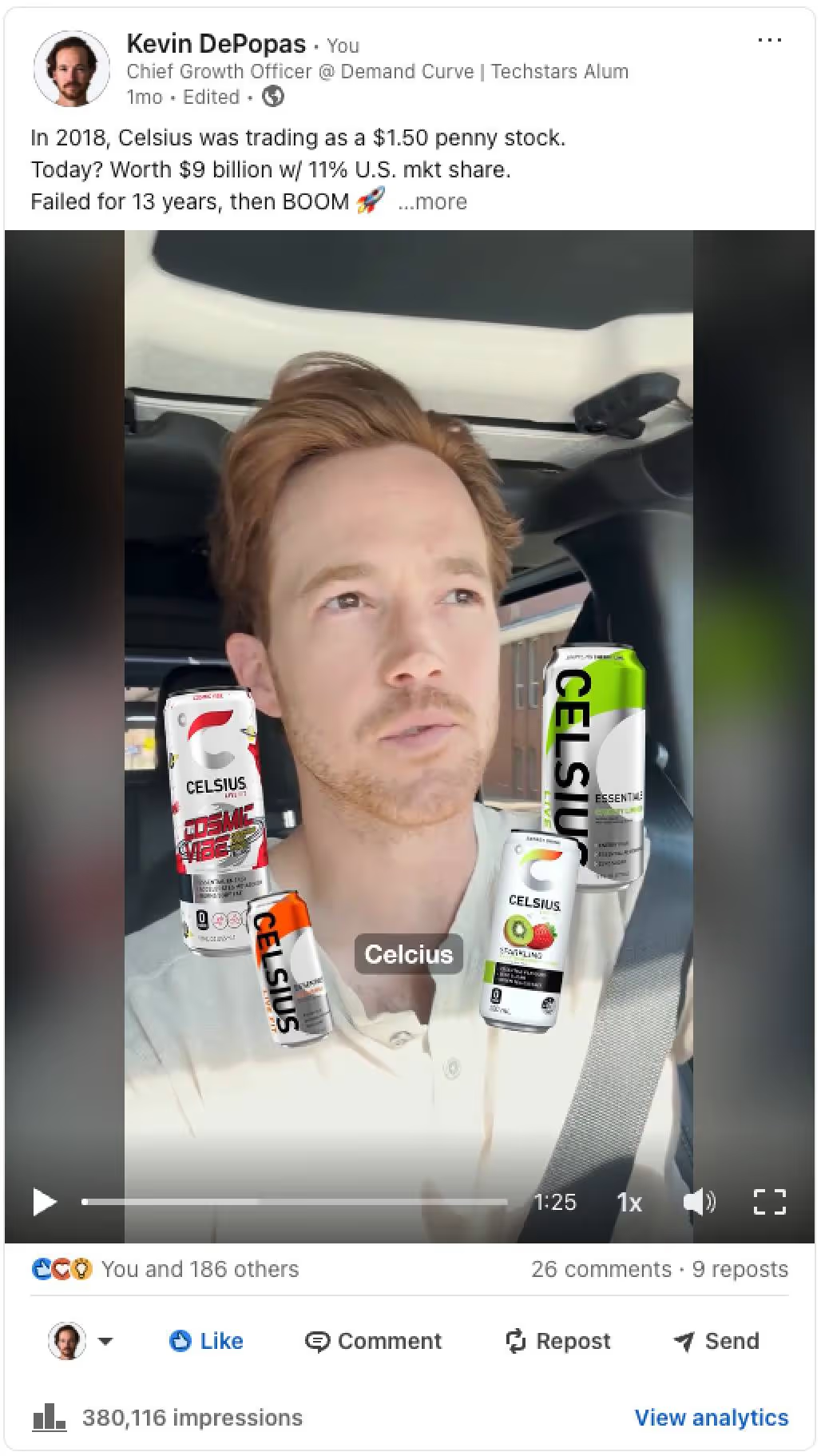
A Brute Force Approach
One brute force way to test the generalist principle is starting with a hook that has nothing to do with your business, then bridging to your actual topic.
This concept is similar to the idea of basing your content on "validated outlier" formats and hooks. We cover this topic in-depth in Growth Program 2.0. Hop on the waitlist here.
Here's an example. This creator's videos regularly saw 1,200 to 10,000 views until he posted the video below (which reached 1.3M views & 68k likes).
The video starts with a viral meme hook, then transitions to showing the creator's AI workflow for optimizing landing page messaging. Yes, this technique is a bit cheeky, but his account reached 45k followers within 10 weeks of launching. Can't knock the results.
Note: The brute force approach still needs to be executed thoughtfully. The video above worked because the viral meme humorously bridges into a much drier (but still intriguing and valuable) AI workflow. If the juxtaposition wasn't funny, or if the workflow wasn't valuable, the video probably would have flopped.
We'll Be The Guinea Pig
We're running our own experiment next Tuesday (July 8th), testing the generalist hook format from above. The formula:
- Start with a validated generalist viral hook (similar to the one above)
- Build a bridge to a curiosity-inducing workflow (that adds value)
- Demonstrate expertise on our actual topic throughout the video
I'll report back on whether it works or whether I look like an idiot for trying. Seriously though, check our LinkedIn on Tuesday to see this technique in a business context.
How to Use This Today
First, look at your last 10 posts. Count how many require insider knowledge to understand. If it's more than two, you're probably being too niche. Also, consistently low (and not improving) view counts are a red flag.
Second, take your next planned post and rewrite the first 1-3 lines a couple times (or a couple hundred using AI). Each version should pique the interest of someone outside your industry. Then pick the one that would even make your mom curious.
Third, remember that broader reach doesn't mean dumbing down your content. It means being smarter about how you package it.
The goal isn't to trick people into watching your content. We're simply trying to earn the attention of a wider audience, which allows us to deliver value to more of the people who matter to your business.
Have fun testing!
Kevin
P.S. The video we're testing on Tuesday opens with a sweaty, shirtless tech-bro surrounded by liquor bottles. Professional reputation on the line. Wish us luck.
Algorithms Changed. A Lot of Creators Didn't.
Insight from Kevin DePopas—our Chief Growth Officer
Greatest Hits Series
Let's start with the math that changed how we think about growth.
Growth Loops, not Growth Hacks
Insight from Reforge.
Which would you choose:
- Initiative A: Gives you 500 new users this week but nothing afterward.
- Initiative B: Gives you 20 new users in week one, 22 in week two, etc (growing 10% WoW) for every week going forward.
Initiative B will take 14 weeks to reach 500 new users.
But after 1 year, you’ll have 28,208 new users and grow by ~2600 per week. By the end of year 2, you have 4,035,039 new users (assuming a constant 10% growth rate).
This is the general principle behind compounding Growth Loops:

In short, the output of a marketing initiative feeds back into the input. Examples:


Another classic example is ads:
- You spend money to run ads
- You profitably acquire new customers
- You use said profit to acquire more customers. If you need help running ads, we’ve built an ad agency specifically designed for startups.
In short, your primary marketing efforts should not be one-off tactics. Instead, they should be initiatives that can compound. Here are examples that do not compound:
- Launching on Product Hunt: You get an influx of users. You… can’t launch on Product Hunt again.
- Timed-limited Promos: You get a big influx of customers and revenue. You can’t just run another promo.
- Press coverage: You get featured in Forbes. You get a big spike in traffic. It disappears a couple of days later. You can’t be featured all the time.
Compound growth sounds great. But how do you know which loops to build? This is where strategy comes in.
Create a real strategy, not just a list of goals & tactics
Insight from Mark Pollard.
Most companies' "strategies" are either purely:
Goals:
- Become relevant with Gen Z
- Increase sales by 30%
Tactics:
- Post on LinkedIn 5 times per week
- Create lead magnets
Mark (aka Strategy Friend) defines a strategy as "an informed opinion about how to win."
Your strategy is supposed to tell you exactly what your team needs to do to grow. Yet, according to Mark, most strategies look like this:
_01HKDX748DHCD7G8QF6XKJXY59.avif)
They're missing the key insight to the real cause of the problem and a strategy to help solve the problem. Instead, they just jump straight into tactics with no clear vision.
"Tactics are simply the activities that make a strategy happen."
Here are two examples of what a good strategy looks like:
_01HKDX74P3K81JDEZEXSP0E3RS.avif)
_01HKDX752P9MGE96D7WGRGS07T.avif)
We've covered the power of compounding growth. We understand how strategy drives tactics. Now let's simplify growth to its essence.
This mental model will help you shrink the big wide world of growth opportunities into four logical buckets.
The 4 high-level ways to drive growth
Insight from a great article from MKT1.
Fundamentally, there are only four high-level ways to drive growth.
This image from MKT1 summarizes it perfectly:
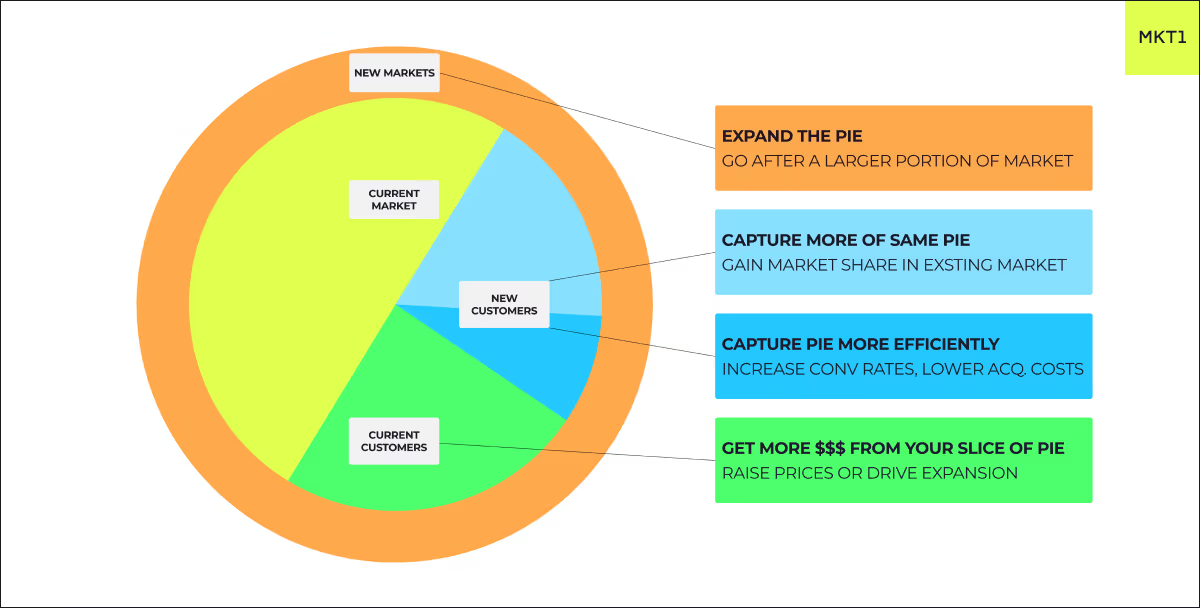
A startup can do a million things to grow (we’ve covered over 455 of them here), but given extremely limited resources, you should find the highest leverage place to apply pressure to grow now.
Understanding these four primary levers helps you prioritize. Let’s dive into each:
1. Get more $$$ from your current slice of pie
- Charge more money from existing customers (make sure to increase perceived value too).
- Sell more products to existing customers (upsell/cross-sell)
- For SaaS, increase revenue per customer by adding new features and tiers, increase the number of seats they use, or increase product usage.
- Reduce churn so revenue can grow over time. The SaaS Quick Ratio is a handy metric for determining whether your growth and churn are healthy.
2. Capture the same pie more efficiently
You’re always getting new customers, but you can do it better. You can generate more revenue with the same or less cost and effort.
There are really only two fundamental ways to do this:
- Increase conversion rates with better funnels (copy, landing pages, lead magnets, sales, etc).
- Lower acquisition costs with better creatives, targeting, lead quality, (and conversion rates ;0)
Note: Check our Growth Vault for 84+ tactics to increase conversions
3. Capture more of the same pie
You’re growing within the same market segment but can get MORE leads:
- Double down on what’s working, but always experiment with creative ideas.
- Watch out for diminishing returns (increasing acquisition costs), especially on ads, if you’ve been going after the same market for a while and keep increasing budgets. That’s especially true if it’s a niche market.
- If you’re steadily growing, don’t wait until you cap out before expanding the pie because it takes longer than you think.
- Set up a different growth engine (content or sales instead of ads)
Note: No matter how good you are, you will never get the whole pie, sorry!
4. Expand the pie (or test new pies entirely)
- Go after new markets/segments (industries, company sizes, geos, verticals).
- If you’re very early stage, this is just trying to find product-market fit.
- Depending on the new segment, you can either use the same growth engine (ads) or you need to set up another one (i.e., outbound or content).
- Create new content, messaging, and funnels tailored to the new “pie”.
- Always run small tests before going all in. Make sure to prioritize your tests using the RICE/DRICE frameworks.
- Double down if you have similar or higher conversion rates with this new market or segment.
How to use it
Every few months, pick one of these to prioritize and go hard on it. What matters most will depend on your current circumstances (and likely stage). For example:
- A very early-stage company is either focusing hard on one market/segment or testing several to find product-market fit.
- A startup with PMF will likely want to improve conversion rates with well-optimized funnels, great onboarding, and strong retention.
- Then they'll want to focus on capturing more of the same pie by ramping up their current growth engine (ads) or setting up a second (outbound).
- Then they might want to get more from their current customers by charging more and upselling and cross-selling.
- Then, they might want to expand markets/segments as they reach saturation in their current ones.
If you want some support...
Growth Program 2.0 takes these frameworks deeper with personalized growth paths, AI-powered feedback, and human coaching to help you implement and iterate.
Knowing frameworks is step one. Executing and adapting is where the real work lives. We’re here to support you along the way.
Join Growth Program 2.0 Waitlist →
— Kevin and the Demand Curve Team
Greatest Hits Series
The Creativity Paradox: Why "Creative" Ads Fail For Unknown Brands
Insight from Joey Noble, Creative Strategist at Demand Curve
A lot of marketers get distracted trying to impress other marketers, but what they should really be doing is converting strangers into customers.
When Nike runs an abstract, artistic campaign, it works because everyone already knows what Nike does.

And Apple can show artistic lifestyle shots because their products are already familiar. These brands have earned the right to be creative through decades of clear messaging. They’ve already established what they do and why it matters.
When you're an unknown startup trying the same approach, you're essentially asking people to solve a puzzle while doom scrolling. No thank you.
Your job here is to educate and excite your prospects, not confuse them with fancy, abstract messaging.
You have about 0.5 seconds to communicate value before they scroll past, and you can only afford to be creative once you've built clear brand association with your specific outcome.
But why is this so hard for unknown startups to accept? The answer lies in basic psychology.
The Cognitive Load Problem
Psychologist George Miller discovered that humans can only process 5-7 pieces of information at the same time. And in low-consideration span environments, like social media, that number drops even lower.

This means that every "creative" element like clever wordplay, abstract imagery, multiple messages all add cognitive load.
So the formula is simple: more mental effort = less conversions.
Example of High Cognitive Load (Low Converting):
- Headline: "Connect With Prospects In Powerful New Ways"
- Subtext: "Revolutionary AI-powered sales ecosystem"
- Visual: Abstract geometric shapes
- Mental effort required: What does this do? Who is it for? How does it help me?
Here’s how you should rewrite it:
Example of Low Cognitive Load (High Converting):
- Headline: "Get 2x More Sales Calls Booked"
- Subtext: "AI writes your cold emails in 30 seconds"
- Visual: Simple email screenshot
- Mental effort required: None. The value instantly clicks in your mind.
Now the value is super clear. You save time writing emails, and get 2 times the amount of calls booked.
But cognitive load is step one, now let’s talk about step two: context. We’ll figure out exactly what headspace your audience is in when your ad pops up.
Context Is Everything: Matching Creative to Mindset
Before writing a single word, visualize where your prospect is when they see your ad. The more descriptive, the better.
Instagram/TikTok: Entertainment Mode
- Mindset: Mindlessly scrolling, chilling on the couch, TV on, baby is crying, and your cat is trying to scale the screen door again. Distractions are everywhere.
- Consideration span: 0.5-3 seconds for initial hook
- Creative approach: Bold, simple, outcome-focused
- What could work: "47 calls booked in 30 days" with calendar screenshot and numbers in a big font.
LinkedIn: Professional Break Mode
- Mindset: Quick break between meetings, stress-eating a protein bar, while looking to learn something to improve at your job.
- Consideration span: 2-5 seconds, but higher intent
- Creative approach: Professional but direct, focus on business outcomes and tutorials
- What could work: "Here's exactly how I booked 47 calls this last month" with a loom video attached explaining your process.
Facebook: Social Connection Mode
- Mindset: Checking on high school friends you haven't talked to in 10 years, getting distracted by your uncle's political rants, seeing that your mom shared a video of a guy making tiny pancakes. Your ad should feel like content a friend would actually share.
- Consideration span: 1-2 seconds, very low tolerance for promotion
- Creative approach: Native, conversational, problem-first
- What could work: "Anyone else struggling to get clients on calls? Found this approach that actually works" with casual selfie-style video, feels like a friend sharing a genuine discovery.
YouTube: Content Consumption Mode
- Mindset: You’re trying to figure out how to “Fix a Squeaky Door in 2 Minutes” and now you’re getting an ad about tax software. You’re annoyed, about to click on the skip button, but you might give it 5 seconds if it’s actually interesting.
- Consideration span: 5 seconds before skip option, slightly more patient than Instagram/TikTok.
- Creative approach: Story-driven, can be longer, but hook still critical
- What works: "This changed how I book clients" with personal story
Now that we understand how context shapes attention, let's get tactical. Here are the four pillars that separate high-converting creative from expensive failures.
The 4 Pillars of Anti-Creative Creative
Pillar 1: Outcome-First Messaging
Stop talking about your company. Start talking about their results.
The Transformation:
- Before: "We're the world's leading email marketing platform"
- After: "Send emails that actually get opened"
Lead with the outcome they want, not the process you provide.
More Examples:
- Before: "Advanced CRM with AI-powered analytics"
- After: "Never lose a lead again"
- Before: "Revolutionary fitness technology"
- After: "Lose 10 pounds in 30 days"
- Before: "Comprehensive project management solution"
- After: "Finish projects 2 weeks faster"
Pillar 2: Ruthless Simplicity
Every word in your creative should earn its place. If it doesn't directly contribute to the value proposition, cut it.
Meaningless Phrases to Eliminate:
- "World-class" (says nothing specific)
- "Revolutionary" (overused, meaningless)
- "Cutting-edge" (what does this actually mean?)
- "Industry-leading" (according to who?)
The Edit Test: Read your headline out loud. If you can remove a word without losing meaning, remove it.
Example Edit Process:
- Original: "Our revolutionary AI-powered platform helps busy startups streamline their daily workflow processes"
- Edit 1: "AI-powered platform that helps startups streamline workflows"
- Edit 2: "AI platform that streamlines startup workflows"
- Final: "Automate your daily tasks with AI"
Pillar 3: Problem-Solution Clarity
Your prospect should instantly understand three things:
- What problem you solve
- How you solve it
- What they get as a result
Here’s a high-converting formula: "Get [Specific Outcome] with [Simple Method] in [Time Frame]"
Examples:
- "Get 100 qualified leads with AI-powered prospecting in 7 days"
- "Build a profitable newsletter with our content templates in 30 minutes"
- "Book 5x more sales calls with personalized video outreach in 10 minutes"
Pillar 4: Context Optimization
Like we talked about before, design your creative for the specific platform and mindset, not your brand guidelines.
- Instagram Version: Bold text overlay, clear benefit, swipe-friendly format
- LinkedIn Version: Professional screenshot, business outcome, comment-worthy angles
- Facebook Version: Conversational tone, problem-first approach, native feel
- YouTube Version: Story setup, clear payoff, skip-resistant hook
Your Anti-Creative Audit Cheatsheet
Run every ad creative through these questions:
Clarity Check:
- Can a 12-year-old understand what I'm offering?
- Is the main benefit in the first 5 words?
- Does the visual support or distract from the message?
Simplicity Test:
- Can I remove any words without losing meaning?
- Am I using industry jargon or clear language?
- Is there only one main message?
Context Alignment:
- Does this work for someone scrolling mindlessly?
- Am I respecting their current mindset on this platform?
- Is the cognitive load minimal?
Outcome Focus:
- Do I lead with customer outcome, not company features?
- Is the benefit specific and measurable?
- Would my ideal customer instantly see the value?
The Bottom Line
The most effective creative isn't creative at all, it's clear, direct, and outcome-focused.
Save the artistic expression for when you're Nike. Until then, master the art of boring clarity that converts strangers into customers.
— Joey and the Demand Curve Team
The Creativity Paradox: Why "Creative" Ads Fail For Unknown Brands
Insight from Joey Noble, Creative Strategist at Demand Curve
The Five Fits That Matter (And One Bonus)
Insight from Demand Curve Growth Program
Think of your startup as a puzzle with five interlocking pieces. Miss one, and growth becomes much more difficult:

- Market-Product Fit: Do people desperately want what you’re building?
- Market-Model Fit: Can your market actually afford what you’re selling?
- Market-Brand Fit: Does your brand resonate with your target audience?
- Market-Channel Fit: Can you reach your market where they hang out?
- Model-Channel Fit: Does your pricing align with your acquisition costs?
*Bonus* Product-Channel Fit: Can someone understand your product's value in the time/format your channel provides?
Each fit is a potential failure point. But get all five (ideally, six) right, and you can unlock scalable, sustainable growth.
Market-Product Fit
Most people call this "product-market fit" or PMF.
Definition: People want your product so badly they’d be upset if you took it away.
The test: When Brian Chesky asked early Airbnb users how they’d feel if Airbnb disappeared, they said “devastated.” That’s market-product fit.
Signs you have it:
- Customers pull your product from you (vs. you pushing it)
- Word-of-mouth becomes your biggest growth channel
- People use your product despite bugs and missing features
- Retention curves flatten (people stick around)
Red flags you don’t:
- You’re constantly convincing people why they need your product
- High churn after trials or POCs
- “It’s nice, but…” is the most common feedback
What founders miss: “Nice to have” and “must have” are very different. If your market can easily live without you, you might not have market-product fit (or you’re just in a crowded space with lots of alternatives).
For early-stage founders, market-product fit is your north star. Without this fit, optimizing anything else is premature. Check out our growth program if you need helping nailing market-product fit.
Market-Model Fit
Definition: Your pricing matches both your market’s ability/willingness to pay and your growth ambitions.
The math:
- 1,000 customers × $100/year = $100K business (lifestyle).
- 1,000 customers × $100K/year = $100M business (venture-scale).
It's hard to build a billion-dollar business selling $10/month to SMBs, the math simply doesn’t work at scale.
If you have a small market size AND low average annual revenue per customer, that's a market-model fit issue (especially if your goal is to build a large company).
This seems like an obvious concept, but it's something startups often get wrong. That's likely because they think their market is bigger than it really is, and/or they think they'll be able to charge more than they really can.

This diagram from founder and investor Christoph Janz demonstrates our point. There's a tradeoff between the number of customers you need to acquire and the price you're able to charge.
Market-Brand Fit
Definition: Your brand instantly connects with your market’s identity and aspirations.
Here’s an example:
Stripe, the payments infrastructure company, had to build trust to scale. Businesses are understandably cautious about who handles their money and customer payment data.
They crafted a brand that emphasizes security, reliability, and technical excellence. Their documentation, website design, and even their API are all highly crafted, communicating trustworthiness without saying a word.
If their brand was cluttered, overly casual, or inconsistent, they’d likely struggle to win trust from developers and finance teams.

Most founders treat branding as an afterthought, but your brand is often your first (and sometimes only) chance to connect with your market.
Like Stripe, your brand should immediately communicate fit with your market.
Market-Channel Fit
Definition: Your ideal customers naturally congregate where you’re trying to reach them.
The test: Ask 10 ideal customers: “Where do you spend your time online or in-person?" Their answers will point towards potential channels.
Combinations that work:
- B2B SaaS → LinkedIn (decision-makers discussing business)
- Gen Z fashion → TikTok (young people seeking trends)
- Developer tools → GitHub/X/Reddit (engineers sharing solutions)
- Enterprise software → Outbound sales (complex deals need human touch)
Combinations that fail:
- Senior healthcare → Snapchat (wrong demographic)
- DevTools → FM radio ads (engineers don’t discover tools there)
- Luxury goods → Groupon (destroys premium positioning)
Choosing channels based on cost or comfort rather than where customers actually hang out can be a costly mistake.
Model-Channel Fit
Definition: Your business model's unit economics align with your customer acquisition channel costs.
This determines which channels you can actually afford to use profitably. The more you charge, the more you can spend to acquire each customer.
A few rules of thumb:

Your model-channel fit can also determine fundraising needs.
For example, if you're bringing an enterprise SaaS tool to market with $100K ACV, expect to spend 15-30% of ACV to acquire customers ($15K-$30K CAC).
If you only raise a $100K friends-and-family round, you'll run out of capital after acquiring 3-7 customers. This might signal you need to raise significantly more to effectively bring the product to market.
Product-Channel Fit: The Bonus Consideration
Definition: Your product's complexity matches your channel's ability to communicate value.
Some products are too complex to explain in low-attention channels. Others are too simple to justify high-touch channels.
The communication test: Can someone understand your product's value in the time/format your channel provides?
Examples that work:
- Simple meditation app + TikTok ads = ✓ (15-second video can show the entire value prop)
- Enterprise security software + direct sales = ✓ (complex product gets dedicated explanation time)
Examples that fail:
- Enterprise security software + Instagram ads (only) = ✗ (impossible to explain compliance features while users scroll)
- Simple task app + 3-hour sales calls = ✗ (wastes everyone's time explaining obvious features)
Smart teams choose an appropriate set of channels that allow them to naturally convey the value of their product (and address objections) rather than forcing complex products through low-touch channels.
Your Next Steps
Audit Your Fits: This doesn’t have to be an academic exercise. Just talk with your co-founders, your team, or yourself, and rate each fit from 1-10. Be intellectually honest, and brainstorm the changes you need to make to improve your score.
Your growth potential is bottlenecked by your weakest score, not your strongest.
The testing hierarchy:
- Validate Market-Product Fit first (nothing else matters without this)
- Confirm Market-Model Fit second (can they afford it?)
- Develop the others in parallel (they’re interdependent)
You can fake fits temporarily with capital. Discounts simulate market-model fit. Ads mask poor channel fit. But eventually, reality wins.
If you could only fix one fit in the next 90 days, which would create the biggest breakthrough?
That’s where you start. Not with your strongest fit, with your weakest.
If you liked this content, check out our growth program. It contains hundreds of in-depth modules just like this.
Why You Need a Content System
Insight from Neal O’ Grady—Co-Founder at Demand Curve
Struggling to consistently create content that resonates with your audience?
You’re not alone. Many creators face the same challenge: they sit down to create but waste precious time staring at a blank page, wondering what to post.
The solution isn’t more creativity. It’s better systems.
You don’t need a rigid framework, but clear structure is essential. Many top creators, like Seth Godin, have repositories of ideas and research to pull from when writing.
Without the foundation, they’d often be stuck too, starting each day from zero.
The Complete Content Creation Framework
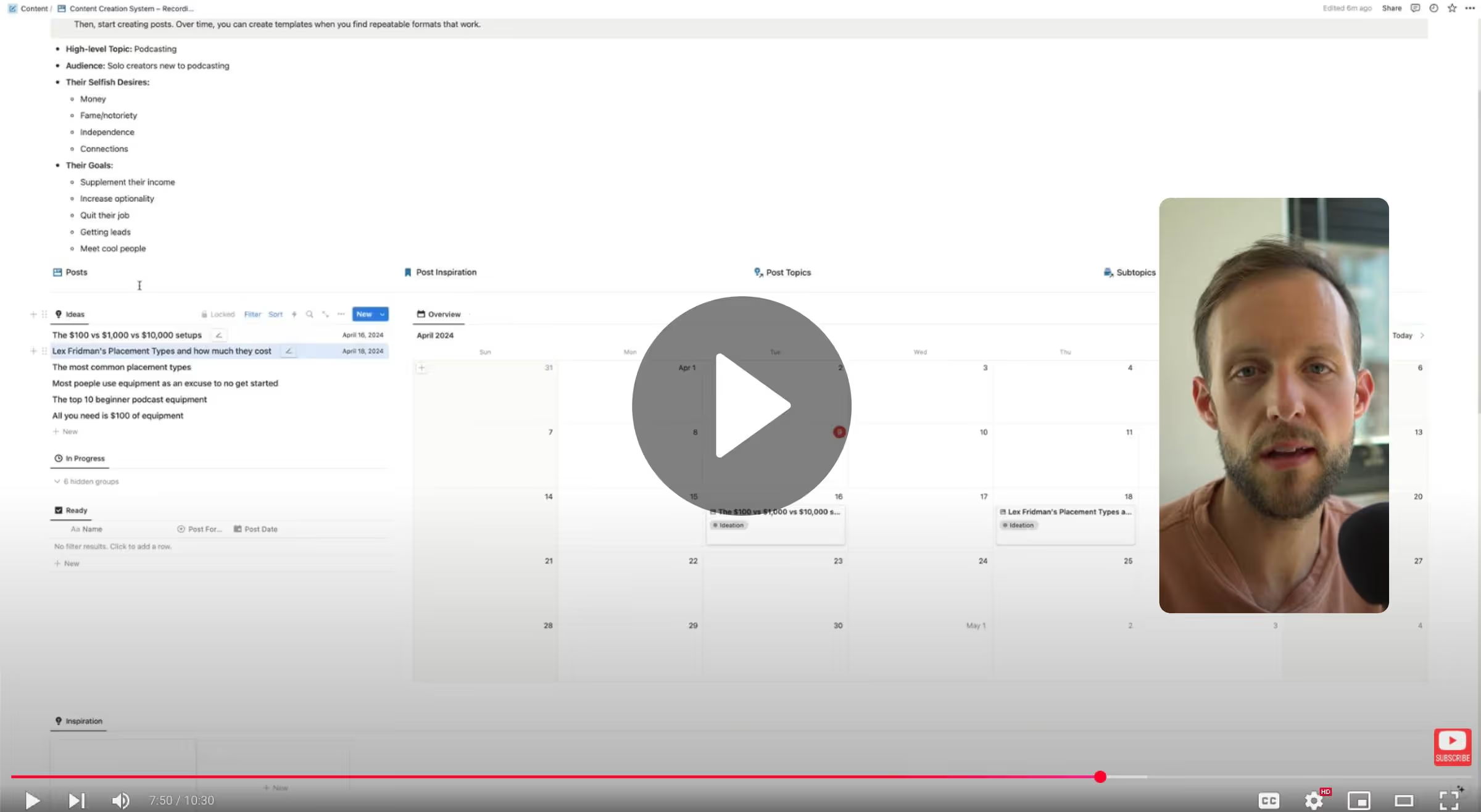
The template consists of five key components:
1. Strategic Foundation (Top Section)
At the very top of your template, you’ll fill out a few key details to ground your content strategy. This gives future-you (and tools like ChatGPT) the clarity needed to generate content that actually resonates. These inputs help guide your creative thinking and ensure that everything you create speaks directly to your ideal audience.
Think of this section as your always-visible north star: a quick reference to keep your content focused, aligned, and audience-driven:
- High-level Topic: Your primary subject area
- Audience: Who specifically you're creating for
- Their Selfish Desires: What they secretly want
- Their Goals: What they're trying to achieve
2. Content Management (Left Section)
The left sidebar contains a navigation menu that helps you track posts through your creation pipeline. This is where you'll move content from ideation to publication, with dedicated views that filter your posts automatically based on their current status.
Track posts through your creation pipeline:
- Ideas: Initial concepts waiting to be developed
- In Progress: Content currently being created
- Ready: Completed content ready to be scheduled
- Calendar View: Visual scheduling interface
3. Inspiration Repository
Below your post management area, you'll find a dedicated database for capturing interesting content from around the web, your personal swipe file. Instead of saving content across different platforms, use this section to store everything in one place.
Capture inspiration efficiently:
- Save content from platforms like Instagram, X, YouTube, and Reddit
- Use tools like the Save to Notion browser extension
- Review these saved items when brainstorming new content
4. Subtopics List
While the Strategic Foundation helps you define your high-level topic and audience, this Subtopics List is where you start mapping out your actual content lanes. The Subtopics table appears in the main body of the template and serves as a bridge between your high-level topic and specific post ideas.
Break down your high-level topic into 5-10 broader categories:
- Think of each subtopic as a lane in your content strategy
- Use these categories to tag and organize future post ideas
- This structure helps maintain balance and variety in your content
5. Post Topics & Content Types
The Post Topics table is where everything comes together. Each entry connects to a specific subtopic and includes multiple fields for planning your approach. As you create entries in this table, they'll automatically appear in your Posts view, ready for scheduling and creation.
This is where your ideas start to crystalize into actual posts.
Each post can be framed using one of several proven content types, as outlined in this guide:
- Actionable: Step-by-step breakdown of how to do something
- Observation: What you've observed about the topic
- X vs Y: Compare two situations with an interesting takeaway
- Present/Future: How things work today vs. how they'll work in the future
- Contrarian: Your spicy point of view that differs from the mainstream
- Analytical: Breakdown of a topic, company, person, or content style
- Motivational: Inspire your audience to achieve their goals
- Listicle: A list of things, people, books, tools, podcasts, etc.
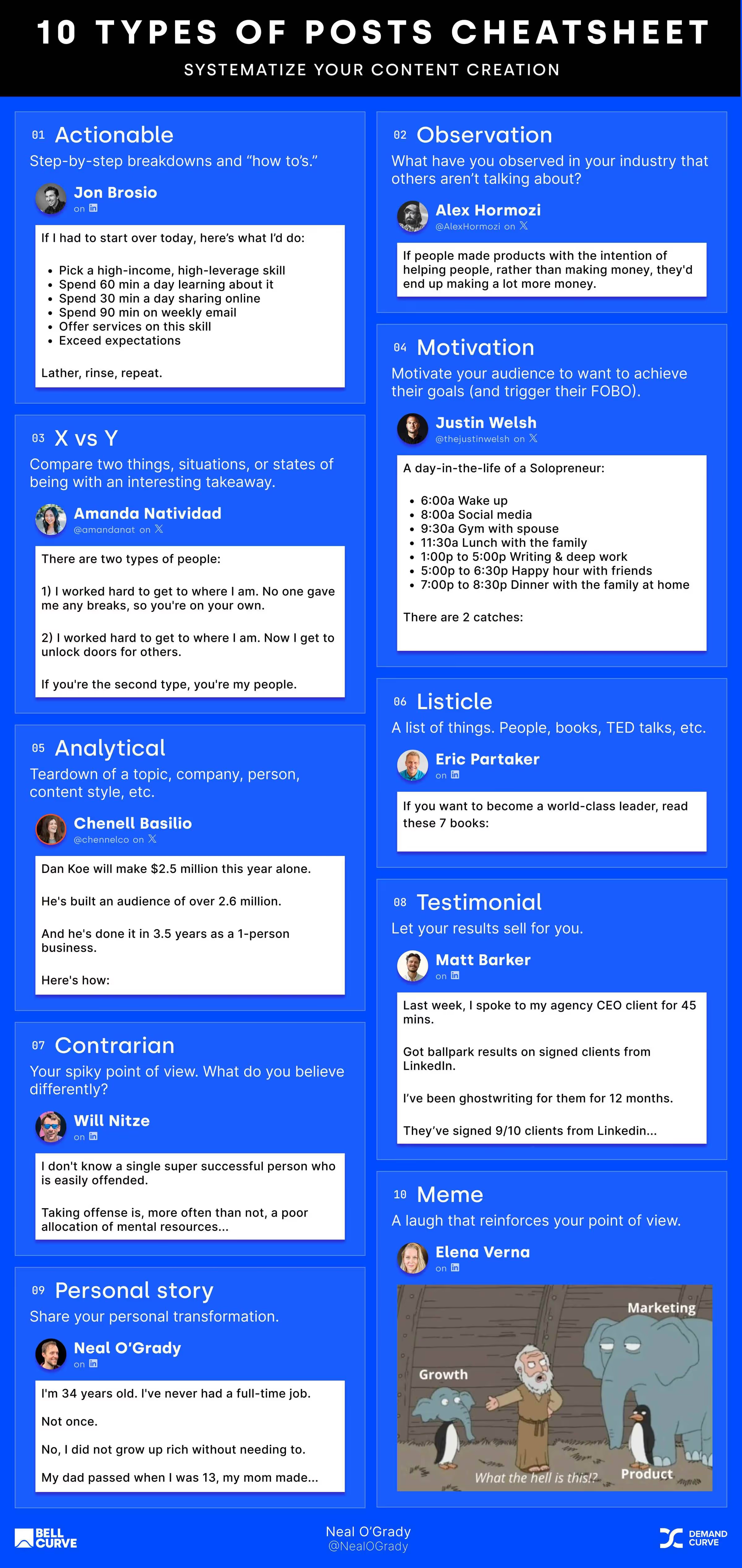
How to Use the Content Creation System (In Just 6 Steps)
Step 1: Make a copy of the template
You can find the Notion template here.
- Click the three dots in the top-right corner of the original template
- Select "Duplicate" from the dropdown menu
- The template will be copied to your own Notion workspace with all the structure intact but none of your personal content
Step 2: Fill in your strategic foundation
At the top of your newly duplicated template, add your:
- High-level topic that you'll be creating content about
- Target audience description, being as specific as possible
- Their selfish desires (what they want but might not admit publicly)
- Their specific goals (what they're actively trying to achieve)
Here’s an example of Podcasting for beginners:
Step 3: Generate 5-10 subtopics
- Scroll down to the Subtopics table in the main section of the template
- Click into the table and add new rows for each broad category within your high-level topic
- These should be fairly broad concepts that can each contain multiple post ideas
- For a podcasting niche, you might include categories like Equipment, Tools, and Sponsorships
Step 4: Generate post topics within each subtopic
- For each subtopic you've created, brainstorm specific angles or implementations
- These should be focused enough to cover in a single post but broad enough to approach from multiple angles
- Add these as new entries in the Post Topics section, making sure to link each to its parent subtopic
Example of post topics for Tools, Equipment and Sponsorships subtopics:
Bonus: Leverage AI to accelerate this process
ChatGPT is excellent at generating a ton of ideas for you to filter through
- Try prompts like: "Generate 10 specific post topics about podcast equipment for beginners"
- Use AI to brainstorm different angles for approaching the same topic
- Filter through the suggestions and add the ones that resonate with your brand voice
- Remember that AI is your assistant, not your replacement, so always review and refine suggestions
Here’s the Video Walkthrough:
Step 5: Create 10 specific posts by assigning a post type
- Within the Post Topics table, each idea can be approached from multiple angles
- For each post topic, click into the entry and select which approach would be most effective:
Step 6: Schedule and create
- Return to the Calendar view in the left sidebar
- Drag posts from your idea pool onto specific dates in the calendar
- Click into each scheduled post to add details like platform, format (carousel, video, etc.)
- As you publish content, track metrics like engagement and reach to see what performs best
Keep this cycle going—your calendar becomes your content engine, and your ideas stay organized, fresh, and ready to publish.
The Bottom Line
Remember, the goal isn't perfection. The system is designed to reduce friction in your creative process and ensure you're creating content that strategically serves your audience.
Feel free to adapt however works for you:
- Some people enjoy using the whole system to generate ideas
- Others just use the Posts table and nothing else
- It's whatever system works for you and keeps you writing
The key is consistency. Even the most brilliant content strategy fails without execution.
Why most GPT ads look like garbage and how to fix it
Insight from Joey Noble, Creative Strategist at Demand Curve.
Most GPT-generated image ads are mediocre at best.
Yet on social media, everyone says, “I whipped up these high-converting ads with ChatGPT in half a minute.”
What they’re hiding is all the 12+ iterations they had to make, the edits they did in Photoshop, and that they very thoroughly prompted GPT to get a decent output.
Meanwhile, on LinkedIn:
“Just tell GPT to clone this ad with your branding—and boom—a high-quality ad.”
So I tried that. I said, “Recreate this ad but with my product and branding.”
The results were disappointing to say the least:
- Layouts that didn’t make sense
- Copy that reads like it was written by my grandpa on hallucinogens
- Warped product renders
- Fonts and colors that didn’t match my brand
- And zero grasp of why the ad worked in the first place
Here’s the ad I asked it to clone:

I like this feature point-out ad from Oats Overnight. It tells me the cost, calories, protein amount, and that others love it. Perfect.
Since it’s an Ecomm ad, I selected one of my recent favorite Ecomm brands, IM8, to make an ad for (I'm not affiliated; I just like their packaging).
I asked GPT to clone the ad but with my branding and product. I gave it a list of some value props and let it rip.
Recreate this ad but with im8health.com’s branding. Attached is the image of my product, and here are some value props to use:
- 95% felt a noticeable boost in daily energy levels.- 85% experienced less bloating and improved digestion.- Only $2 per serving- One scoop. Once a day.- All-in-one wellness.- Superfoods, Greens, Fruits, Herbs.- Heart Health Support.- Joint and Muscle Health Support.- Hydra Electrolytes.
Here’s what I got:

That’s not what I was expecting.
The visual hierarchy isn’t great. The padding is atrocious.
It changed the product image and decided that “technology” is actually spelled “technotogy.”
It also got rid of the elements that I felt made the reference a great ad.
Here’s what I’ve observed: GPT isn't your creative director (yet). It's your caffeinated but clueless intern.
It needs constraints, structure, and direction. Without them, you get, well.. this.
I spent the last few weeks building a repeatable system that turns GPT into a rough-draft engine, one that gets you 95% of the way to a usable ad in a fraction of the time and cost of starting from scratch.
Here’s how it works:
Step 1: Create a JSON file of your brand
Most people give vague instructions in GPT, such as “Use our brand colors and fonts.” But GPT works exponentially better with structured data.
Instead, feed it a JSON file like this:
json
{
"brandName": "IM-8",
"colors": ["#A40000", "#E3D8CD", "#FFFFFF"],
"fonts": ["Playfair Display", "Inter"],
"valueProps": [
"Supports gut health",
"All-in-one daily greens",
"Backed by nutrition science"
],
"tone": "Scientific but approachable",
"targetAudience": "Health-conscious professionals, 30-45",
"callToAction": "Try risk-free for 30 days"
}
This gives GPT constraints and direction, which leads to better creative output.
But the neat part is you don’t need to be technical or know how to create a JSON file. Just tell ChatGPT everything you want included in the file and it’ll create for you.
What I do is feed it everything I want it to know, like brand guidelines, tone of voice, font style, look and feel, etc. I also take a full-page screenshot of my landing page for ChatGPT to extract things I didn’t think of. (Link to the screenshot tool: gofullpage.com)
Here’s the exact prompt I used:
You’re going to create a master JSON file of my brand. You will structure the file in such a way that I can easily feed it to you to reference when making image ads – so that you can apply my branding to the ad references I give you. I want you to take my fonts, branding, colors, value props etc and turn it into the ultimate JSON file.
Here’s what the JSON must include:
- brand_name: e.g., “IM-8 Daily Essentials”
- tagline: One-line brand positioning or hero line
- fonts:
- headline_font: name or description
- body_font: name or fallback option
- colors:
- primary: hex code
- secondary: hex code
- background: hex code
- accent: hex code
- value_props: High-impact claims or stats (e.g., “95% felt more energy”)
- functional_benefits: Tangible outcomes of using the product
- trust_signals: Endorsements, social proof, certifications
- key_ingredients or core_features: If the product is ingredient- or feature-driven
- tone_voice: A few adjectives that describe how the brand speaks (e.g., “confident, clinical, warm”)
- visual_branding_notes: Description of packaging aesthetics, logo placement, typical imagery (but not ad layouts)
[Insert any other specific brand guidelines that ChatGPT might not be able to extract from the landing page screenshot alone]
Attached is a full-page screenshot of my product landing page. Analyze it thoroughly and extract all relevant branding cues, layout patterns, and copywriting angles — including testimonials, claims, imagery style, and benefits.
Now that I have a structured JSON file, I can go to the next step.
Step 2: Ask GPT how it would prompt itself
I don’t see enough people doing this.
Instead of trying to write the perfect prompt yourself, give GPT your brand JSON + a reference ad and ask:
“With this JSON and ad reference, how would you prompt yourself to recreate this ad, step-by-step, using your own best practices?”
GPT will return a specific, structured prompt. And it’s usually better than what I’d come up with anyways. Once I get the prompt I’ll read through it and modify it a bit to get exactly what I want.
You’ll get something like this:

Step 3: Feed it the right imagery
GPT image generation works best when you’re clear about what kind of image you want.
Use a reference ad and match its structure. For example:
- If the ad uses a product photo on a clean background, upload your product photo.
- If it uses lifestyle imagery, pull something from Unsplash or your own shoots.
The more visually aligned your input is, the better the output.
I used these images for my ad:


Step 4: Feed everything into ChatGPT to get a solid rough draft creative
Now I’ll give ChatGPT the prompt that it generated itself, my brand JSON file again, and the product images.
With a much better prompt and structured data for ChatGPT to use, I get a much better result:

Much better, but not perfect yet.
- There are still some misspellings.
- The fonts aren’t accurate.
- And some of the spacing could be improved.
- It also randomly decided to add “Total wellness. Simplified” to the bottle.
At this point you can continue to tweak it within GPT, but I wouldn’t recommend this. You tell it, “Change the headline to ‘Elite Daily Nutrition’” and it changes that but then also morphs your product or changes other copy.
Here’s what I would do instead:
Step 5: Polish the result with a junior designer
GPT gets you most of the way there. But the fine details still break as I pointed out above.
So I take the GPT draft and hand it off to a junior designer (Fiverr, GetAds, etc.) with a simple brief:
“Use this layout. Replace the fonts and imagery with the real assets. Keep everything else the same.”
By limiting the designer’s scope to just “make this look exactly like this, but with our real assets,” you avoid lengthy creative discussions, long briefs and feedback loops.
Here’s what the final output looks like:

Bonus step: Turn this into a project within ChatGPT
Create a ChatGPT project and give it the JSON file, your brand guidelines, and anything else you’d want it to know so you don’t have to do this every time. Then any time you want to create a new ad you can just do so within the project and it will already have all your brand details saved.
Final thoughts
AI isn’t replacing designers anytime soon. But it is changing the creative workflow from expensive exploration with long feedback loops to rapid iteration with focused human polish.
The teams winning with AI aren’t replacing their designers. They’re creating human-AI workflows that leverage the strengths of both.
Why most GPT ads look like garbage and how to fix it
Insight from Joey Noble, Creative Strategist at Demand Curve.
The Strategy Behind Notion Mail: New Entry Points, Not Just New Features
Insight from Kevin DePopas—our Chief Growth Officer
If you're Notion users like we are at Demand Curve, you have good reason to be excited about Notion Mail's April 2025 launch. It's a sleek email client that works with your existing email accounts, and it has some pretty powerful native AI features.
But what makes this launch interesting isn't just the product itself — we know Notion creates good products — but how it fits into Notion's broader growth strategy: creating multiple entry points into their ecosystem to expand their addressable market.
This approach directly addresses a challenge that successful software companies eventually face: market saturation. While competitors battle for the same users in the project management space, Notion is opening new doors.

Market Signals Point to Saturation
Growth in the project management and personal productivity category appears to be cooling. IDC’s latest Collaboration Applications sizing shows YoY spend expanding 32.9% in 2020, 28.4% in 2021, and just 14.6% in 2022, with a preliminary 13.7% clip for 2023, according to Computerworld’s analysis.
On the ground, public filings tell the same story:
The land-grab days are ending; the hand-to-hand fight for share has begun. Additional market signals reinforce this shift:
- Traffic plateau: Google Trends, App-Store chart logs, and Similarweb ranks point the same way: interest in “Notion” hasn’t cratered—but it also hasn’t broken out since mid-2023. The growth curve is bending horizontal.
- Competitive intensity: ClickUp, Asana, Monday.com, and Microsoft Loop are all battling for the same enterprise customers with increasingly similar feature sets.
Acquisitions Signal Notion's Expansion Strategy
Rather than simply fighting harder in this competitive landscape, Notion has methodically expanded with strategic acquisitions and product launches:
Each acquisition follows the same playbook: acquire a best-in-class tool, sunset the original service, and relaunch it as a free, independent app that complements but doesn’t require the core workspace.
This pattern reveals a deliberate strategy to create multiple on-ramps into the Notion ecosystem rather than simply enhancing their core product.
The Potential Revenue Opportunity
While Notion Mail is currently free, looking at comparable email clients reveals significant monetization potential:
Notion has already established a precedent for feature-specific pricing with Notion AI, which costs an additional $8/month per user. This suggests an emerging monetization strategy: instead of simply raising core workspace prices, Notion could charge separately for each specialized tool.
If Notion eventually charges just $5 monthly for Mail, $5 for Calendar, and maintains the $8 for AI features—all as optional add-ons to their base workspace—they could potentially 2X their average revenue per user (ARPU) through an à la carte model.
I’ve personally experienced the value proposition. Before Notion Mail, I paid $50/month for Fyxer (month-to-month Professional plan). I’ve since switched to Notion Mail—making their ecosystem stickier while saving monthly costs.
This approach opens up opportunities for Notion and strengthens their ecosystem:
- Direct revenue potential: Standalone tools can be monetized independently at premium price points
- Higher ARPU opportunity: Specialized tools justify higher per-user pricing than general platforms
- Increased switching costs: Each additional tool raises the barrier to leaving the ecosystem
- Competitive displacement: Replacing point solutions reduces competition without direct confrontation
Creating Multiple On-Ramps for Different User Segments
Notion’s strategy aligns with Geoffrey Moore’s “Crossing the Chasm” framework—but with a twist. Rather than trying to push one product across the chasm, they’re building multiple bridges tailored to different user segments.
While many tech professionals have already adopted project management tools, adoption remains significantly lower outside tech hubs. Nearly a quarter of micro-SMBs still run projects on email and spreadsheets, according to Capterra’s 2021 Project-Management User Survey.
By offering free, standalone tools with immediate utility, Notion reduces the psychological barriers that typically prevent later-stage adopters from trying new productivity tools:
- Email is familiar: Even the most change-resistant users understand email
- Zero switching costs: Works with existing email addresses
- Minimal learning curve: Email UI patterns are broadly understood
- Mission-critical but contained risk: Email is essential but a client swap is relatively low-risk
The Enterprise Trojan Horse
Beyond targeting individual late adopters, Notion’s standalone tools create another growth vector: grassroots adoption within organizations already using competing project management tools.
According to Torri's SaaS Visibility and Impact Report, 69% of tech leaders cite unauthorized tools as a top security concern—indirectly confirming that employees regularly adopt helpful tools regardless of official IT policy.

This shadow IT pattern creates two advantages for Notion:
- Foothold without displacement: Companies can use ClickUp, Asana, or Microsoft Project for project management while individual teams adopt Notion’s free tools for personal workflows.
- Internal champions: As more employees use Notion’s tools, the company builds advocates who can eventually influence broader adoption decisions.

The Macro Context: Changing Work Patterns
Two broader trends likely factor into Notion’s strategy too:
- The lean-team era: Companies are producing more with fewer employees. Meta cut 21,000 positions in 2023 during its “Year of Efficiency,” yet grew revenue by 16% compared to 2022, according to CNBC.
- Growth in independent workers: The freelance economy continues expanding, with over 64 million Americans freelancing in 2023, up from 60 million in 2022 according to Upwork’s Freelance Forward study.

These shifts create demand for lightweight, integrated tools rather than enterprise-heavy solutions—precisely the niche Notion’s standalone apps fill.
What’s Next for Notion?
Given the pattern established, I predict Notion’s next likely move is a video conferencing or screen recording tool with AI integration.
The evidence points in this direction:
- Skiff’s technology already included encrypted video calling capabilities
- Notion’s Special Projects engineering listings mentioned “real-time collaboration and rich media” (since been removed)
- AI email tools like Fyxer already include seamless video meeting assistants that draft follow-up emails based on the meeting notes.
- Calendar (time) → Mail (communication) → Video/Meetings (presence) forms a logical progression
This would move closer to completing Notion’s daily workflow coverage, adding the synchronous layer to their growing stack and feeding Notion AI with valuable meeting transcript data.
For users, the integration would create a compelling workflow: schedule a meeting in Calendar, join via Notion’s video tool, capture AI notes, and link everything to your workspace—all within one ecosystem.
I'd love a Loom-esque asynchronous video recording tool within Notion too. 😉
Takeaways for Companies in Maturing Markets
Notion’s strategy offers valuable lessons for any company facing growth plateaus:
- Add doors, not just features: When direct competition intensifies, create new entry points that target adjacent, untapped audiences rather than just adding features to your core product.
- Build standalone value first, integration second: Ensure each new tool delivers immediate value independently before pushing ecosystem benefits. This lowers acquisition barriers while creating multiple monetization opportunities.
- Price like a specialist when possible: Specialized tools can often command higher per-seat prices than general platforms. Consider pricing standalone tools separately to increase overall ARPU.
- Recognize where your market sits on the adoption curve: Products designed for early adopters don’t always resonate with the late majority. Different segments require different entry points and value propositions.
The Bottom Line
For founders and growth leaders, the key takeaway is that sometimes the most effective strategy isn’t competing harder for the same customers—it’s finding creative ways to expand your addressable market while creating new monetization opportunities.
What do you think of Notion’s strategy? Would your business benefit from a similar approach? Reply to this email with your thoughts—I read every response.
The Strategy Behind Notion Mail: New Entry Points, Not Just New Features
Insight from Kevin DePopas—our Chief Growth Officer
How Vail Resorts Collects 75% of Revenue Before Winter Even Starts
Insight from Kevin DePopas—our Chief Growth Officer
The largest ski company in the world has completely flipped its business model over the past 15 years.
In 2008, 65% of skiers at Vail Resorts bought single-day lift tickets. Today, 75% of their customers purchase season passes, committing thousands of dollars months before the first snowfall.
This transformation didn't happen by accident. It was a deliberate strategy to address a serious threat to their business: climate change.
.avif)
Analysis of 652 sites across the Western U.S. reveals a troubling trend: 81% of ski areas have experienced decreased snowfall since 1955, with almost half seeing drops of 20% or more. Unpredictable snowfall creates unpredictable revenue—a nightmare for any seasonal business.
Hat tip to @sportsball on Instagram for their fantastic data visualization on this topic that inspired our analysis. Check these guys out.
Vail’s solution? Use pricing psychology to drive non-refundable annual season pass purchases.
Since 2010, the company has steadily increased the price of single-day lift tickets to an astonishing $329 per day—nearly triple what they cost just a decade ago. Meanwhile, they’ve kept their unlimited Epic Pass around $1,000 for the entire season.
.avif)
The brilliance of this strategy is in the mental calculation it triggers:
“If I ski just 3-4 days this season, the annual pass pays for itself!”
This pricing approach presents several advantages:
- Hedge against uncertain weather: Vail collects payment upfront, regardless of future weather.
- Cash flow improvement: The company receives a substantial capital boost before their high-cost operating season begins.
- Perceived value: Customers feel like they’re getting a deal, even as they commit more money upfront.
But this isn’t just a ski industry phenomenon. Companies across sectors are applying this same psychological trigger—and we recently spotted a particularly good example.
The "Anchor Shock" Strategy in Action: Screen.Studio’s Clever Pricing
While researching screen recording tools, we stumbled across an example of anchor pricing in action, Screen Studio. Their pricing triggered the same result as Vail's, more annual signups.
Screen Studio's pricing page initially shows a very affordable $9 per month. It looks like a great deal until you notice it's for annual billing. Switch to monthly pricing, and you'll experience the "anchor shock" as the price jumps to $29 per month.

$348 for a year of monthly payments versus just $108 for the annual plan. The math feels obvious—you break even after just four months of use, making the annual plan feel like the only rational choice. (And yes, we became annual subscribers.)
While most SaaS companies offer a modest 15-20% discount on annual plans, Screen Studio's dramatic 3X difference creates a much stronger pull toward annual commitments.
This example prompted us to investigate: How effective is this pricing strategy? To find out, we ran the numbers.
The “Anchor Shock” Math: Why Dramatically Lower Annual Prices Can Generate More Revenue
To understand why companies are embracing this strategy, we created a simple model comparing two hypothetical pricing approaches for a SaaS product:

What happens when 100 potential customers visit each pricing page and we track the revenue from this "month 0" cohort for two years? Let’s examine the assumptions for our model:

Key differences between our two scenarios:
- Conversion Rate (2% vs. 6%): The Anchor model converts three times more visitors. When a $50/month product is suddenly available for the equivalent of $12.50/month (annual plan), it becomes accessible to a much wider audience. What was previously a considered purchase becomes closer to an impulse buy.
- Plan Mix (50/50 vs. 83/17): In the Standard model, we assume a 50/50 split between annual and monthly subscribers (1 annual, 1 monthly). This is conservatively high, and favorable for the Standard model. In the Anchor model, we see a dramatic shift toward annual plans (5 annual, 1 monthly). This shift occurs because the annual discount is so compelling that it’s hard to justify the monthly option.
- Annual Renewal Rate (50% vs. 80%): The Anchor model’s annual price ($150) creates much less “renewal friction” than the Standard model’s $500 renewal. At $150, it’s more likely to be approved without scrutiny, while $500 often triggers a “do we still need this?” evaluation.
Now let’s see how these models perform at key stages:
Month 0: Initial Conversion

Right from the start, the Anchor model generates 45% more revenue ($800 vs. $550) due to higher conversion rates and more annual plans.
End of Year 1

By the end of the first year (including renewals), the Anchor model has generated $1,950 compared to the Standard model’s $1,350—a 44% advantage.
End of Year 2

After two years, the gap widens. The Anchor model produces a cumulative $2,530 versus $1,575 for the Standard model.

That’s $955 more revenue from the same 100 visitors—a 61% increase—despite charging 70% less for annual plans ($150 vs. $500).
It’s important to note that our model only follows the initial cohort from Month 0. In reality, these effects would compound month over month, year over year, as each new cohort follows the same pattern.
Want to play with the numbers for your business? Reply to this email and we'll send you the full editable model.
Why The Anchor Shock Strategy Works
The Psychological Principles at Work
This strategy leverages several cognitive biases:
- Price anchoring: The high monthly price makes the annual price seem like a bargain by comparison.
- Loss aversion: Once customers do the math, choosing the monthly option feels like “losing money.”
- Future discounting: Most people overestimate how long they’ll use a product, making the annual commitment seem like an even better deal.
How to Implement the Anchor Shock Strategy in Your Business
There are two primary ways to implement the anchor shock pricing strategy:
- Increase your monthly price while keeping your annual price stable (if your monthly plan is currently underpriced).
- Decrease your annual price while keeping your monthly price stable (if your monthly price is already appropriate and you have margin to spare on your annual plan).
Either approach can work—the key is creating a ~3X differential between the 12 month total cost of your annual and monthly plans.
Beyond that core principle, here are specific implementation tips:
1. Set your monthly price point strategically
This becomes your anchor—the reference point against which everything else is judged. Don’t be afraid to set it higher than you might normally think.
2. Create a large gap to your annual plan
Instead of the typical 15-20% annual discount, aim for a 65-75% difference when calculated on a monthly basis.
3. Lead with the annual price (shown monthly)
This is critical: On your pricing page, show the monthly equivalent of your annual plan FIRST. Seeing the lower monthly price first is what sets the psychological hook.

4. Test different gaps
While 3X appears to be a sweet spot, every business is different. This is something you can A/B test relatively quickly to see how the math works for your specific audience and business model.
5. Consider adding a premium tier
This further enhances the perceived value of your annual plan through comparison, making it look like the reasonable middle option. Screen Studio also has a $229 "Pay Once" option, which also makes $108 feel like a great deal.
Industry Examples Beyond SaaS
Online Courses:
- Monthly access: $49/month
- Annual access: $199/year ($16.58/month equivalent)
- The pitch: “Access all courses for less than 5 months’ worth of the monthly plan!”
Coaching Business:
- Pay-per-session: $299/session
- 12-session package: $1,199 ($99.92/session)
- The pitch: “Book a 12-session package and save 67% per session!”
When It Might Not Work
While the Anchor Shock strategy has proven effective across many businesses, it may not be right for every situation:
- Low retention products: If your product has inherently low retention regardless of price, the annual renewal advantage may not materialize.
- Premium positioning: For luxury or high-end products, dramatic discounts might undermine perceived value.
- Complex pricing structures: Products with multiple tiers, add-ons, or platform pricing (like HubSpot...sheesh) may find it difficult to implement consistently across their pricing matrix.
- Long sales cycles: Enterprise products with lengthy approval processes may not see the same impulse buying effect.
Final Thoughts
The Anchor Shock strategy challenges conventional wisdom about maximizing revenue per customer. By optimizing for conversion and retention rather than unit economics, companies can achieve significantly higher overall revenue.
Whether you’re running a ski resort facing climate uncertainty or a SaaS startup looking to improve cash flow, consider experimenting with this approach. Your customers might thank you for the perceived deal, while your business benefits from higher conversion rates and predictable revenue.
How Vail Resorts Collects 75% of Revenue Before Winter Even Starts
Insight from Kevin DePopas—our Chief Growth Officer
Steal creative ideas from others
Insight from DC's Growth Program.
AI increasingly dominates the performance of ad channels.
These days, the optimal targeting strategies mostly let AI do the heavy lifting.
You feed Meta the copy and creatives, and it figures out who to show it to.
Which makes creatives by far the most important variable to test.
But you also don't want to waste money testing subpar creatives either.
So you might as well steal the creative ideas from others.
There are a few ways to gather inspiration:
- Creative inspiration tools: Tools like Foreplay and Atria let you browse a big library of ads.
- Ad channels themselves: The Meta Ad Library and LinkedIn Ad Library let you peak at ads that any company is running.
- Social media: Sometimes, the best inspiration organically pops into your social feed.
- Databases and galleries: Random sites have created databases of ads.
Let's dive into each of those now:
Creative inspiration tools
We'll start with creative inspiration tools because they help you:
- Discover great ads either organically or by searching
- See their accompanying ad copy, landing page, and whether they're still running that ad or not (a good signal it's working)
- Save great ads you stumble upon into collections (aka "boards").
You can then use those to inspire yourself, your team, or your clients.
Here are the two tools we recommend:
- Foreplay: The tool we use internally with our agency to gather inspiration to use internally and to share with clients.
- Atria: A competitor to Foreplay with some analytics tooling (for more $).
Here's a walkthrough of Foreplay from our in-house creative, Joey Noble:
Meta and LinkedIn Ad Libraries
Here are the links to the ad libraries:
These tools let you search for the ads being run by specific companies.
Here's a walkthrough from Joey of how to do just that:
And, of course, if you decide to use Foreplay or Atria, save any great ads you find to your boards. If not, you can also save them to a swipe file, notion, google drive, or whatever else you may use.
Social media
How to tell you're a real marketer:
You stop to watch the ads as you browse social media. AND you save the ones you find interesting.
Whenever you're scrolling through Instagram, TikTok, LinkedIn, YouTube, or wherever, take note of an ad that:
- Catches your attention
- Makes you stop scrolling
- Keeps you watching until the end
- Has you questioning whether you should click or not
- Or, is just creative or interesting
Then, you can save the ads to Foreplay for future reference. You do that by forwarding the ad to the Foreplay Instagram account (assuming you linked your Instagram to your Foreplay account).
Note: I apologize in advance for the search results that come up when you search "foreplay" on Instagram 🙄.
Databases and galleries
Various websites or influencers out there have curated ads:
- Adfolio: Database of great b2b ads.
- Ads of the World: Ads from big brands.
- Commarts: Ads from big brands.
- The Ad Professor: An influencer who shares a lot of ad inspo.
- Copywriting Examples: Great repo from Harry Dry!
I also have some curated ads you can see here:
Some quick ad creative takeaways
Here's some rapid-fire advice:
- Hooks are the most important. People hate ads in general. So you better intrigue them as fast as possible.
- Don't make people think. People have zero patience for confusing ads.
- Don't be fancy. Simple, clean, & straightforward is almost always best.
- Try not to be a “creative copywriter.” You're not trying to win an award. You're trying to sell a product.
- Be novel/quirky. Peculiarity often stops the scroll.
- Leverage culture. Familiarity, topicality, and relevance help.
- Get in the mindset of the audience. The best ads often come from noob ad makers with an iPhone and an intimate understanding of:
- Who they are
- What problems they're struggling with
- What they're worried about
- What their selfish desires are
- What they care about
- Don't talk about you, talk about them. Make them the hero of the story. Your product is the lead supporting character.
- Kill your darlings. Ruthlessly cut meaningless words or elements that don't add to the value of what you're saying—even if you like it.
Let others make your ads more efficient
Don't create in a vacuum.
Finding inspiration should always be a part of your creative process.
Need help from a growth strategist?
As part of the natural rhythm of work life, some of our incredible team members eventually move on to new adventures.
Antoine is doing just that—going out on his own to pursue freelance growth strategy and advisory work.
If you're in need of early-stage growth support, Antoine is your guy:
- He’s a rockstar strategist with over 10 years of experience growing both bootstrapped and venture-backed companies.
- He’s already helped take 2 SaaS startups from early-stage to acquisition, and now he’s looking to bring that same magic to new projects.
- He’s currently taking on just 2 new clients.
He typically offers this for $7,000, but is offering a giant 50% discount for the DC audience. Work with him for only $3.5k.
How to make your product more viral
Insight inspired by Kyle Poyar.
Churn kills a lot of products.
Acquiring new customers or leads is often linear (you gain X customers per month because you spend $YYYY on ads).
Churn, however, is often exponential (you lose Y% per month).
You completely stall out when your churn = your new acquisition.
For example, if you:
- Add ~100 customers per month, and
- Lose ~3% of your customers each month due to churn
You'll completely stall out once you have ~3,333 customers.
Here's a chart visualizing this "Growth Ceiling."

Ways to prevent stalling out and keep growing?
- Reduce churn (better product, better onboarding, etc)
- Crank up acquisition (more content, more ads)
- Make your product more viral
Let's focus on how to make your product more viral
A truly viral product grows itself—each new customer refers one or more other customers.
If you can achieve that, you have a completely self-sustaining growth engine where each user leads to another user which leads to another user (and so on).
This growth is typically measured by the "viral coefficient"—the average number of new users each current user brings in. If this coefficient is greater than 1, you're experiencing viral growth.
Here's a nice graph showing growth over time based on viral coefficients of 0.8, 1, and 1.2. As you can see, it goes wild once you go over 1.

(You probably heard a lot about the R factor during COVID, this is the same thing, except for product growth, we usually call it the K factor)
Virality makes your acquisition efforts easier
It drastically reduces your customer acquisition costs and accelerates your growth, creating sustainable momentum that ads alone can't achieve.
Imagine two scenarios where it costs you $50 to acquire each new customer:
- Each new customer refers 0 new customers. To scale you need to keep spending $50 per customer—which will break because as you scale your CAC will generally increase as you target colder and colder audiences.
- Each new customer refers 2 new customers. Therefore, it costs you ~$16.67 per customer because of the 2 free referrals. You can push ads much harder and have room to scale (particularly if those referred customers also refer customers).
Cracking virality is huge.
The two types of virality
One last stop before the actionable tips. There are two types of product virality:
#1. Internal virality: The product spreads from person to person in a company.
Design products that naturally spread within an organization—tools like Slack, Notion, or Figma achieved massive internal virality through seamless user adoption as one user in an org invites other users in the org.
#2. External virality: The product spreads from person to person across different companies.
Tools like Calendly or Typeform spread externally because users naturally send their branded links to new, external audiences.
We'll talk about ways to achieve both.
Viral products aren't built by accident—they're engineered.
Here’s how to give your product the best shot at organic growth.
1. Embed social features directly into your product
The best viral products are inherently social, and the user cannot get value from the product unless shared with someone else. Examples include:
- Calendly: People can't book unless you share your Calendly.
- Figma: You can't share a design or collaborate without sharing your Figma.
- Loom: You can't easily share your video without sending the Loom link (I mean, you could download it and send it, but the easy sharing is the real value prop of Loom)
- Dropbox: To get the most value, you need to be able to share the files.
When you design your product, consider ways to make it so the user can only really get full value by sharing it—even if it's not the core use case.
For example, Foreplay made a secondary product use viral.
Foreplay lets you browse ads that other advertisers run and save them to boards. It's super handy just for gathering inspiration.
To make it more viral, they also make it easy to share the boards you create and share individual ads you find and live on Foreplay-hosted and branded domains.
Here's an example of a board we made with AG1 ads:

2. Remove friction from sharing
Every extra step it takes to share kills virality. Aim for one-click sharing.
Some quick ideas:
- Ever-present obvious CTAs to share.
- Give options for sharing (links, emails, text, social)
- Auto-populate sharing messages to reduce cognitive load (e.g., pre-written referral messages).
- Make it free or really cheap to share
On that last point, Kyle Poyar gives some great ways to make it seamless to get new users in without it immediately costing the sharer money:

3. Remove friction from joining
Every extra step it takes for the referred user to get in and get value kills virality.
Some quick ideas:
- Have generous free tiers or free trials so people can instantly use it.
- Make it so they can get value without needing to create an account, but if they want to take action, they have to create one (like Figma lets you view a file, but if you want to comment or edit it, you need an account)
- Google/Facebook/Apple/LinkedIn account creation so it's quick and easy.
- Have templates and opinionated defaults to make onboarding easy.
4. Brand your product's outputs
When someone shares something from your product, make sure to take the opportunity to make yourself known:

- Add a "Created/Made with" badge. Note: a premium tier could involve removing that branding (like Tally, Typeform, Webflow, etc)
- Host the output on your domain. Examples: Notion, Webflow, Calendly, Foreplay, Typeform.
- Add your watermark when they export it. For example, when you download a video from TikTok it automatically adds TikTok branding:

5. Incentivize referrals
Sure, the best is when people share your product just by using it or because they can't shut up about it.
But with the right incentives, you can:
- Push people over the hump who wouldn't otherwise share
- Turbocharge the rate at which people share
Here are a few ways to incentivize referrals:
- Increase usage limits (more storage, more time, more whatever)
- Free product
- Free bonus incentives (swag)
- Contests
- Free credits (ex: supercharger credit
- Amazon gift cards or straight-up cash
This can either be with the typical referral or affiliate links, or you can build it into the product.
For example, testimonial.to shows its branding on free tiers.
On paid tiers, you can decide to remove the branding, OR you can keep it, but by doing so, you get 30% of the referred revenue from people who click it.

6. Give fun reasons to share
Rather than sharing the product, give users a compelling reason to share something about your product.
- Create badges, leaderboards, streaks, or awards users can share on social media or their LinkedIn profile. (Duolingo’s streaks, HubSpot’s certifications)

- People love to learn about themselves and share things that are core to their identity. Use data you have about the users to create shareable content. Think Spotify Wrapped:

7. Strategically prompt happy users to share
YouTube annoys the hell out of me.
It asks me to upgrade whenever I'm going through the Google 2FA flow—which is exactly when I have zero patience to consider upgrading and just want to log into to finish the task I'm focused on.
Asking for referrals is similar.
Don't ask whenever a user is in the middle of something.
Instead, do it after they've completed a big milestone where they're probably stoked.
8. Surprise and delight users
If you surprise and delight a customer, they will likely share their excitement.
Chewy, the pet food brand, did this best.
Here are insights shared in Marketing Examples:
"Every customer is welcomed with a handwritten card reminding them to call anytime:

They employ 100 artists whose sole job is to paint customers' pets. The portraits are then mailed to unsuspecting customers:

If they hear about a pet passing away, they'll send a bouquet of flowers and a condolence note:

And if you buy the wrong dog food, customer service will tell you:
Don’t worry about returning it, we’ll refund you, just donate the item to a pet shelter"
Not only does this build insane brand loyalty (in a commoditized market), it is also very likely someone will share these stories with friends and on social.
Quick takeaways for virality
- Try to make your product inherently viral.
- Remove friction for people to share and use it
- Brand your product's outputs
- Incentivize referrals
- Give fun reasons to share
- Prompt happy users at the right time
- Surprise and delight customers

No results found. Clear Search.


